Prompt
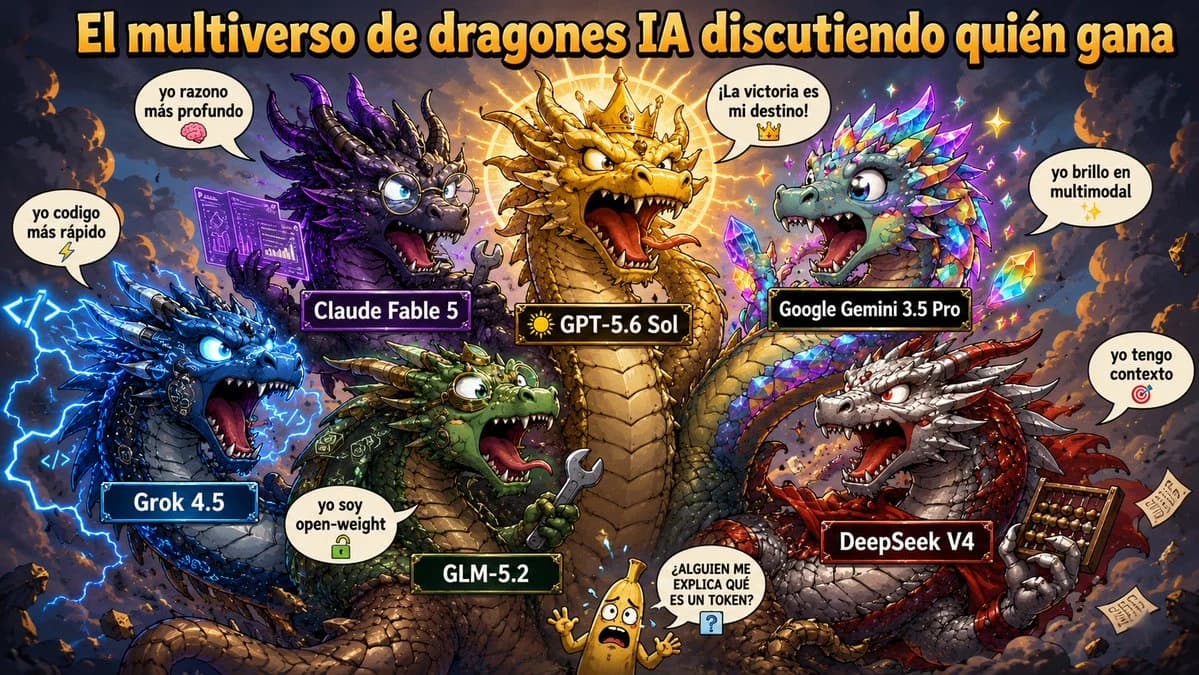
395 wordsGoal: Create a chaotic Spanish-language meme poster titled {argument name="headline text" default="El multiverso de dragones IA discutiendo quién gana"}, showing anthropomorphic AI model dragons arguing in a fantasy storm battlefield, like an epic comic illustration with exaggerated meme humor.
Canvas: Wide 16:9 landscape image, dense composition, dark smoky sky background with orange embers, lightning bolts, floating debris, glowing magical energy, high contrast, saturated colors, crisp cartoon-fantasy rendering.
Layout: Place the large headline across the very top in huge bold yellow-orange letters with thick black outline and subtle drop shadow. Arrange exactly 6 labeled dragons around the scene plus 1 small banana character at the bottom center. The dragons face inward, roaring or boasting as if debating who wins. Use rectangular black nameplates with colored borders on each dragon.
Subjects and labels: Include exactly 6 dragons: 1) center dominant gold dragon labeled {argument name="center dragon label" default="☀️ GPT-5.6 Sol"}, wearing a crown and glowing with a radiant sun halo, roaring with open mouth; 2) left blue cyber-electric dragon labeled "Grok 4.5", surrounded by blue lightning and code symbols, speech bubble says "yo codigo más rápido" with a lightning emoji; 3) upper-left purple scholarly dragon labeled "Claude Fable 5", wearing round glasses, holding or projecting a purple circuit manuscript, speech bubble says "yo razono más profundo" with a brain emoji; 4) upper-right iridescent crystal dragon labeled "Google Gemini 3.5 Pro", covered in rainbow gem scales and sparkles, speech bubble says "yo brillo en multimodal" with sparkle emojis; 5) lower-center green armored dragon labeled "GLM-5.2", holding a wrench, speech bubble says "yo soy open-weight" with a lock emoji; 6) lower-right red and silver dragon labeled "DeepSeek V4", holding an abacus and papers, speech bubble says "yo tengo contexto" with a target emoji. At bottom center, add exactly 1 small frightened yellow banana mascot with arms raised, speech bubble in uppercase: "¿ALGUIEN ME EXPLICA QUÉ ES UN TOKEN?" with a blue question-mark icon.
Visual style: Hyper-detailed digital painting mixed with meme comic art, expressive bulging eyes, huge teeth, dramatic perspective, rim lighting, glowing outlines, fantasy scales, magical sparks, comedic over-the-top expressions. Make the nameplates glossy and readable, with white text. Keep the Spanish text legible and spelled as shown.
Constraints: No extra dragons, no extra characters besides the one banana mascot, preserve exactly 6 AI dragon name labels and their speech bubbles, no watermark, no photo-realism, no minimalist design.About this prompt
AI Dragon Multiverse Meme is a ready-to-use social media prompt for GPT Image 2 on Image 2. Copy the 395 words below, paste them into the Create form, and you will get a result close to the preview above. Tweak the Social Media, Infographic, Product tag if you want to push it somewhere new.
Use it as a starting point, then adjust the subject, lighting, or composition to suit your idea. The credit cost stays the same whether you use it as written or customize it.
Use case
A strong starting point for Social Media
Start here when you want a social media image inspired by AI Dragon Multiverse Meme. The prompt already sets the look and composition; replace the subject, product, colors, or scene details to match your project.
Easy places to tweak
- Subject Swap in your person, product, place, or object without changing the overall composition.
- Look and mood Tune the lighting, palette, camera angle, or materials so the image fits your brand.
- Final format Set the aspect ratio, background, text, or layout notes before you generate.
More prompt paths to explore
Find more GPT Image 2 prompts with a similar style, use case, or subject.
How to use it
- Step 1
Copy the prompt
Hit the Copy button above to grab the full text.
- Step 2
Open Image 2 Create
Head to the Create form and paste it in.
- Step 3
Generate
Hit Generate. Your version lands in seconds.
Make it yours
Load the prompt into the Create form with one click, then start tweaking.