Prompt
141 wordsUse the uploaded reference character as the only main character.
Preserve the character’s identity, silhouette, outfit, accessories, hairstyle, and personality impression.
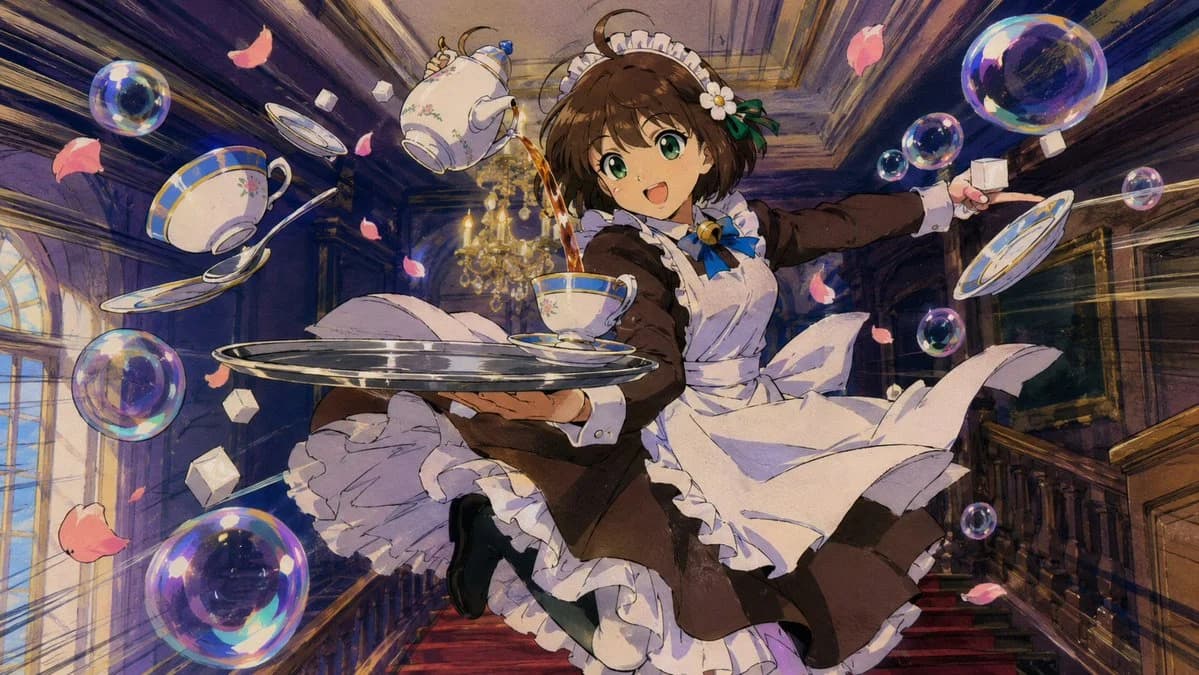
{argument name="character role" default="A maid character"} is performing an impossible dynamic tea-serving action.
She jumps through a {argument name="location" default="grand mansion hall"} while holding a silver tray.
Porcelain cups, a teapot, spoons, sugar cubes, flower petals, and soap bubbles swirl around her in the air.
Tea pours from the teapot into a floating cup without spilling.
Her expression is focused, cheerful, and slightly heroic.
Keep the same composition, pose, object placement, and action.
Change only the visual style according to the STYLE instruction.
No text.
STYLE:
{argument name="art style" default="1990s Japanese cel animation style"}.
Hand-painted background, visible cel shading, soft film grain, analog colors, slightly imperfect linework, nostalgic TV anime atmosphere.
Dynamic sakuga pose, dramatic speed lines, expressive cloth movement.About this prompt
90s Anime Action Maid is a ready-to-use character design prompt for GPT Image 2 on Image 2. Copy the 141 words below, paste them into the Create form, and you will get a result close to the preview above. Tweak the Character Design, Fashion, Beauty tag if you want to push it somewhere new.
Use it as a starting point, then adjust the subject, lighting, or composition to suit your idea. The credit cost stays the same whether you use it as written or customize it.
Use case
A strong starting point for Character Design
Start here when you want a character design image inspired by 90s Anime Action Maid. The prompt already sets the look and composition; replace the subject, product, colors, or scene details to match your project.
Easy places to tweak
- Subject Swap in your person, product, place, or object without changing the overall composition.
- Look and mood Tune the lighting, palette, camera angle, or materials so the image fits your brand.
- Final format Set the aspect ratio, background, text, or layout notes before you generate.
More prompt paths to explore
Find more GPT Image 2 prompts with a similar style, use case, or subject.
How to use it
- Step 1
Copy the prompt
Hit the Copy button above to grab the full text.
- Step 2
Open Image 2 Create
Head to the Create form and paste it in.
- Step 3
Generate
Hit Generate. Your version lands in seconds.
Make it yours
Load the prompt into the Create form with one click, then start tweaking.