Prompt
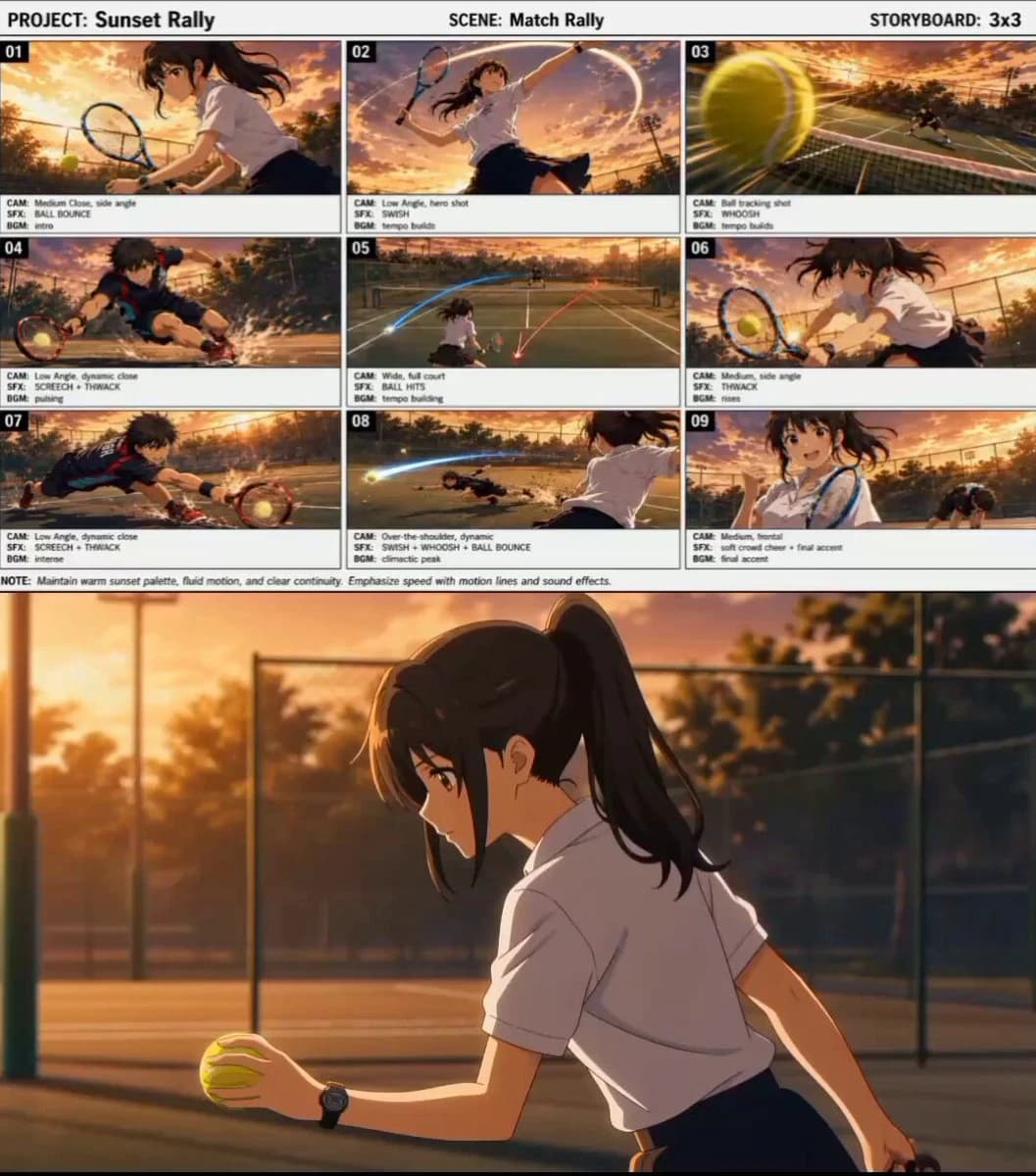
435 wordsCreate a cinematic anime tennis match video at sunset on an outdoor court with chain-link fence, warm golden light, soft lens flare, realistic court shadows, and energetic match atmosphere. Characters: 1. Main player. Anime girl with dark brown ponytail, brown eyes, white short-sleeve shirt, dark pleated skirt, blue tennis racket, wristwatch. She looks focused, confident, and happy at the end. 2. Opponent. Skilled anime boy with messy dark hair, athletic build, dark navy and black tennis outfit with bright red and cyan accents, red-black racket, intense competitive expression. Style: Premium anime sports film, smooth fast action, clean motion blur, dramatic speed lines, professional camera work, clear ball movement, realistic tennis timing, cinematic sound design. Sequence: Shot 1. Start directly in the match. The girl bounces the ball once and quickly prepares to serve. Do not let the ball stay in the air too long. Camera: medium close side angle. SFX: ball bounce, light shoe movement. BGM: calm intro, tension rising. Shot 2. The girl hits a strong serve. Hair and skirt move naturally. Camera: low-angle hero shot. SFX: swish, clean racket hit. Shot 3. Ball POV racing over the net toward the boy. Camera: fast tracking behind the ball. SFX: whoosh. BGM: tempo builds. Shot 4. The boy reacts quickly, slides into place, and returns a difficult shot with strong footwork and clear skill. Camera: low-angle dynamic side shot. SFX: screech, thwack. Shot 5. Wide rally shot. Both players exchange fast shots with visible ball trails and smooth movement. Camera: high wide shot. SFX: tap, thwack, tap. BGM: energy rising. Shot 6. The girl reaches a difficult ball and returns it cleanly while moving sideways. Camera: medium full low-angle shot. SFX: thwack. Shot 7. The boy shows skill again, lunging and sliding to keep the rally alive. Camera: close tracking low angle. SFX: screech, thwack. BGM: intense build-up. Shot 8. Final winning shot. The girl hits a sharp powerful ball to the far left side. The boy stretches or dives but misses it. Make the miss very clear. Camera: over-the-shoulder dynamic shot from behind the girl. SFX: swish, whoosh, far ball bounce. BGM: climactic peak. Shot 9. Final hero moment. The girl smiles happily and gives a small fist pump with the racket in hand. The boy is in the background recovering after missing. Camera: medium slight low-angle shot. SFX: soft crowd cheer, final music hit. BGM: final accent. Important: Keep both characters consistent. Start quickly like a real tennis match. Show both players’ skills and difficult shots. Make the motion smooth, clear, fast, and professional. Make it obvious the girl wins the final point
About this prompt
Cinematic Anime Tennis Match is a Anime Seedance 2.0 prompt with 435 words, structured around shot timing, camera direction, motion cues, and remixable scene details.
Use the visual preview, when available, to understand the composition, then treat the prompt text as a production brief you can adapt for your own subject, brand, or story.
Video prompt structure
Use it for Anime videos
Best for Seedance 2.0 generations that need Anime, Multi-Shot, Audio. Replace the subject, setting, product, dialogue, music, and timing before sending it to the generator.
Customize before generating
- Swap the subject. Keep the camera and timing structure, but change the character, product, or environment.
- Tighten the timeline. Shorten or expand shot blocks so they match the duration you want to render.
- Add reference media. Use first frames, last frames, images, video, or audio when the prompt depends on a specific look or rhythm.
More Seedance paths to explore
Browse adjacent styles and techniques from the same Seedance 2.0 prompt library.
How to use it
- Step 1
Copy or start from this prompt
Use the full prompt as a structured draft rather than rewriting the whole video brief.
- Step 2
Open Seedance 2.0
Send the text into the Seedance generator and choose text, image, or reference mode.
- Step 3
Adapt and render
Tune duration, aspect ratio, reference media, camera notes, and dialogue before generating.
Make it a Seedance video
Start from this prompt in the Seedance 2.0 generator, then adjust the scene, duration, aspect ratio, and reference media.