Prompt
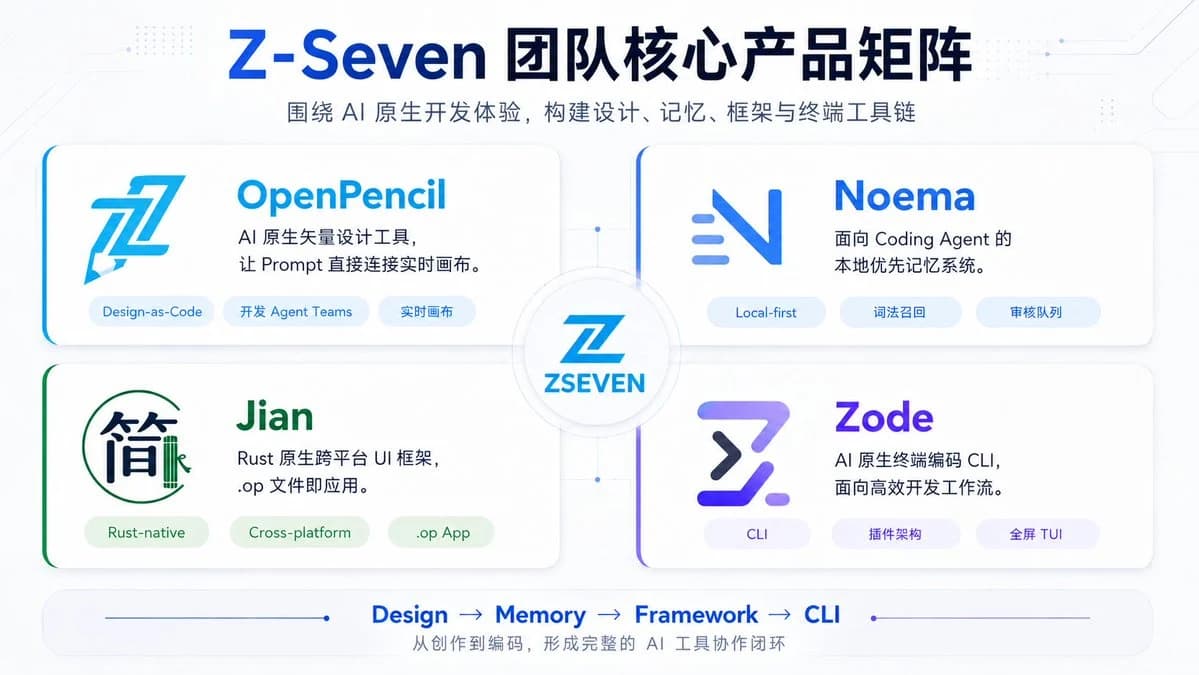
374 wordsGoal: Create a clean futuristic Chinese tech product matrix slide for {argument name="brand name" default="Z-Seven"}, showing the team’s core AI-native product lineup.
Canvas: 16:9 horizontal presentation slide, white to very pale blue background, subtle circuit-board traces, tiny dotted tech patterns, thin connector lines, soft shadows, glossy SaaS/AI startup aesthetic.
Header: Large centered headline in dark navy and bright blue: {argument name="headline text" default="Z-Seven 团队核心产品矩阵"}. Under it, a smaller gray-blue subtitle: {argument name="subtitle text" default="围绕 AI 原生开发体验,构建设计、记忆、框架与终端工具链"}.
Layout: Arrange exactly 4 rounded rectangular product cards in a 2×2 grid around a central circular hub. The cards are large white panels with subtle shadows, soft borders, and colored accent strokes on the left edge or corner. Connect all four cards to the center with faint blue connector lines and small node dots. In the center, place a circular badge containing a stylized blue Z logo and the text “ZSEVEN”.
Product cards: Include exactly 4 cards, each with one logo, one product name, one two-line description, and exactly 3 pill-shaped tags.
1. Top-left card: Product name “OpenPencil” in bright cyan-blue. Large angular blue pencil/Z style logo on the left. Description: “AI 原生矢量设计工具,\n让 Prompt 直接连接实时画布。” Tags, exactly 3: “Design-as-Code”, “开发 Agent Teams”, “实时画布”.
2. Top-right card: Product name “Noema” in vivid blue. Minimal blue gradient N-like logo with three short horizontal motion lines. Description: “面向 Coding Agent 的\n本地优先记忆系统。” Tags, exactly 3: “Local-first”, “词法召回”, “审核队列”.
3. Bottom-left card: Product name “Jian” in green. Logo resembles the Chinese character “简” inside a thin green circular outline with a small bamboo-like vertical mark. Description: “Rust 原生跨平台 UI 框架,\n.op 文件即应用。” Tags, exactly 3: “Rust-native”, “Cross-platform”, “.op App”.
4. Bottom-right card: Product name “Zode” in purple-blue gradient. Logo is a bold futuristic Z/terminal symbol in purple and navy. Description: “AI 原生终端编码 CLI,\n面向高效开发工作流。” Tags, exactly 3: “CLI”, “插件架构”, “全屏 TUI”.
Footer: Add a rounded horizontal bottom bar with a thin blue line and dot accents. In the center, show exactly 4 workflow steps separated by arrows: “Design → Memory → Framework → CLI”. Beneath it, add the small Chinese caption: “从创作到编码,形成完整的 AI 工具协作闭环”.
Visual style: Modern enterprise AI product slide, crisp vector-like typography, blue/cyan/purple/green accents, soft gradients, high readability, no photo texture, no watermark. Use balanced margins and make all text sharp and legible.About this prompt
Z-Seven AI Product Matrix Slide is a ready-to-use infographic prompt for GPT Image 2 on Image 2. Copy the 374 words below, paste them into the Create form, and you will get a result close to the preview above. Tweak the Infographic, Storyboard, Product tag if you want to push it somewhere new.
Use it as a starting point, then adjust the subject, lighting, or composition to suit your idea. The credit cost stays the same whether you use it as written or customize it.
Use case
A strong starting point for Infographic
Start here when you want a infographic image inspired by Z-Seven AI Product Matrix Slide. The prompt already sets the look and composition; replace the subject, product, colors, or scene details to match your project.
Easy places to tweak
- Subject Swap in your person, product, place, or object without changing the overall composition.
- Look and mood Tune the lighting, palette, camera angle, or materials so the image fits your brand.
- Final format Set the aspect ratio, background, text, or layout notes before you generate.
More prompt paths to explore
Find more GPT Image 2 prompts with a similar style, use case, or subject.
How to use it
- Step 1
Copy the prompt
Hit the Copy button above to grab the full text.
- Step 2
Open Image 2 Create
Head to the Create form and paste it in.
- Step 3
Generate
Hit Generate. Your version lands in seconds.
Make it yours
Load the prompt into the Create form with one click, then start tweaking.