Prompt
222 words{
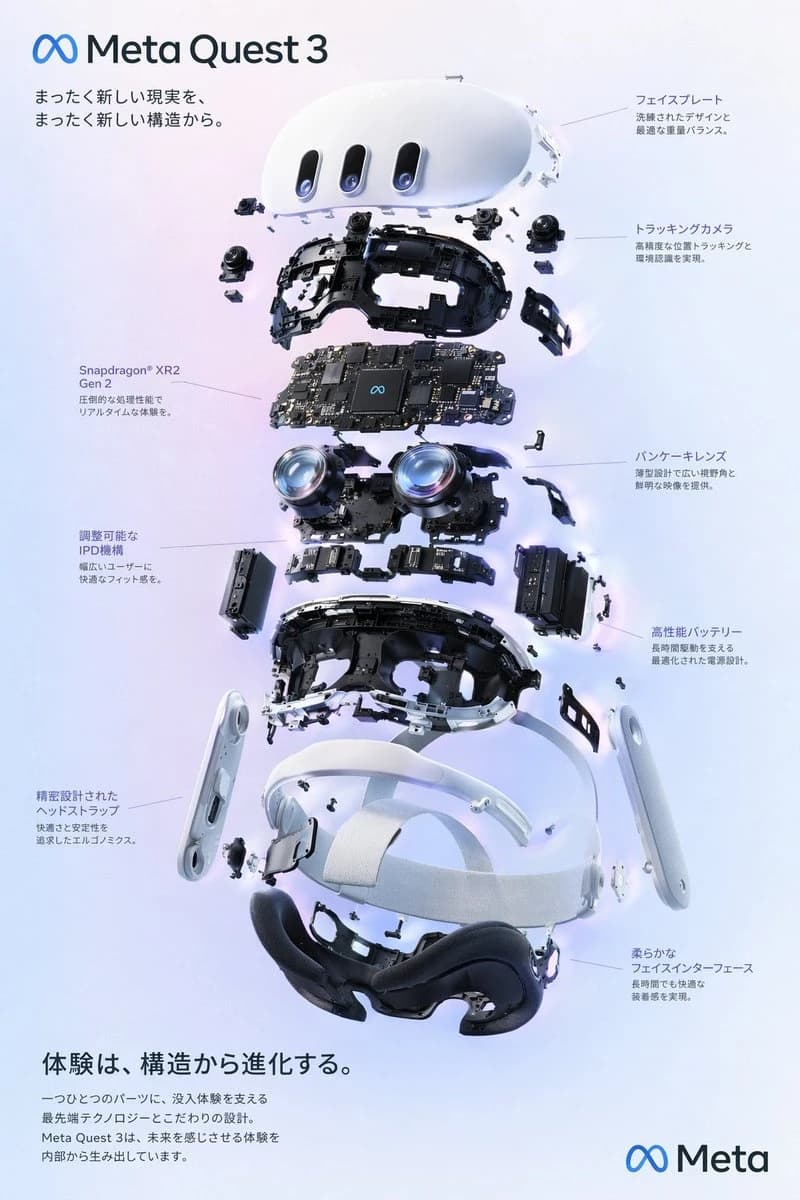
"type": "exploded view product diagram poster",
"subject": "VR headset",
"style": "clean high-tech 3D render, studio lighting, glowing accents",
"background": "{argument name=\"background color\" default=\"soft purple and blue gradient\"}",
"header": {
"logo": "∞ {argument name=\"product name\" default=\"Meta Quest 3\"}",
"subtitle": "{argument name=\"main catchphrase\" default=\"An entirely new reality, from an entirely new structure.\"}"
},
"layout": {
"centerpiece": "vertically stacked exploded view of a VR headset showing 9 distinct layers of internal components: outer shell, camera sensors, motherboard with chip, pancake lenses, internal frame, battery packs, side straps, top strap, and facial interface cushion.",
"callout_labels": {
"count": 8,
"left_side": [
"Snapdragon® XR2 Gen 2\nBlazing processing power for real-time experiences.",
"Adjustable IPD mechanism\nA comfortable fit for a wide range of users.",
"Precision-engineered head strap\nErgonomics designed for comfort and stability."
],
"right_side": [
"Faceplate\nRefined design and optimal weight balance.",
"Tracking cameras\nHigh-precision positional tracking and environment sensing.",
"Pancake lenses\nA slim design delivering a wide field of view and sharp images.",
"High-performance battery\nAn optimized power design that supports long sessions.",
"Soft facial interface\nComfortable to wear even for long periods."
]
},
"footer": {
"left_text_block": {
"headline": "{argument name=\"bottom headline\" default=\"Experience evolves from structure.\"}",
"body": "Every single part carries cutting-edge technology and meticulous design that support immersive experiences. Meta Quest 3 creates experiences that feel like the future — from the inside out."
},
"right_logo": "∞ Meta"
}
}
}About this prompt
VR Headset Exploded View Poster is a ready-to-use ad creative prompt for GPT Image 2 on Image 2. Copy the 222 words below, paste them into the Create form, and you will get a result close to the preview above. Tweak the Product Ad, Ad Creative, Infographic tag if you want to push it somewhere new.
Use it as a starting point, then adjust the subject, lighting, or composition to suit your idea. The credit cost stays the same whether you use it as written or customize it.
Use case
A strong starting point for Ad Creative
Start here when you want a ad creative image inspired by VR Headset Exploded View Poster. The prompt already sets the look and composition; replace the subject, product, colors, or scene details to match your project.
Easy places to tweak
- Subject Swap in your person, product, place, or object without changing the overall composition.
- Look and mood Tune the lighting, palette, camera angle, or materials so the image fits your brand.
- Final format Set the aspect ratio, background, text, or layout notes before you generate.
More prompt paths to explore
Find more GPT Image 2 prompts with a similar style, use case, or subject.
How to use it
- Step 1
Copy the prompt
Hit the Copy button above to grab the full text.
- Step 2
Open Image 2 Create
Head to the Create form and paste it in.
- Step 3
Generate
Hit Generate. Your version lands in seconds.
Make it yours
Load the prompt into the Create form with one click, then start tweaking.