Prompt
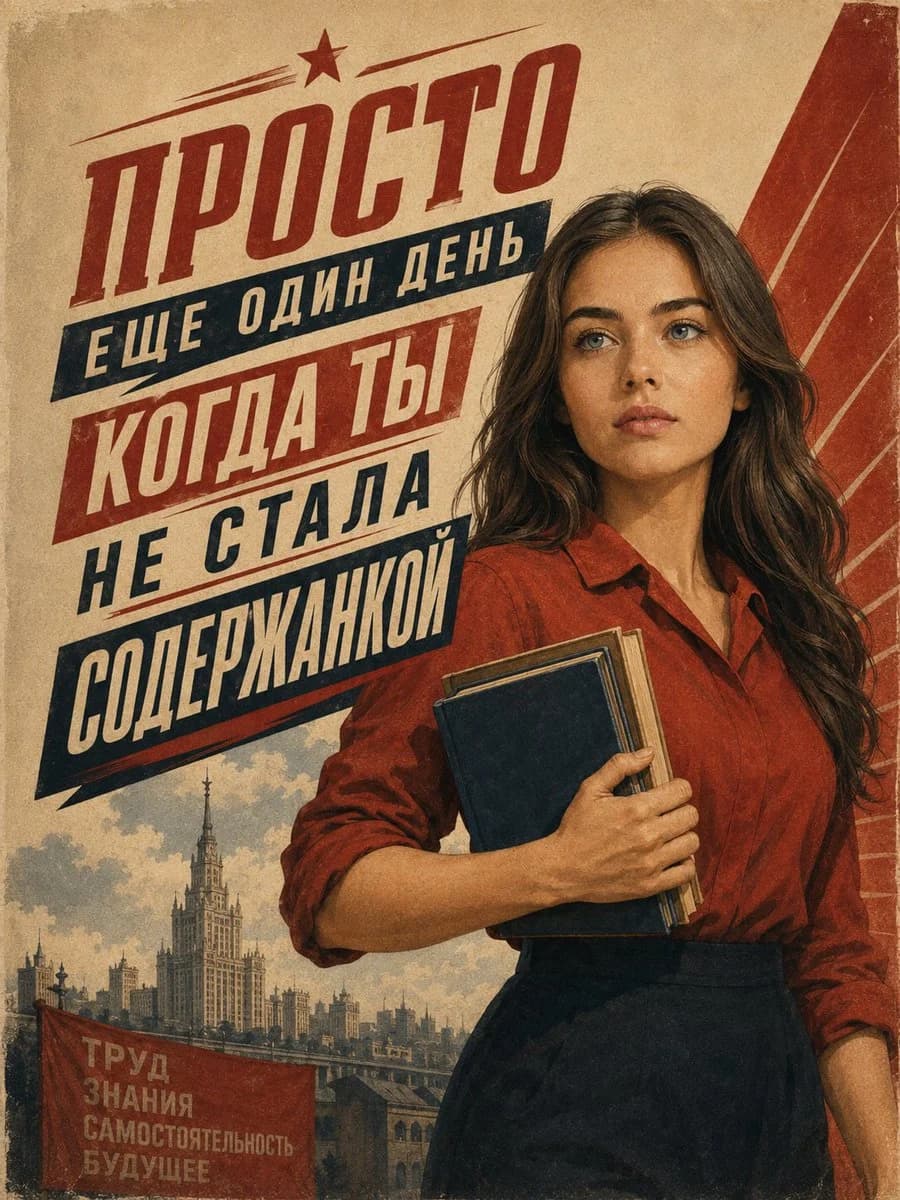
389 wordsGoal: Create a vintage Soviet-style propaganda poster about productivity and self-discipline, combining bold constructivist typography with a realistic young student portrait.
Canvas: Vertical poster, 3:4 aspect ratio, aged tan paper texture with worn edges, faded ink, grain, scratches, and subtle stains. Use a limited palette of brick red, navy blue, cream, tan, and muted gray.
Layout: The left two-thirds are dominated by large diagonal Russian headline typography, slanting upward from lower left to upper right. The right half features a young woman from mid-thigh upward, slightly overlapping the text. A large red geometric diagonal architectural shape fills the upper-right background. The lower-left corner contains a small cityscape vignette and a red banner.
Text content: Use exactly 5 large headline blocks in Russian, with bold condensed block lettering: 1) top red word “ПРОСТО” with a small red star above it and thin speed lines, 2) navy banner “ЕЩЕ ОДИН ДЕНЬ”, 3) red banner “КОГДА ТЫ”, 4) navy text “НЕ СТАЛА”, 5) large navy banner “СОДЕРЖАНКОЙ”. Include exactly 1 small red banner in the lower-left foreground with 4 stacked Russian lines: “ТРУД”, “ЗНАНИЯ”, “САМОСТОЯТЕЛЬНОСТЬ”, “БУДУЩЕЕ”. Main customizable slogan: {argument name="main Russian slogan" default="ПРОСТО ЕЩЕ ОДИН ДЕНЬ КОГДА ТЫ НЕ СТАЛА СОДЕРЖАНКОЙ"}.
Subject details: A serious young woman, about early twenties, light skin, long wavy dark brown hair, blue-gray eyes, natural makeup, calm determined expression, looking slightly upward and to the viewer’s left. She wears a brick-red collared blouse with rolled sleeves tucked into a high-waisted dark navy skirt. She holds exactly 3 books against her chest with both arms: 1 dark navy front book, 1 beige-page book behind it, and 1 thin brown book edge visible. Customize her look with {argument name="woman appearance" default="young woman with long wavy dark brown hair and blue-gray eyes"} and {argument name="outfit colors" default="brick-red blouse and dark navy skirt"}.
Background details: In the lower-left background, paint a muted Soviet-era city skyline with exactly 1 tall Stalinist skyscraper as the central landmark, smaller buildings around it, a bridge or embankment, and cloudy sky. The foreground banner color is {argument name="banner color" default="faded red"}. The overall poster style is {argument name="poster style" default="aged Soviet constructivist propaganda poster"}.
Visual style: Realistic painted portrait blended with screen-printed poster graphics, heroic composition, strong diagonal movement, distressed lithograph texture, slightly faded colors, crisp but weathered typography, no modern UI elements, no watermark.About this prompt
Vintage Soviet Student Propaganda Poster is a ready-to-use infographic prompt for GPT Image 2 on Image 2. Copy the 389 words below, paste them into the Create form, and you will get a result close to the preview above. Tweak the Infographic, Fashion, Travel tag if you want to push it somewhere new.
Use it as a starting point, then adjust the subject, lighting, or composition to suit your idea. The credit cost stays the same whether you use it as written or customize it.
Use case
A strong starting point for Infographic
Start here when you want a infographic image inspired by Vintage Soviet Student Propaganda Poster. The prompt already sets the look and composition; replace the subject, product, colors, or scene details to match your project.
Easy places to tweak
- Subject Swap in your person, product, place, or object without changing the overall composition.
- Look and mood Tune the lighting, palette, camera angle, or materials so the image fits your brand.
- Final format Set the aspect ratio, background, text, or layout notes before you generate.
More prompt paths to explore
Find more GPT Image 2 prompts with a similar style, use case, or subject.
How to use it
- Step 1
Copy the prompt
Hit the Copy button above to grab the full text.
- Step 2
Open Image 2 Create
Head to the Create form and paste it in.
- Step 3
Generate
Hit Generate. Your version lands in seconds.
Make it yours
Load the prompt into the Create form with one click, then start tweaking.