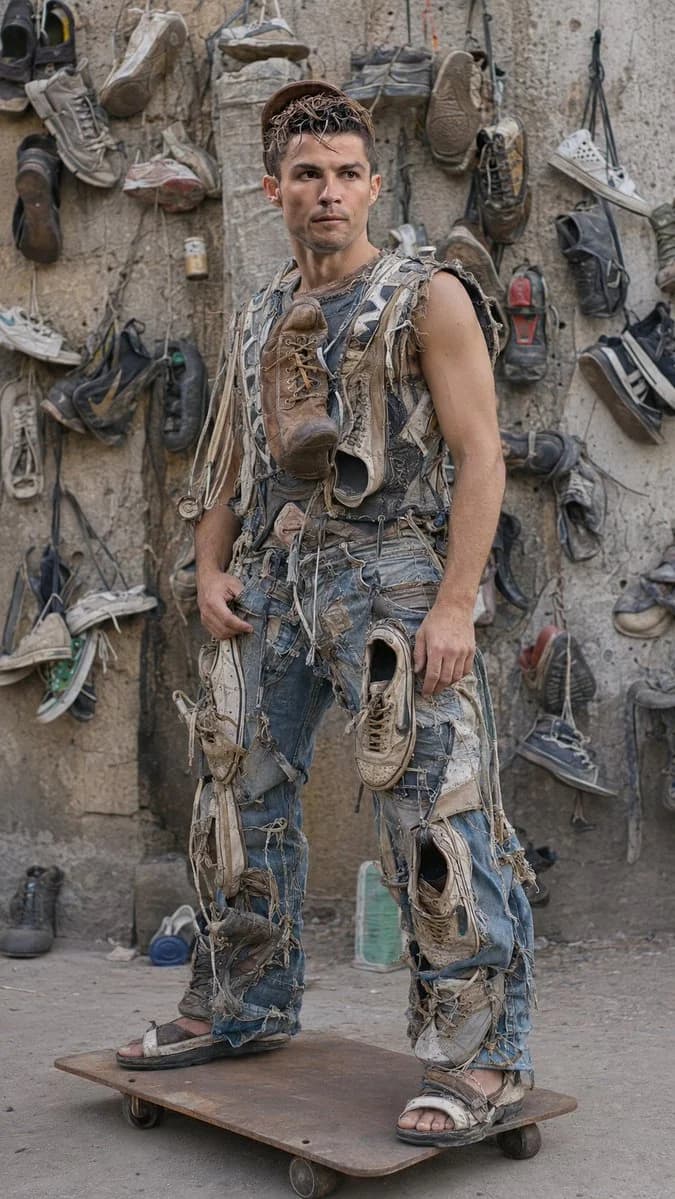
Prompt
271 wordstype:image_generation_prompt
{
"style":"extreme hyper-realistic documentary fashion photography, authentic viral Instagram reel realism, raw street couture, handmade recycled fashion, zero CGI, real mobile-camera capture",
"subject":{
"identity_source":"strictly use uploaded reference image",
"identity_preservation":{
"priority":"maximum facial accuracy",
"preserve_exactly":[
"face shape","skin tone","eyes","nose","lips","jawline","haircut","expression","natural imperfections"
],
"goal":"identical to uploaded person, real Instagram reel frame realism"
},
"pose":"standing naturally on a small rusty steel skateboard platform, slightly leaning forward",
"body_language":"casual confident street attitude, realistic posture and weight balance",
"expression":"calm emotionless stare with viral reel confidence",
"outfit":{
"design":"fully handcrafted recycled outfit made from old shoes, rugged boots, damaged sneakers, denim scraps, hanging laces, stitched fabrics",
"rules":[
"physically wearable",
"real gravity-based materials",
"no fantasy look",
"true handmade realism"
],
"details":[
"dirty boot attached to chest",
"hanging shoelaces",
"worn sneaker-stitched denim",
"frayed seams",
"scratched rubber soles",
"used leather textures",
"dust accumulation",
"realistic folds"
],
"footwear":"worn rugged sandals and damaged shoes"
}
},
"environment":{
"location":"real outdoor alley workshop",
"background":{
"wall":"unfinished concrete wall covered with hanging old shoes and boots",
"details":[
"dust-covered shoes",
"dirty concrete textures",
"aged urban environment",
"real hanging shadows",
"weather damage",
"authentic underground workshop vibe",
"organic imperfections"
]
},
"ground":"dusty rough concrete floor with dirt and debris",
"platform":"small rusty homemade skateboard-like steel plate with tiny wheels"
},
"lighting":{
"type":"soft natural cloudy daylight",
"avoid":[
"studio lighting",
"cinematic glow",
"fake HDR"
]
},
"camera":{
"device":"high-end smartphone reel screenshot",
"lens":"35mm mobile lens",
"framing":"full-body vertical",
"angle":"slightly low handheld angle",
"focus":"sharp face and outfit realism",
"motion":"subtle reel motion blur"
},
"quality":{
"resolution":"16K ultra realism",
"textures":[
"skin pores",
"shoe cracks",
"dust particles",
"fabric stitching",
"metal rust",
"concrete texture"
],
"rendering":"indistinguishable from real life"
},
"mood":[
"raw authenticity",
"creative survival",
"viral underground fashion",
"street innovation"
],
"aspect_ratio":"9:16"
}About this prompt
Recycled Shoes Streetwear Reel is a ready-to-use portrait prompt for GPT Image 2 on Image 2. Copy the 271 words below, paste them into the Create form, and you will get a result close to the preview above. Tweak the Social Media, Portrait, Product tag if you want to push it somewhere new.
Use it as a starting point, then adjust the subject, lighting, or composition to suit your idea. The credit cost stays the same whether you use it as written or customize it.
Use case
A strong starting point for Portrait
Start here when you want a portrait image inspired by Recycled Shoes Streetwear Reel. The prompt already sets the look and composition; replace the subject, product, colors, or scene details to match your project.
Easy places to tweak
- Subject Swap in your person, product, place, or object without changing the overall composition.
- Look and mood Tune the lighting, palette, camera angle, or materials so the image fits your brand.
- Final format Set the aspect ratio, background, text, or layout notes before you generate.
More prompt paths to explore
Find more GPT Image 2 prompts with a similar style, use case, or subject.
How to use it
- Step 1
Copy the prompt
Hit the Copy button above to grab the full text.
- Step 2
Open Image 2 Create
Head to the Create form and paste it in.
- Step 3
Generate
Hit Generate. Your version lands in seconds.
Make it yours
Load the prompt into the Create form with one click, then start tweaking.