Prompt
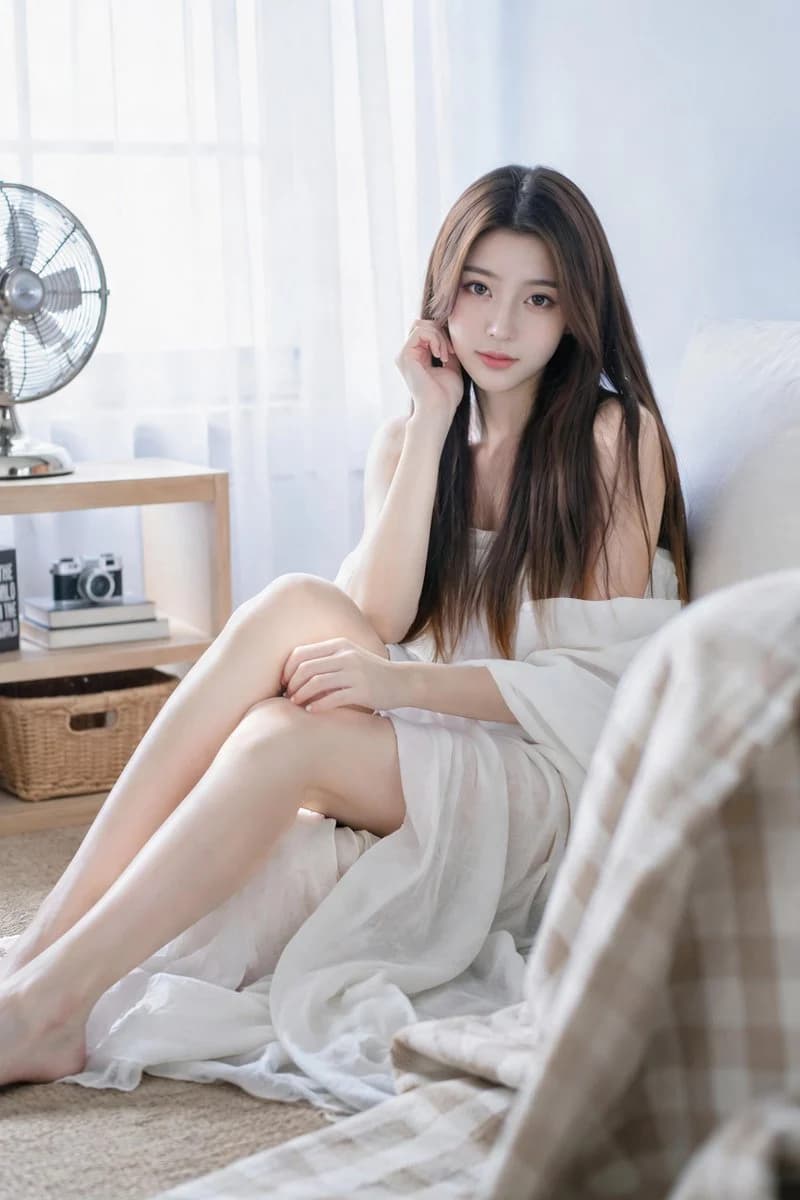
371 wordsSoft and realistic vertical indoor portrait in a bright and transparent natural light lifestyle photography style. {argument name="age" default="A 20-year-old"} adult woman sitting on the floor leaning against a low bed or padded seat in a peaceful minimalist room. Slightly to the right, leaning back against a white pillow or the edge of a sofa, her body extending diagonally from the lower-left foreground to the right side of the screen. A quiet, gentle, slightly dreamy expression, looking directly at the camera. Character: {argument name="hair style" default="extremely long dark brown straight hair"} with warm golden-brown tips, middle-parted, falling smoothly over the shoulders and chest. Soft and exquisite makeup: thick eyeliner, long lashes, light peach blush, glowing fair skin, shiny light pink lips. Relaxed and elegant posture—one hand near the hair or cheek; the other resting gently on the knee. Styling: A dignified and soft boudoir portrait composition. Dark brown straight hair naturally covers the bare shoulders and upper body. Soft, matte, lightweight {argument name="clothing" default="white draping fabric"} surrounds the knees, refined and sophisticated—focusing on natural light, a calm atmosphere, posture, and fabric texture. Scene: Bright minimalist room. Behind her: a large window with sheer white tulle curtains, overexposed sunlight pouring in, light blue-white walls. Left: a small table with a vintage-style metal fan. Background: a low wooden bookshelf with stacked books, a small camera or decorative items, a woven storage basket, and a visible black book cover with bold white text. Right foreground: soft-focus blurred checkered blanket or fabric edge—adding depth and a framing effect. Lighting and Tone: High-key diffused natural light from the window—soft halos on the face, hair, shoulders, arms, white fabric, and floor. Shallow depth of field, creamy highlights, gentle shadows, clean pastel tones. Color palette: bright whites, light blue walls, warm skin tones, dark brown hair, light wood furniture, understated grey flooring, and soft beige accents. Style: Realistic indoor natural light portrait photography, bright minimalist room, relaxed sitting posture, dark long straight hair, white draping fabric, soft dreamy expression, tulle curtains, vintage fan, background bookshelf, bright high-key lighting, shallow depth of field, vertical format, high detail. No watermarks, no logos, no cartoon feel, no strong flash, no deformed anatomy, no extra people, no cluttered elements, no explicit nudity.About this prompt
Realistic Minimalist Indoor Female Portrait is a ready-to-use portrait prompt for GPT Image 2 on Image 2. Copy the 371 words below, paste them into the Create form, and you will get a result close to the preview above. Tweak the Portrait, Fashion, Architecture tag if you want to push it somewhere new.
Use it as a starting point, then adjust the subject, lighting, or composition to suit your idea. The credit cost stays the same whether you use it as written or customize it.
Use case
A strong starting point for Portrait
Start here when you want a portrait image inspired by Realistic Minimalist Indoor Female Portrait. The prompt already sets the look and composition; replace the subject, product, colors, or scene details to match your project.
Easy places to tweak
- Subject Swap in your person, product, place, or object without changing the overall composition.
- Look and mood Tune the lighting, palette, camera angle, or materials so the image fits your brand.
- Final format Set the aspect ratio, background, text, or layout notes before you generate.
More prompt paths to explore
Find more GPT Image 2 prompts with a similar style, use case, or subject.
How to use it
- Step 1
Copy the prompt
Hit the Copy button above to grab the full text.
- Step 2
Open Image 2 Create
Head to the Create form and paste it in.
- Step 3
Generate
Hit Generate. Your version lands in seconds.
Make it yours
Load the prompt into the Create form with one click, then start tweaking.