Prompt
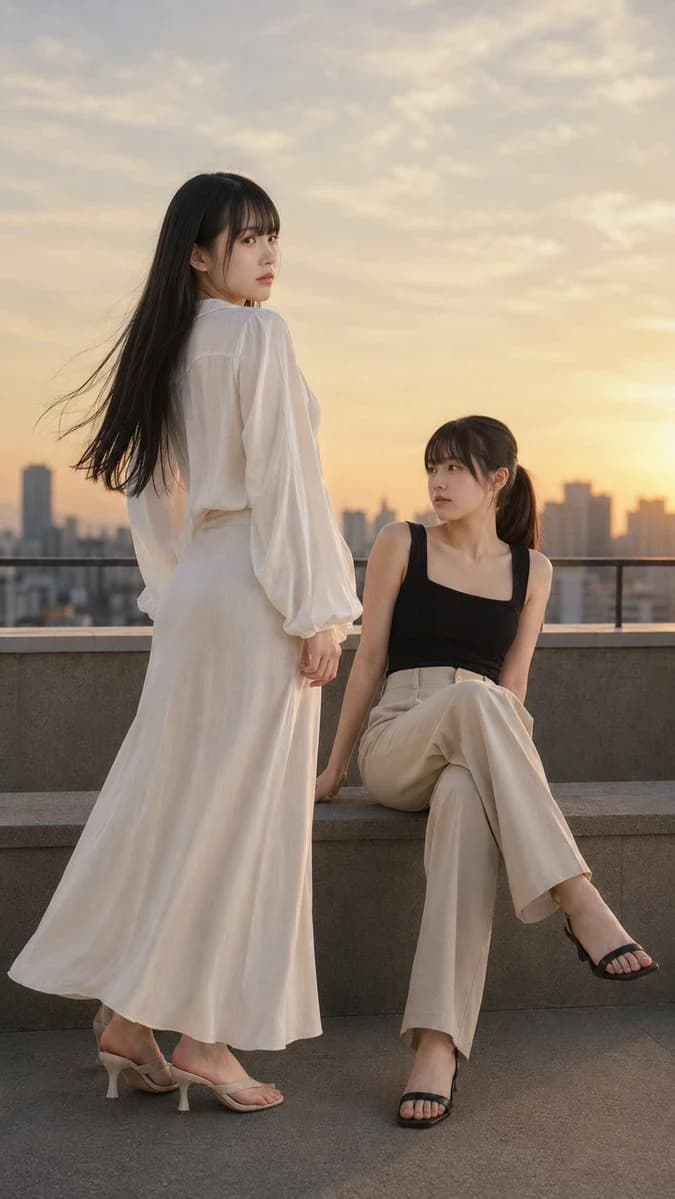
400 wordsCreate a realistic vertical street life portrait depicting {argument name="subjects" default="two East Asian adult women over 21"} walking side by side on a {argument name="setting" default="city sidewalk"} at {argument name="time of day" default="sunset"}. The composition should be full-body, from toes to the top of the head, with the two women in the center, looking at each other gently as they walk. The atmosphere should be warm, natural, calm, and friendly, as if capturing a moment of urban fashion.\n\nThe woman on the left has long, straight black hair with soft bangs fluttering in the evening breeze. She is wearing an off-white ribbed cardigan over a slim-fitting white cropped tank top, paired with a beige pleated mini skirt. She wears white short socks and white sneakers. Her posture is relaxed, arms hanging naturally, one foot stepping forward, her gaze gentle and focused on the woman on the right.\n\nThe woman on the right has long dark hair tied in a low ponytail with straight bangs. She is wearing a dark blue cropped zip-up jacket over a matching slim-fitting cropped top, paired with high-waisted charcoal gray wide-leg pants. Her hands are casually tucked into her pockets, and she wears white sneakers. Her expression is calm and contemplative, looking back at the woman on the left.\n\nThe scene is set on a clean city sidewalk, with a stone masonry wall on the left and street railings, traffic signs, trees, and parked cars on the right, with a cityscape faintly visible in the background. The sun is low behind them, creating a warm amber backlight, outlining their hair and shoulders with a shimmering glow and casting long shadows on the sidewalk. The sidewalk tiles should show realistic texture and a golden luster.\n\nThe lighting should be warm natural sunset light, coming from behind them slightly to the right, complemented by soft fill light on their faces. Use shallow depth of field, realistic skin textures, delicate clothing fabrics, sharp folds, soft hair strands, subtle bokeh, and a sophisticated cinematic lifestyle style.\n\nStyle: Realistic urban friendship photography, two East Asian adult women walking together on a city sidewalk at sunset, wearing casual coordinated outfits, cream cardigan with a pleated skirt, navy blue cropped jacket with gray pants, warm backlight, natural expressions, soft snapshot vibe, high detail, vertical aspect ratio, no text, no watermarks, no logos, no other people in focus, no deformed bodies, no cartoon style, no harsh flash, no clutter.About this prompt
Realistic East Asian Street Portrait is a ready-to-use social media prompt for GPT Image 2 on Image 2. Copy the 400 words below, paste them into the Create form, and you will get a result close to the preview above. Tweak the Social Media, Product, Fashion tag if you want to push it somewhere new.
Use it as a starting point, then adjust the subject, lighting, or composition to suit your idea. The credit cost stays the same whether you use it as written or customize it.
Use case
A strong starting point for Social Media
Start here when you want a social media image inspired by Realistic East Asian Street Portrait. The prompt already sets the look and composition; replace the subject, product, colors, or scene details to match your project.
Easy places to tweak
- Subject Swap in your person, product, place, or object without changing the overall composition.
- Look and mood Tune the lighting, palette, camera angle, or materials so the image fits your brand.
- Final format Set the aspect ratio, background, text, or layout notes before you generate.
More prompt paths to explore
Find more GPT Image 2 prompts with a similar style, use case, or subject.
How to use it
- Step 1
Copy the prompt
Hit the Copy button above to grab the full text.
- Step 2
Open Image 2 Create
Head to the Create form and paste it in.
- Step 3
Generate
Hit Generate. Your version lands in seconds.
Make it yours
Load the prompt into the Create form with one click, then start tweaking.