Prompt
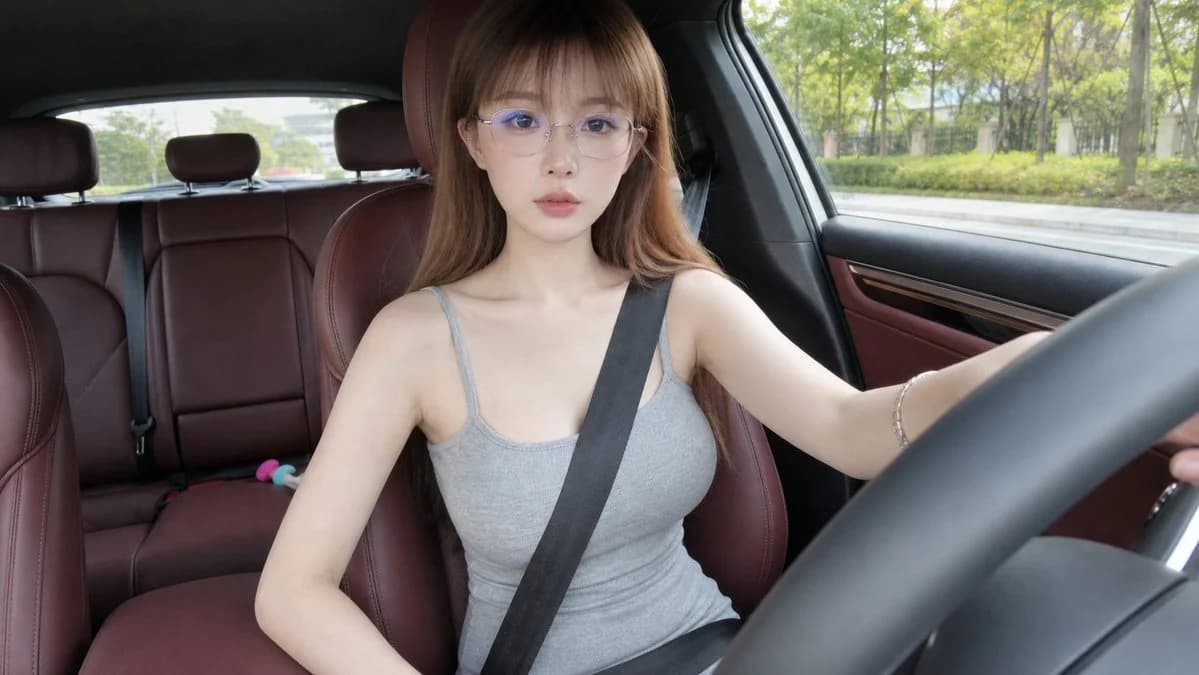
448 wordsGenerate a realistic first frame of a car interior selfie video, landscape 16:9. The frame looks like it was taken by a small wide-angle camera fixed in front of the passenger seat or near the center console, slight wide-angle, close-up interior first-person perspective, like a social media short video screenshot.
The protagonist is an adult female with a cold, quiet, and delicate temperament, overall looking like a protagonist in a daily car selfie video. Her face is small and oval, her features are naturally delicate, her nose is straight, her lips are natural, and her expression is calm and light, with a bit of coldness but not exaggerated. She faces the camera directly or looks slightly forward, with her full face clearly visible, not looking down or sideways. She wears fine-framed transparent or light silver glasses, {argument name="hairstyle" default="long straight light brown hair with light air bangs, falling naturally over the shoulders"}. Wears {argument name="clothing" default="a simple gray sleeveless knit dress or a gray sleeveless top with matching bottoms"}, the styling is clean, daily, dignified and natural.
She is sitting in the driver's seat, the seat belt is buckled and fixed: the black seat belt is clearly slanted across the upper body from the shoulder to the side of the waist, naturally fitting the body, not pulling the seat belt or inserting the buckle. One of her hands is naturally placed near the steering wheel or lightly touching it, and the other hand is lowered by the seat side or leg side, in a posture like the moment after sitting up straight before preparing to drive. The expression is focused and calm, eyes can look at the camera or slightly toward the road ahead.
The car interior features {argument name="interior" default="red-brown leather seats and red-brown door panels"}, with the steering wheel forming a distinct foreground in the right front of the frame, and the dashboard, window edges, and rear seats visible. Outside the window are greenery, trees, and slightly blurred street scenes along a daytime city road, but the car looks like it hasn't started yet, and the background is relatively static. Natural sunlight shines through the window, providing real skin texture and natural hair shine.
Overall style: Real photography, high-quality mobile phone or action camera car selfie video first frame, clear and natural, slight wide-angle distortion, real car interior space, social media short video texture, not like a studio portrait.
Avoid: Bowing head, side face, buckling seat belt, pulling seat belt, subtitles, text, watermarks, extra characters, exaggerated poses, exaggerated posing, missing seat belts, deformed steering wheels, finger deformities, glasses deformation, disordered car interior structure, high-speed background movement, night scenes, anime style, CG feel, plastic skin, excessive beautification.About this prompt
Realistic Car Interior Selfie is a ready-to-use social media prompt for GPT Image 2 on Image 2. Copy the 448 words below, paste them into the Create form, and you will get a result close to the preview above. Tweak the Social Media, Mockup, Storyboard tag if you want to push it somewhere new.
Use it as a starting point, then adjust the subject, lighting, or composition to suit your idea. The credit cost stays the same whether you use it as written or customize it.
Use case
A strong starting point for Social Media
Start here when you want a social media image inspired by Realistic Car Interior Selfie. The prompt already sets the look and composition; replace the subject, product, colors, or scene details to match your project.
Easy places to tweak
- Subject Swap in your person, product, place, or object without changing the overall composition.
- Look and mood Tune the lighting, palette, camera angle, or materials so the image fits your brand.
- Final format Set the aspect ratio, background, text, or layout notes before you generate.
More prompt paths to explore
Find more GPT Image 2 prompts with a similar style, use case, or subject.
How to use it
- Step 1
Copy the prompt
Hit the Copy button above to grab the full text.
- Step 2
Open Image 2 Create
Head to the Create form and paste it in.
- Step 3
Generate
Hit Generate. Your version lands in seconds.
Make it yours
Load the prompt into the Create form with one click, then start tweaking.