Prompt
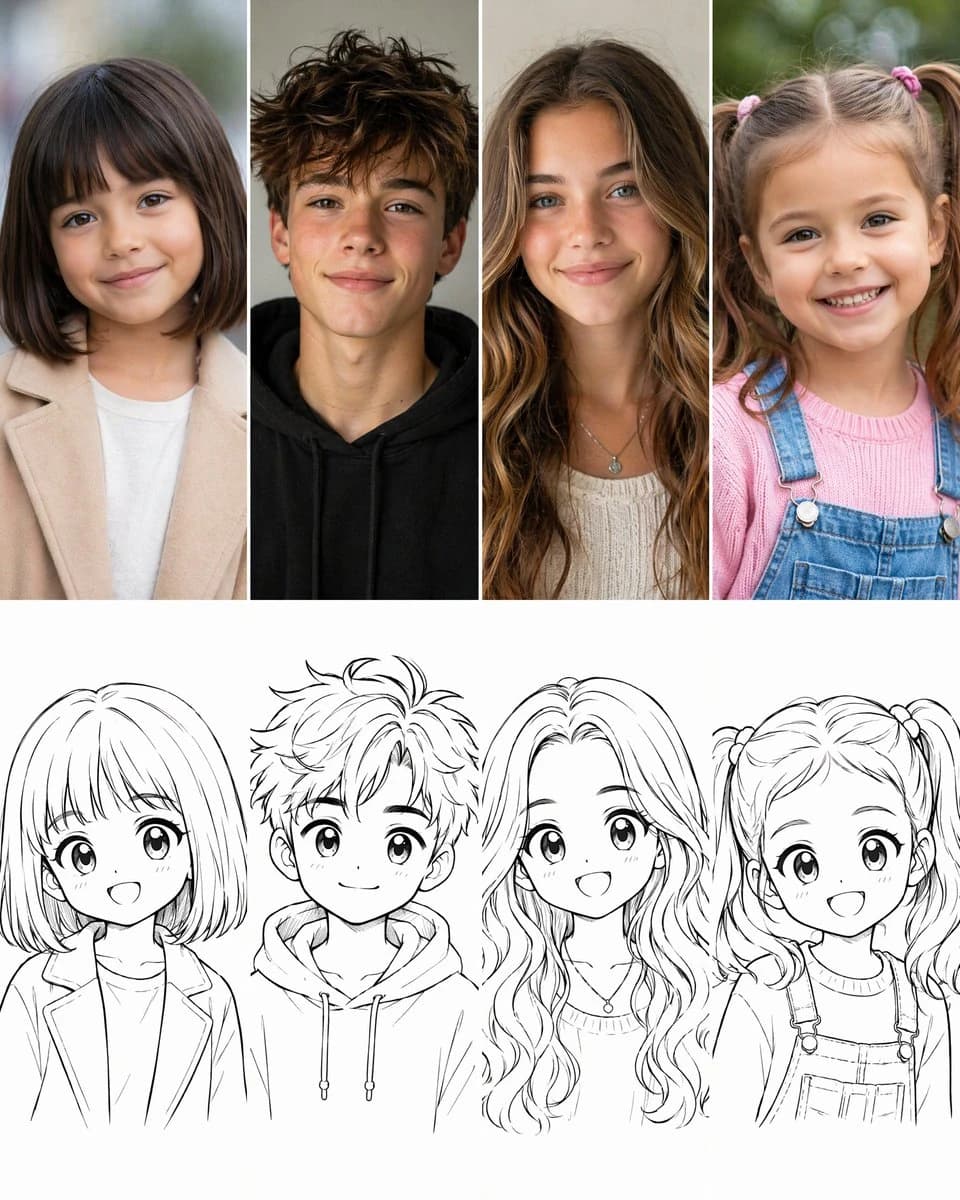
395 wordsGoal: Create a 2-row by 4-column comparison grid showing a transformation from realistic child and teen portrait photos into cute 2D anime-style sketch drawings.
Canvas: Square vertical-ish social media image, clean white background, 4 equal columns separated by thin white gutters. The top row is full-color realistic photography; the bottom row is black-and-white line art. Each column pairs one person above with their matching cartoon sketch below.
Layout: Use exactly 8 panels total: 4 realistic portraits in the top row and 4 corresponding manga sketches in the bottom row. Crop all subjects as front-facing bust portraits, centered in each column. Keep the top row photographic and softly lit; keep the bottom row as clean black ink line art on white with no color fill.
Top row subjects, left to right: 1) a young girl with a straight dark brown bob haircut and blunt bangs, gentle smile, beige coat over a white shirt, softly blurred outdoor background; 2) a teenage boy with messy tousled brown hair, subtle freckles, relaxed smile, black hoodie, neutral indoor background; 3) a teenage girl with long wavy light-brown hair, blue-green eyes, soft smile, cream knit top and small pendant necklace, warm neutral background; 4) a little girl with light brown pigtails tied with pink hair ties, bright toothy smile, pink sweater under denim overalls, green outdoor bokeh background.
Bottom row sketches, left to right: 1) matching anime girl with bob haircut and bangs, large sparkling eyes, open cheerful smile, blazer-like coat and shirt; 2) matching anime teen boy with spiky messy hair, big eyes, small smile, hoodie with drawstrings; 3) matching anime teen girl with long flowing wavy hair, large eyes, open smile, knit neckline and pendant necklace; 4) matching anime little girl with twin pigtails, big round eyes, open happy smile, sweater and overall straps with buttons.
Visual style: The photo row should look realistic, high-resolution, natural skin tones, shallow depth of field, soft daylight. The sketch row should look like polished Japanese manga/anime character line art, adorable proportions, oversized eyes, expressive faces, clean varied line weight, minimal shading, white negative space.
Constraints: No captions, no logos, no watermark, no extra people, no additional panels. Preserve the exact 4-column pairing and make each sketch clearly reinterpret the person directly above it. Use {argument name="grid theme" default="realistic children and teenagers transformed into cute anime sketches"}, with a wholesome magical childhood feeling.About this prompt
Photo to Anime Sketch Comparison Grid is a ready-to-use comparison prompt for GPT Image 2 on Image 2. Copy the 395 words below, paste them into the Create form, and you will get a result close to the preview above. Tweak the Social Media, Comparison, Storyboard tag if you want to push it somewhere new.
Use it as a starting point, then adjust the subject, lighting, or composition to suit your idea. The credit cost stays the same whether you use it as written or customize it.
Use case
A strong starting point for Comparison
Start here when you want a comparison image inspired by Photo to Anime Sketch Comparison Grid. The prompt already sets the look and composition; replace the subject, product, colors, or scene details to match your project.
Easy places to tweak
- Subject Swap in your person, product, place, or object without changing the overall composition.
- Look and mood Tune the lighting, palette, camera angle, or materials so the image fits your brand.
- Final format Set the aspect ratio, background, text, or layout notes before you generate.
More prompt paths to explore
Find more GPT Image 2 prompts with a similar style, use case, or subject.
How to use it
- Step 1
Copy the prompt
Hit the Copy button above to grab the full text.
- Step 2
Open Image 2 Create
Head to the Create form and paste it in.
- Step 3
Generate
Hit Generate. Your version lands in seconds.
Make it yours
Load the prompt into the Create form with one click, then start tweaking.