Prompt
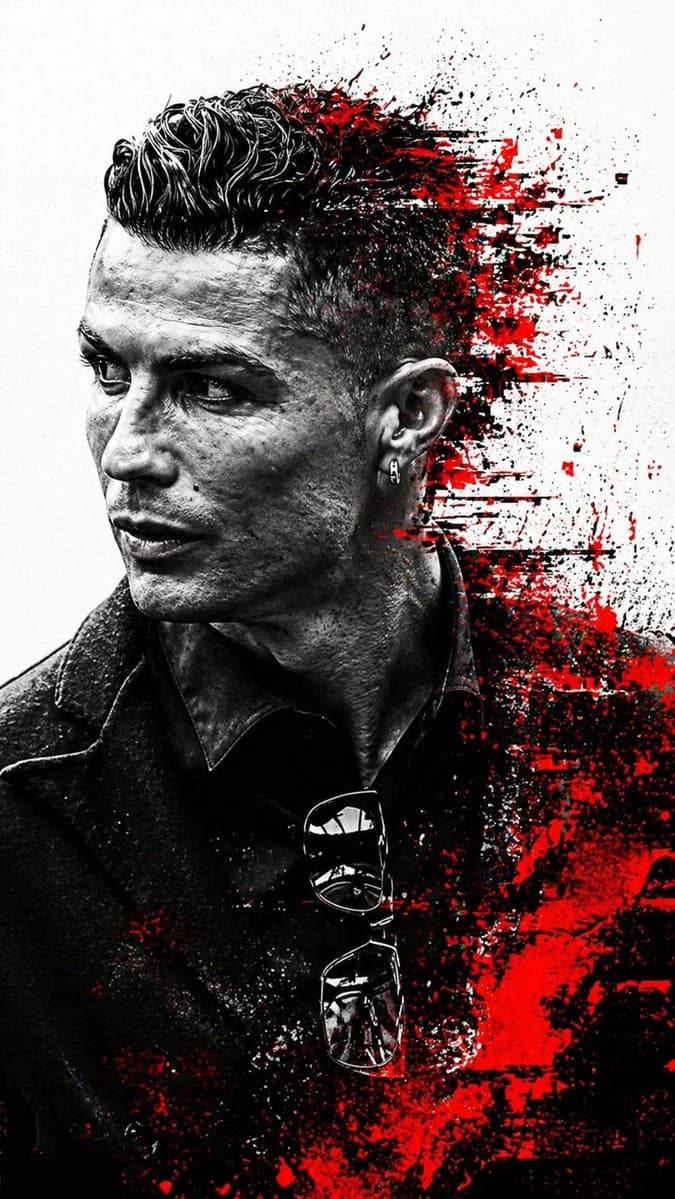
152 wordsSubject: A sharp, high-contrast side-profile portrait of a handsome man with a defined jawline, short stubble, and voluminous, textured dark hair styled upwards. Style & Composition: A fusion of realistic photography and abstract digital glitch art. The subject is rendered in stark black and white, set against a clean, minimalist white background. Color Palette: Strictly monochromatic (deep blacks and bright whites) with aggressive, vibrant splashes of crimson red. Graphic Elements: > * Glitch Effect: The back of the head and the lower torso dissolve into abstract geometric shards, pixel sorting, and "glitchy" red brushstrokes. Texture: Gritty, ink-wash textures and distressed digital overlays that suggest a modern noir or cyberpunk editorial feel. Lighting & Technicals: > * Lighting: Intense side-lighting (Chiaroscuro) creating deep shadows on the face to highlight bone structure. Details: Hyper-realistic skin texture, individual hair strands visible, high-grain film aesthetic. Framing: Vertical aspect ratio, close-up profile shot. Aspect ratio is 9:16
About this prompt
Monochrome Glitch Profile Portrait is a ready-to-use portrait prompt for GPT Image 2 on Image 2. Copy the 152 words below, paste them into the Create form, and you will get a result close to the preview above. Tweak the Portrait, Vintage, Watercolor tag if you want to push it somewhere new.
Use it as a starting point, then adjust the subject, lighting, or composition to suit your idea. The credit cost stays the same whether you use it as written or customize it.
Use case
A strong starting point for Portrait
Start here when you want a portrait image inspired by Monochrome Glitch Profile Portrait. The prompt already sets the look and composition; replace the subject, product, colors, or scene details to match your project.
Easy places to tweak
- Subject Swap in your person, product, place, or object without changing the overall composition.
- Look and mood Tune the lighting, palette, camera angle, or materials so the image fits your brand.
- Final format Set the aspect ratio, background, text, or layout notes before you generate.
More prompt paths to explore
Find more GPT Image 2 prompts with a similar style, use case, or subject.
How to use it
- Step 1
Copy the prompt
Hit the Copy button above to grab the full text.
- Step 2
Open Image 2 Create
Head to the Create form and paste it in.
- Step 3
Generate
Hit Generate. Your version lands in seconds.
Make it yours
Load the prompt into the Create form with one click, then start tweaking.