Prompt
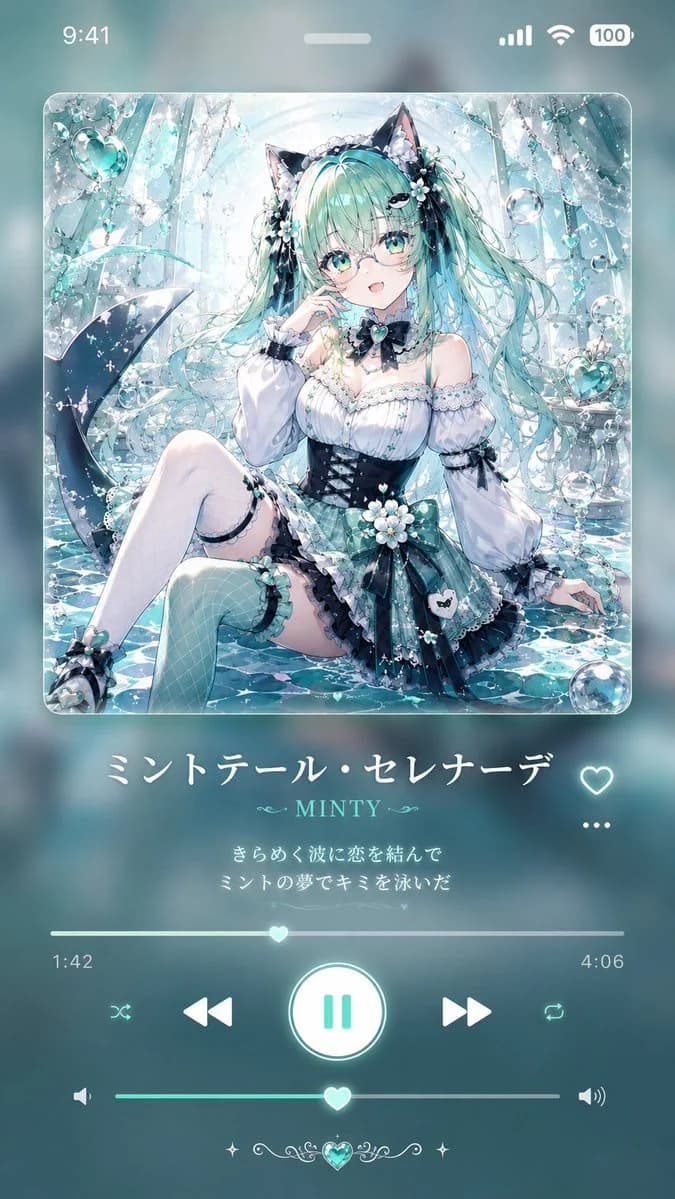
451 wordsGoal: Create a vertical 9:16 smartphone wallpaper styled like a dreamy music player screen, featuring an anime album-art illustration and a translucent teal audio UI.
Canvas: 9:16 phone wallpaper, soft aqua and mint color palette, blurred glassmorphism background, iPhone-like status bar at the top showing 9:41 on the left and signal, Wi‑Fi, and 100% battery on the right, with a small white home-indicator pill near the top center.
Main album art: A large rounded-square album cover centered in the upper half, with glossy glass edges and subtle glow. Inside the cover, illustrate {argument name="character name" default="Minty Serenade"} as a beautiful anime cat-girl mermaid-idol sitting in sparkling shallow water inside an ornate crystalline underwater palace. She has very long flowing {argument name="hair color" default="mint turquoise"} twin-tail hair, black cat ears, large aqua eyes, delicate round glasses, a shy open-mouth expression, and pale skin. Her outfit is a frilly white-and-black gothic lolita swimsuit dress with mint plaid accents, black corset waist, lace sleeves, ribbons, flower ornaments, pearl details, thigh-high stockings, and small teal bows. Include a dark mermaid tail curling behind her on the left. Surround her with bubbles, dangling crystal chains, heart-shaped aqua jewels, white flowers, shimmering water reflections, sparkles, and luminous cyan highlights. The illustration should be highly detailed, romantic, glossy, and ethereal.
Music player layout below album art: Center the song title in large elegant white Japanese text: {argument name="song title" default="ミントテール・セレナーデ"}. To the right of the title line place one outlined heart favorite icon. Below it, show the artist name in smaller mint serif text with decorative flourishes: {argument name="artist name" default="MINTY"}. Under that, include exactly 2 centered Japanese lyric lines in small glowing white text: 1) {argument name="lyric line one" default="きらめく波に恋を結んで"} 2) {argument name="lyric line two" default="ミントの夢でキミを泳いだ"}. To the right of the lyric area place a horizontal three-dot menu icon.
Playback controls: Add one thin progress bar with a glowing heart-shaped scrubber near the center; show elapsed time 1:42 on the left and total time 4:06 on the right. Beneath it, place exactly 5 playback icons in a row: shuffle, previous track, large circular pause button in the center, next track, repeat. The central pause button should be a glowing white circle with mint pause bars. Below that, add a volume slider with speaker icon on the left, louder speaker icon on the right, and another heart-shaped knob. At the bottom center, add a small decorative aqua heart gem with symmetrical filigree and tiny star sparkles.
Visual style: Soft glow, translucent frosted glass UI, crisp anime rendering, pastel mint/cyan highlights, white typography, romantic underwater fantasy mood, no harsh shadows, no watermark, no extra app branding. Keep all interface elements aligned and readable like a polished music playback screen.About this prompt
Mint Anime Music Player Wallpaper is a ready-to-use ui mockup prompt for GPT Image 2 on Image 2. Copy the 451 words below, paste them into the Create form, and you will get a result close to the preview above. Tweak the Social Media, UI Mockup, UI tag if you want to push it somewhere new.
Use it as a starting point, then adjust the subject, lighting, or composition to suit your idea. The credit cost stays the same whether you use it as written or customize it.
Use case
A strong starting point for UI Mockup
Start here when you want a ui mockup image inspired by Mint Anime Music Player Wallpaper. The prompt already sets the look and composition; replace the subject, product, colors, or scene details to match your project.
Easy places to tweak
- Subject Swap in your person, product, place, or object without changing the overall composition.
- Look and mood Tune the lighting, palette, camera angle, or materials so the image fits your brand.
- Final format Set the aspect ratio, background, text, or layout notes before you generate.
More prompt paths to explore
Find more GPT Image 2 prompts with a similar style, use case, or subject.
How to use it
- Step 1
Copy the prompt
Hit the Copy button above to grab the full text.
- Step 2
Open Image 2 Create
Head to the Create form and paste it in.
- Step 3
Generate
Hit Generate. Your version lands in seconds.
Make it yours
Load the prompt into the Create form with one click, then start tweaking.