Prompt
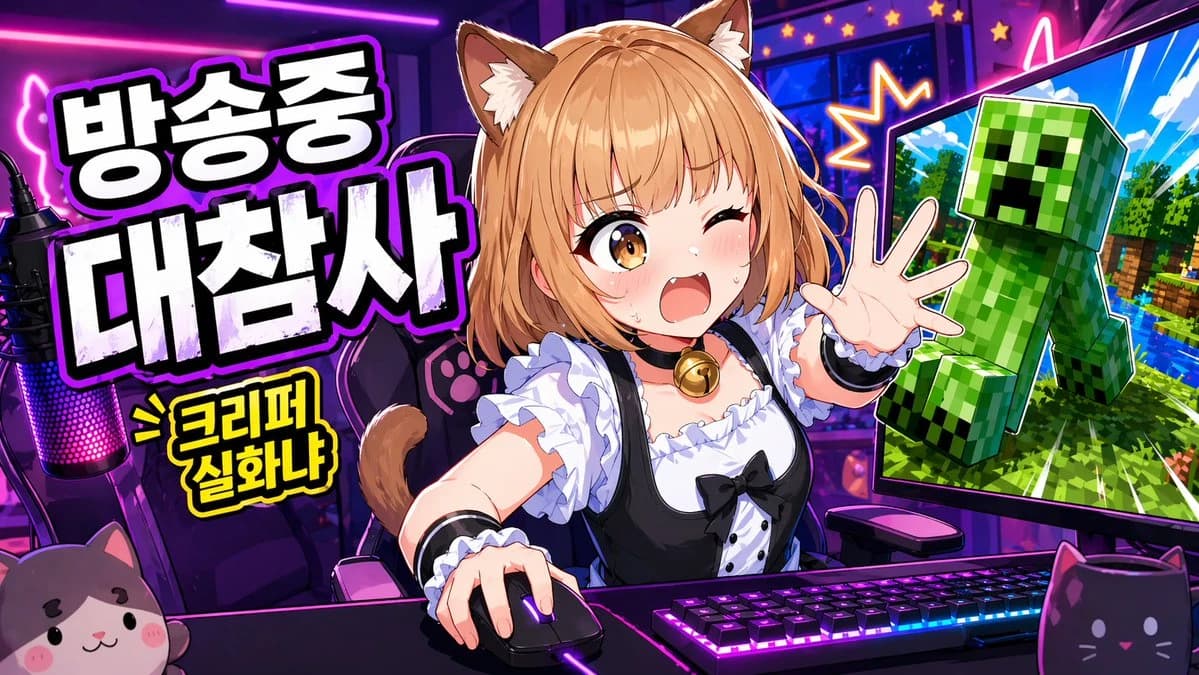
305 wordsA vibrant anime-style YouTube thumbnail for a livestream gaming broadcast, in a wide 16:9 composition, with a neon purple and pink streamer room. Center the scene on a cute catgirl VTuber sitting at a desk, shown from the waist up, leaning forward energetically with one hand on a computer mouse and the other hand reaching toward the viewer. She has {argument name="hair color" default="light orange-blonde"} bob-cut hair with soft bangs, fluffy brown-and-cream cat ears, and a visible cat tail. Her face is intentionally obscured by a solid rectangular censor block in the center. She wears a black-and-white maid-inspired outfit with a frilly white blouse, black dress bodice, puff sleeves, white ruffles, black ribbon bow, and a gold bell choker. Place a mechanical keyboard with bright RGB lighting on the desk, a glowing gaming mouse, and a streamer microphone on the far left with pink-purple LED lighting. Put 2 cat-themed desk items in the foreground: a plush cat face on the bottom left and a black cat-shaped mug on the bottom right. Behind her is a gaming chair with paw-print details. On the left side, add large bold Korean headline text in thick white block letters with black fill shadows and a glowing purple outline, stacked in 2 lines: {argument name="headline text" default="방송중 대참사"}. Below it, add a smaller yellow comic-style burst caption with black outline reading {argument name="sub text" default="> 크리퍼 실화냐"}. On the right side, show 1 large computer monitor angled inward, displaying a Minecraft-like scene with bright blue sky, green trees, water, and a large green Creeper popping out toward the viewer, outlined dramatically like a sticker cutout. Add starburst effects and neon accents around the monitor to heighten the chaos. Use exaggerated thumbnail aesthetics: ultra-saturated colors, sharp cel shading, thick outlines, glossy highlights, high contrast, dynamic perspective, and a clickworthy streamer-disaster mood.About this prompt
Anime VTuber Minecraft Stream Thumbnail is a ready-to-use ui mockup prompt for GPT Image 2 on Image 2. Copy the 305 words below, paste them into the Create form, and you will get a result close to the preview above. Tweak the Social Media, UI, Mockup tag if you want to push it somewhere new.
Use it as a starting point, then adjust the subject, lighting, or composition to suit your idea. The credit cost stays the same whether you use it as written or customize it.
Use case
A strong starting point for UI Mockup
Start here when you want a ui mockup image inspired by Anime VTuber Minecraft Stream Thumbnail. The prompt already sets the look and composition; replace the subject, product, colors, or scene details to match your project.
Easy places to tweak
- Subject Swap in your person, product, place, or object without changing the overall composition.
- Look and mood Tune the lighting, palette, camera angle, or materials so the image fits your brand.
- Final format Set the aspect ratio, background, text, or layout notes before you generate.
More prompt paths to explore
Find more GPT Image 2 prompts with a similar style, use case, or subject.
How to use it
- Step 1
Copy the prompt
Hit the Copy button above to grab the full text.
- Step 2
Open Image 2 Create
Head to the Create form and paste it in.
- Step 3
Generate
Hit Generate. Your version lands in seconds.
Make it yours
Load the prompt into the Create form with one click, then start tweaking.