Prompt
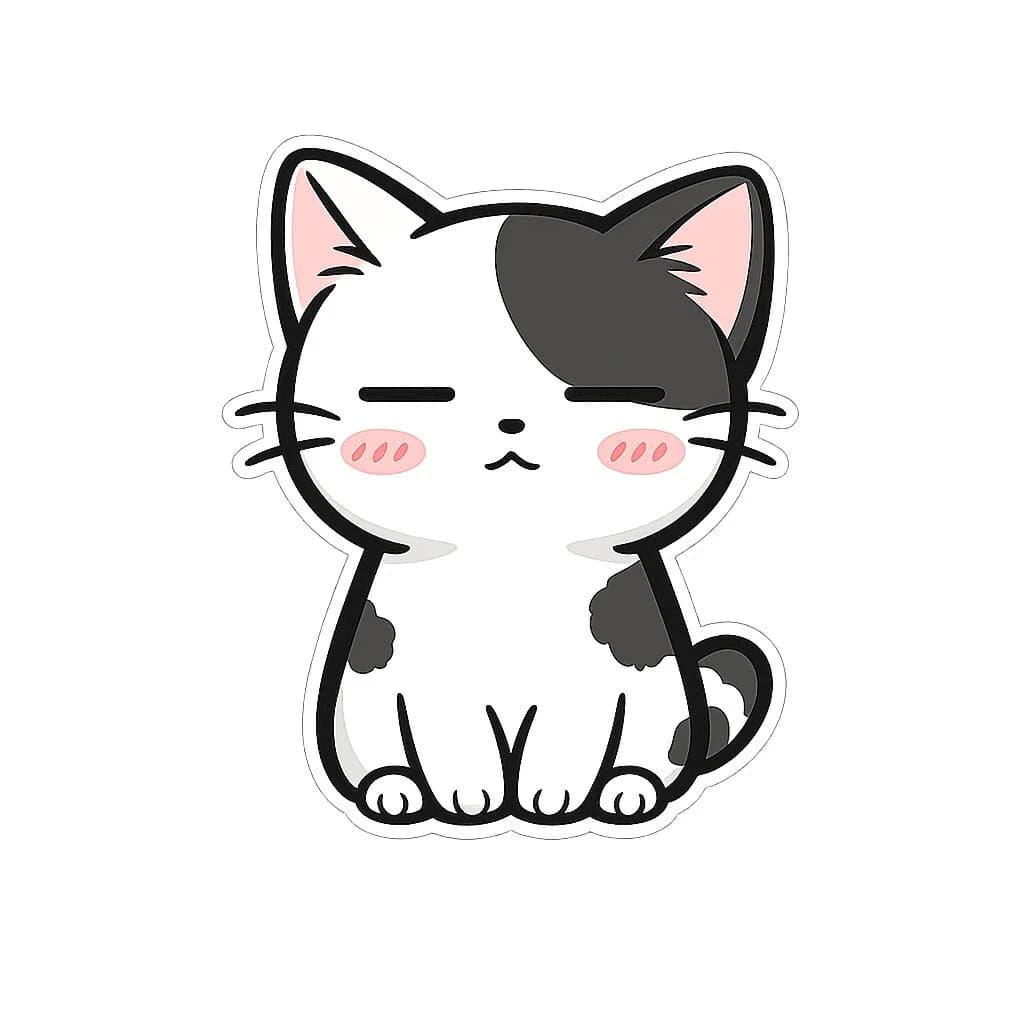
153 wordsCreate a cute kawaii sticker illustration of a sitting chibi cat on a plain white background. The cat is mostly white with {argument name="patch color" default="black"} markings: one large rounded patch covering the viewer-right side of the head and ear, small dark patches on both sides of the body, and a dark curled tail on the viewer-right. Give it oversized triangular ears with soft pink inner ears, a tiny black oval nose, a small pouty cat mouth, three whiskers on each cheek, and closed horizontal eyes shaped like {argument name="eye shape" default="ーー"}. Add two pink blush ovals on the cheeks, each with three darker blush strokes. Use thick smooth black outlines, rounded simplified paws with visible toe lines, a white sticker die-cut border around the character, and a very subtle light gray shadow/outline outside the sticker edge. Center the cat, front-facing, symmetrical, minimal, clean vector-like anime mascot style, no text, no background objects.About this prompt
Kawaii Cat Sticker with Closed Eyes is a ready-to-use portrait prompt for GPT Image 2 on Image 2. Copy the 153 words below, paste them into the Create form, and you will get a result close to the preview above. Tweak the Portrait, Anime, Minimalist tag if you want to push it somewhere new.
Use it as a starting point, then adjust the subject, lighting, or composition to suit your idea. The credit cost stays the same whether you use it as written or customize it.
Use case
A strong starting point for Portrait
Start here when you want a portrait image inspired by Kawaii Cat Sticker with Closed Eyes. The prompt already sets the look and composition; replace the subject, product, colors, or scene details to match your project.
Easy places to tweak
- Subject Swap in your person, product, place, or object without changing the overall composition.
- Look and mood Tune the lighting, palette, camera angle, or materials so the image fits your brand.
- Final format Set the aspect ratio, background, text, or layout notes before you generate.
More prompt paths to explore
Find more GPT Image 2 prompts with a similar style, use case, or subject.
How to use it
- Step 1
Copy the prompt
Hit the Copy button above to grab the full text.
- Step 2
Open Image 2 Create
Head to the Create form and paste it in.
- Step 3
Generate
Hit Generate. Your version lands in seconds.
Make it yours
Load the prompt into the Create form with one click, then start tweaking.