Prompt
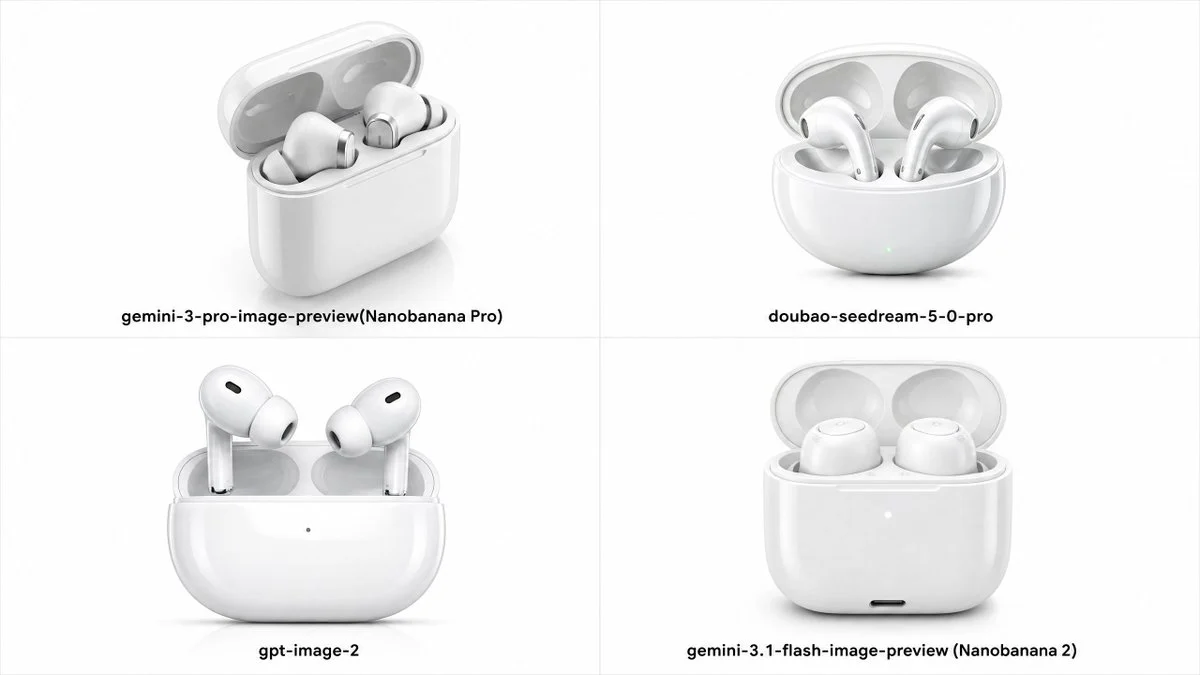
301 wordsGoal: Create a clean comparison grid showing the same e-commerce product rendered by four AI image models: a glossy white true wireless earbud charging case with the lid open, on a white studio background.
Canvas: Wide 16:9 image, divided into exactly 4 equal quadrants by thin light-gray vertical and horizontal divider lines. Minimal white background, soft shadows under each product, high-key product photography look.
Layout: Arrange exactly 4 product renders in a 2 × 2 grid, each centered in its quadrant with a bold black model label beneath it. Keep generous whitespace and align all labels near the lower part of each quadrant.
Quadrants and labels:
1. Top-left: white rounded rectangular charging case open at a three-quarter angle, two earbuds resting inside, semi-transparent lid, soft reflections. Label: “{argument name="top left label" default="gemini-3-pro-image-preview(Nanobanana Pro)"}”.
2. Top-right: rounded pill-shaped white charging case open, two AirPods-style stem earbuds inside, subtle green indicator dot on the front. Label: “{argument name="top right label" default="doubao-seedream-5-0-pro"}”.
3. Bottom-left: front-facing glossy white charging case with open lid, two stem earbuds standing upright, small black oval speaker vents on the buds, tiny dot indicator on the case front. Label: “{argument name="bottom left label" default="gpt-image-2"}”.
4. Bottom-right: front-facing glossy white charging case with open translucent lid, two rounded earbuds sitting low inside without long stems, small white indicator dot and tiny black charging port on the front. Label: “{argument name="bottom right label" default="gemini-3.1-flash-image-preview (Nanobanana 2)"}”.
Visual style: premium e-commerce main image, realistic white plastic and silicone materials, polished surfaces, subtle gray reflections, soft studio lighting, crisp product structure, shallow contact shadows, no decorative props.
Constraints: Use exactly 4 quadrants and exactly 4 labels; do not add logos, watermarks, extra text, hands, packaging, or colored backgrounds. Keep all products white and centered, with the bottom-left render corresponding to {argument name="highlighted model" default="gpt-image-2"}.About this prompt
Four-Model Earbud Product Comparison is a ready-to-use e-commerce prompt for GPT Image 2 on Image 2. Copy the 301 words below, paste them into the Create form, and you will get a result close to the preview above. Tweak the Product Ad, E-commerce, Product tag if you want to push it somewhere new.
Use it as a starting point, then adjust the subject, lighting, or composition to suit your idea. The credit cost stays the same whether you use it as written or customize it.
Use case
A strong starting point for E-commerce
Start here when you want a e-commerce image inspired by Four-Model Earbud Product Comparison. The prompt already sets the look and composition; replace the subject, product, colors, or scene details to match your project.
Easy places to tweak
- Subject Swap in your person, product, place, or object without changing the overall composition.
- Look and mood Tune the lighting, palette, camera angle, or materials so the image fits your brand.
- Final format Set the aspect ratio, background, text, or layout notes before you generate.
More prompt paths to explore
Find more GPT Image 2 prompts with a similar style, use case, or subject.
How to use it
- Step 1
Copy the prompt
Hit the Copy button above to grab the full text.
- Step 2
Open Image 2 Create
Head to the Create form and paste it in.
- Step 3
Generate
Hit Generate. Your version lands in seconds.
Make it yours
Load the prompt into the Create form with one click, then start tweaking.