Prompt
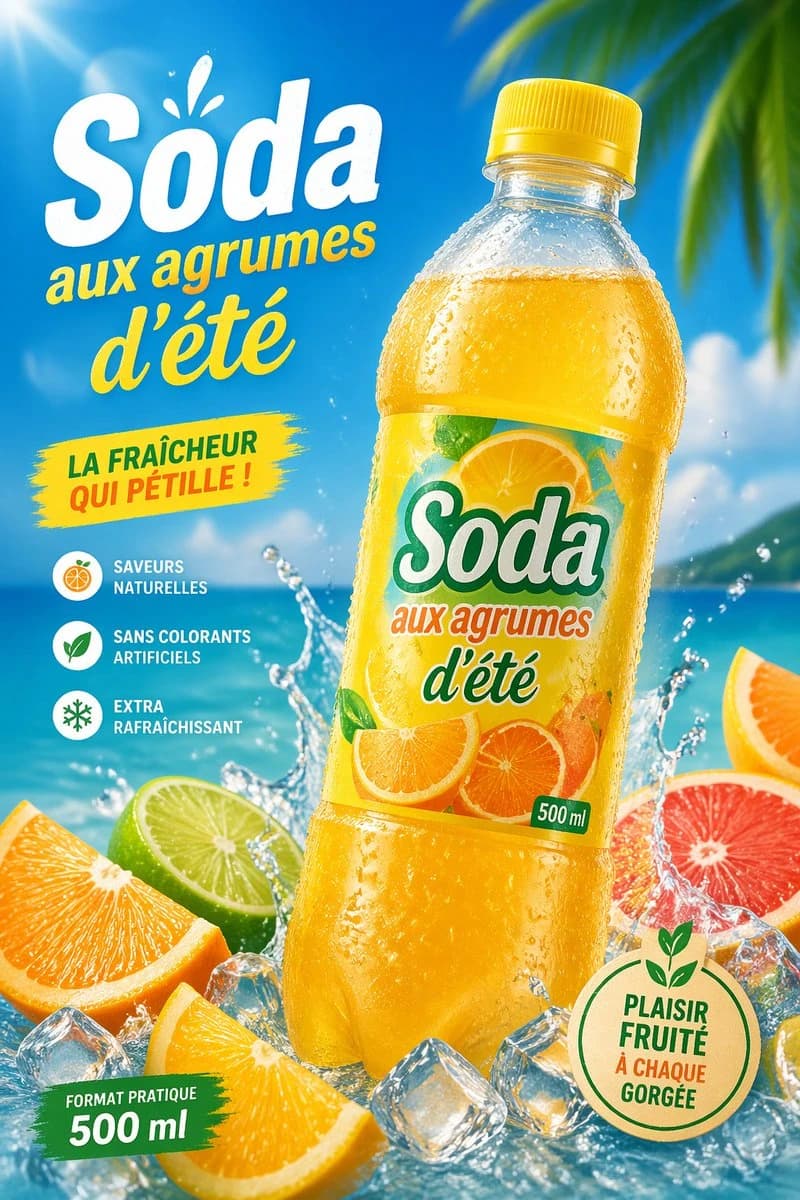
285 wordsCreate a vibrant tropical commercial poster for a citrus soda bottle, in a bright summer advertising style. Show a single large plastic bottle of {argument name="product name" default="Soda"} centered slightly to the right, tilted a little left, with a yellow cap and transparent bottle covered in cold condensation droplets, filled with glowing golden-orange soda. The label should feature sliced oranges and citrus artwork with the brand text "{argument name="product name" default="Soda"}", the phrase "aux agrumes d'été", and a small green "500 ml" mark. Use a sunny beach background with vivid blue sky, turquoise ocean, soft clouds, and blurred tropical palm leaves entering from the upper right corner. Add dramatic water splashes around the base of the bottle, scattered clear ice cubes, and 5 visible citrus pieces in the foreground: 2 orange wedges, 1 lime half, 1 grapefruit half, and 1 partial orange slice at the far right edge. Place large French promotional text on the left: a huge white headline "{argument name="headline text" default="Soda"}" with a small splash accent above it, then yellow script text "aux agrumes d'été" underneath. Add a yellow paint-stroke badge at mid-left with the text "LA FRAÎCHEUR QUI PÉTILLE !". Add a vertical feature list on the lower left with 3 round icons and French captions: "SAVEURS NATURELLES", "SANS COLORANTS ARTIFICIELS", and "EXTRA RAFRAÎCHISSANT". Add a green brushstroke banner at the bottom left reading "FORMAT PRATIQUE 500 ml". Add a round beige eco-style seal at the bottom right with green outline and leaf motif, containing the text "{argument name="seal text" default="PLAISIR FRUITÉ À CHAQUE GORGÉE"}". Lighting should be glossy and high-energy with strong sun flare from the upper left, saturated citrus colors, crisp packaging detail, realistic droplets, and polished supermarket-ad realism.About this prompt
E-commerce Main Image - Tropical Citrus Soda Ad Poster is a ready-to-use e-commerce prompt for GPT Image 2 on Image 2. Copy the 285 words below, paste them into the Create form, and you will get a result close to the preview above. Tweak the Product Ad, E-commerce, Product tag if you want to push it somewhere new.
Use it as a starting point, then adjust the subject, lighting, or composition to suit your idea. The credit cost stays the same whether you use it as written or customize it.
Use case
A strong starting point for E-commerce
Start here when you want a e-commerce image inspired by E-commerce Main Image - Tropical Citrus Soda Ad Poster. The prompt already sets the look and composition; replace the subject, product, colors, or scene details to match your project.
Easy places to tweak
- Subject Swap in your person, product, place, or object without changing the overall composition.
- Look and mood Tune the lighting, palette, camera angle, or materials so the image fits your brand.
- Final format Set the aspect ratio, background, text, or layout notes before you generate.
More prompt paths to explore
Find more GPT Image 2 prompts with a similar style, use case, or subject.
How to use it
- Step 1
Copy the prompt
Hit the Copy button above to grab the full text.
- Step 2
Open Image 2 Create
Head to the Create form and paste it in.
- Step 3
Generate
Hit Generate. Your version lands in seconds.
Make it yours
Load the prompt into the Create form with one click, then start tweaking.