Prompt
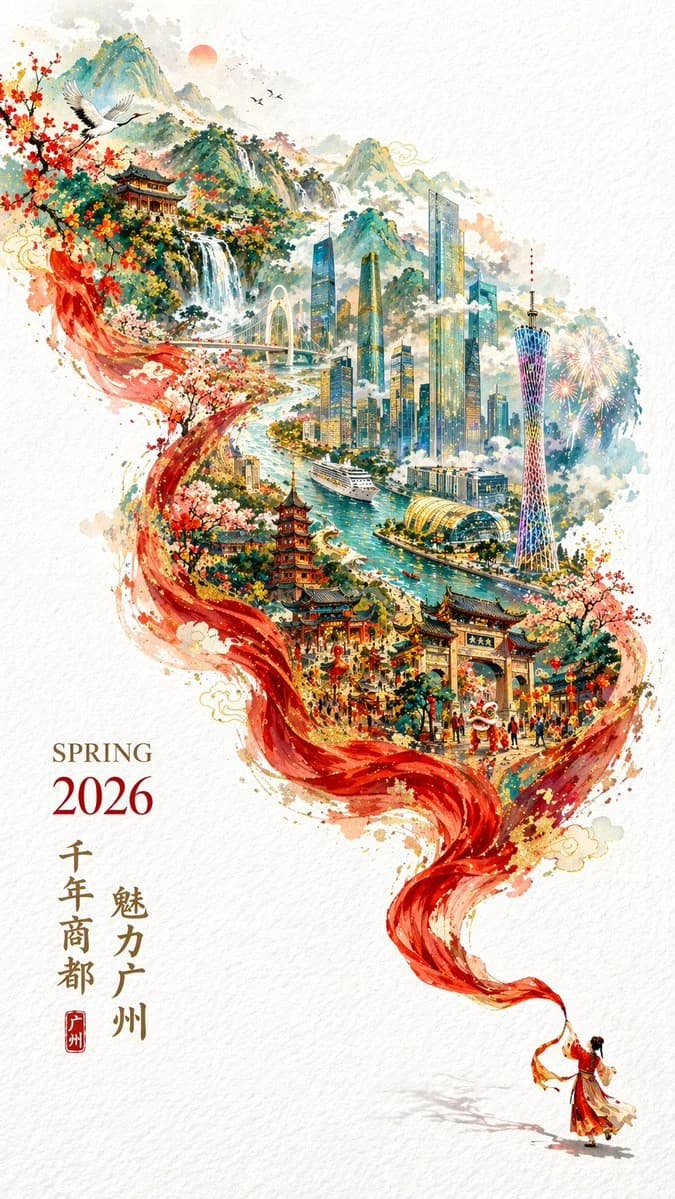
92 words{argument name="event" default="Spring Festival 2026"} {argument name="city" default="Guangzhou"} city promo poster, vertical 9:16, festive yet elegant. Double exposure with S-curve flowing composition on a pure white textured background. Bottom-right corner: a miniature figure in traditional Chinese attire swings a long red silk ribbon that morphs into mountain ridges and river currents, revealing a layered Guangzhou panorama inside, including Canton Tower, Zhujiang New Town skyline, Pearl River with cruise ships, ancient architecture, and Baiyun Mountain. Bottom-left typography: "SPRING 2026" horizontal with a vertical line of Chinese characters reading "Millennial Trade City, Charming Guangzhou."About this prompt
Double Exposure City Promo Poster is a ready-to-use infographic prompt for GPT Image 2 on Image 2. Copy the 92 words below, paste them into the Create form, and you will get a result close to the preview above. Tweak the Infographic, Poster, Travel tag if you want to push it somewhere new.
Use it as a starting point, then adjust the subject, lighting, or composition to suit your idea. The credit cost stays the same whether you use it as written or customize it.
Use case
A strong starting point for Infographic
Start here when you want a infographic image inspired by Double Exposure City Promo Poster. The prompt already sets the look and composition; replace the subject, product, colors, or scene details to match your project.
Easy places to tweak
- Subject Swap in your person, product, place, or object without changing the overall composition.
- Look and mood Tune the lighting, palette, camera angle, or materials so the image fits your brand.
- Final format Set the aspect ratio, background, text, or layout notes before you generate.
More prompt paths to explore
Find more GPT Image 2 prompts with a similar style, use case, or subject.
How to use it
- Step 1
Copy the prompt
Hit the Copy button above to grab the full text.
- Step 2
Open Image 2 Create
Head to the Create form and paste it in.
- Step 3
Generate
Hit Generate. Your version lands in seconds.
Make it yours
Load the prompt into the Create form with one click, then start tweaking.