Prompt
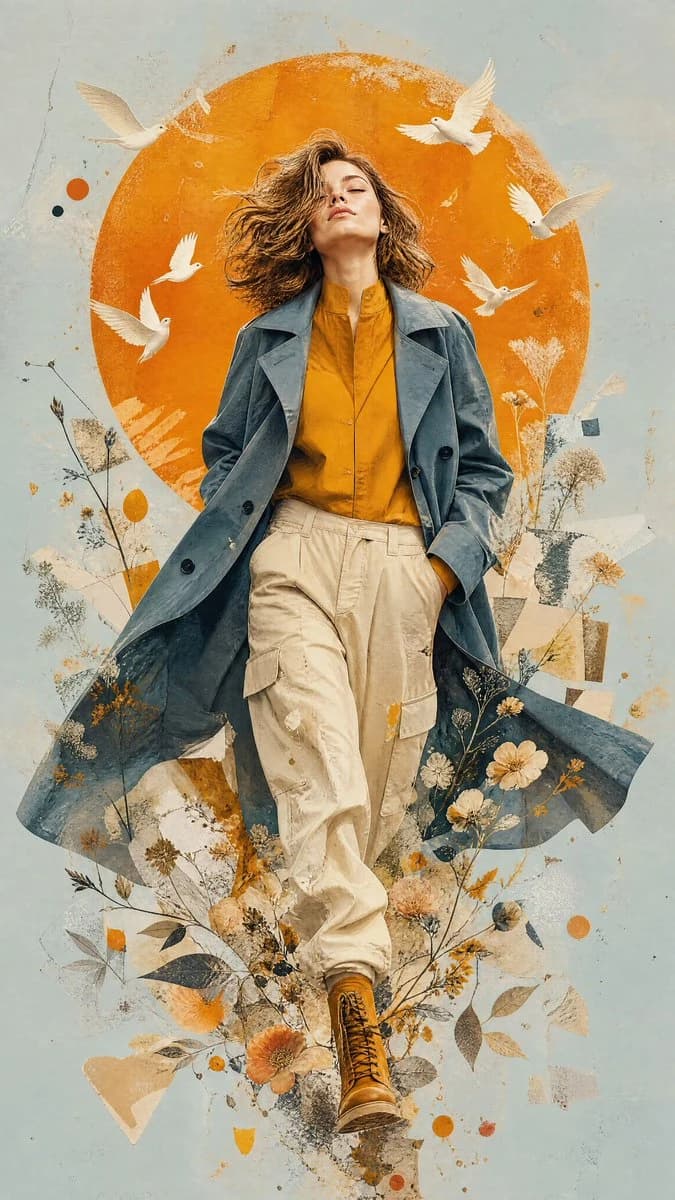
160 wordsA premium contemporary mixed-media editorial illustration of a woman as the attached image, walking confidently forward, symbolizing freedom, transformation, and inner awakening. The subject is captured in a dynamic fashion-editorial stride with one leg crossing naturally in front of the other. Her head is tilted upward toward the sky with closed eyes and a peaceful expression, embracing hope and limitless possibilities.
The subject wears an {argument name="outfit" default="oversized muted slate-blue trench coat layered over a warm golden-mustard button-up shirt with a high collar, loose cream-beige cargo trousers with soft natural folds, and rugged mustard leather combat boots"}. The flowing coat creates elegant movement while the clothing maintains realistic fabric texture and cinematic depth, creating a balance of strength and effortless femininity.
Behind the figure sits a {argument name="background element" default="large vibrant burnt-orange circular sun"}, perfectly centered, occupying nearly two-thirds of the composition and acting as the dominant graphic element.
The background is a {argument name="background color" default="smooth minimalist pale blue"}...About this prompt
Contemporary Editorial Fashion Illustration is a ready-to-use ad creative prompt for GPT Image 2 on Image 2. Copy the 160 words below, paste them into the Create form, and you will get a result close to the preview above. Tweak the Product Ad, Ad Creative, Fashion tag if you want to push it somewhere new.
Use it as a starting point, then adjust the subject, lighting, or composition to suit your idea. The credit cost stays the same whether you use it as written or customize it.
Use case
A strong starting point for Ad Creative
Start here when you want a ad creative image inspired by Contemporary Editorial Fashion Illustration. The prompt already sets the look and composition; replace the subject, product, colors, or scene details to match your project.
Easy places to tweak
- Subject Swap in your person, product, place, or object without changing the overall composition.
- Look and mood Tune the lighting, palette, camera angle, or materials so the image fits your brand.
- Final format Set the aspect ratio, background, text, or layout notes before you generate.
More prompt paths to explore
Find more GPT Image 2 prompts with a similar style, use case, or subject.
How to use it
- Step 1
Copy the prompt
Hit the Copy button above to grab the full text.
- Step 2
Open Image 2 Create
Head to the Create form and paste it in.
- Step 3
Generate
Hit Generate. Your version lands in seconds.
Make it yours
Load the prompt into the Create form with one click, then start tweaking.