Prompt
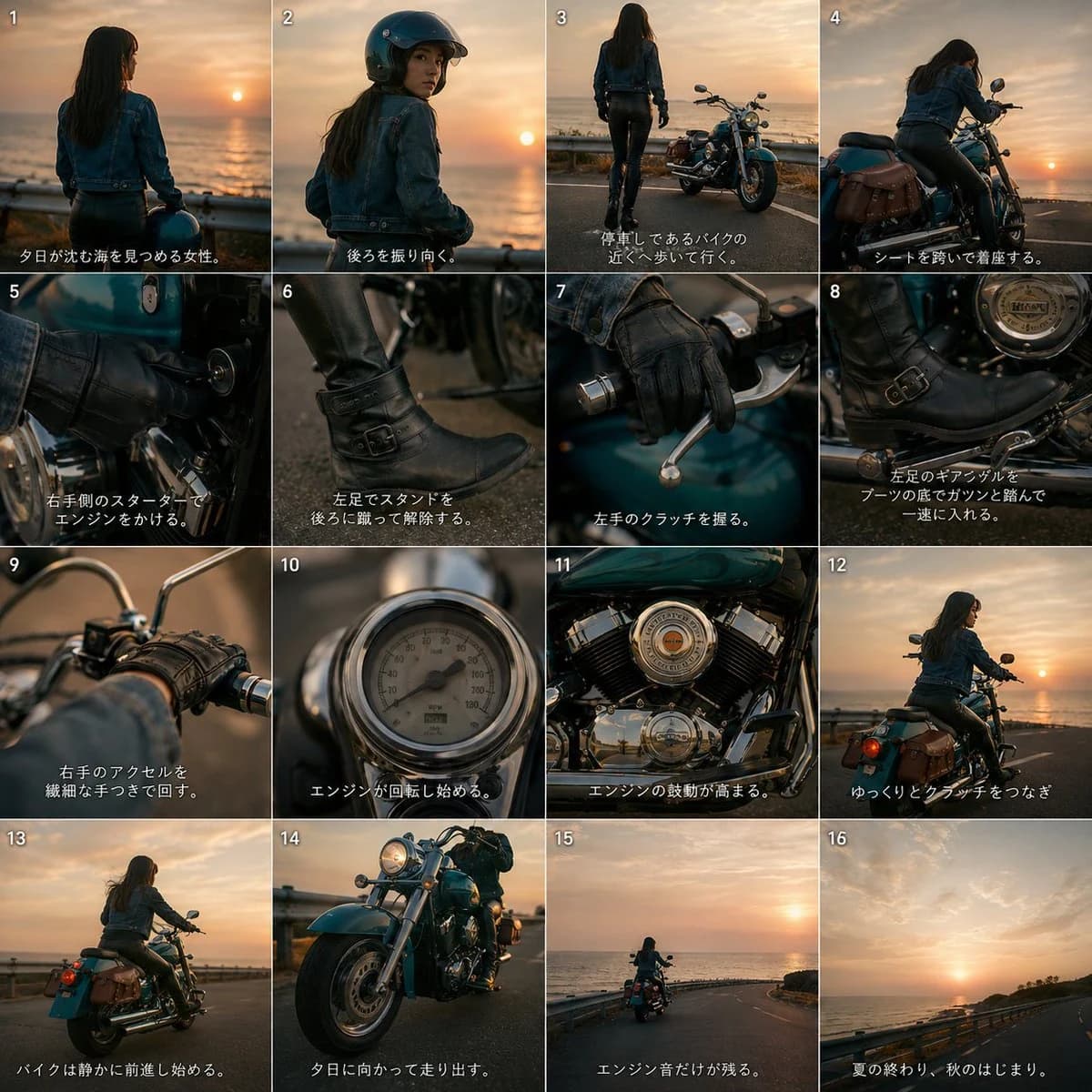
435 wordsUsing REFERENCE_0 as the motorcycle design reference, create a cinematic 4x4 storyboard contact sheet for a short motorcycle video. Preserve the bike’s distinctive turquoise body color, chrome cruiser parts, brown leather saddlebags, black seat, and overall proportions, but place it in a seaside sunset riding scene with a female rider.
Goal: Make a 16-panel visual storyboard showing the rider approaching, starting, operating, and riding the motorcycle, with quick-cut close-ups inspired by a stylish action-film assembly sequence.
Canvas and layout: Square image divided into exactly 16 equal panels in a 4 columns x 4 rows grid. Add small white panel numbers 1–16 in the top-left corner of each panel. Add short Japanese subtitle text along the bottom of each panel in white, with a subtle dark shadow for readability.
Scene and character: Add {argument name="rider description" default="a woman with long dark hair wearing a denim jacket, black leather pants, black boots, and black gloves"}. Set the location to {argument name="setting" default="a coastal road beside the ocean at sunset"}, with warm orange evening light, sea horizon, guardrails, and cinematic shallow depth of field.
Panel sequence: Use exactly these 16 shots:
1. Rear view of the woman looking at the sinking sun over the ocean.
2. She turns back over her shoulder, now wearing a black helmet.
3. Wide shot of her walking toward the parked motorcycle near the guardrail.
4. She mounts the motorcycle and settles onto the seat.
5. Close-up of her gloved right hand turning the starter key on the bike.
6. Close-up of her left boot kicking up the side stand.
7. Close-up of her left gloved hand squeezing the clutch lever.
8. Close-up of her left boot pressing the gear pedal down into first gear.
9. Close-up of her right hand twisting the throttle grip.
10. Close-up of the speedometer or gauge coming alive as the engine starts.
11. Close-up of the chrome V-twin engine vibrating and rumbling.
12. Rear three-quarter shot of the motorcycle beginning to move as she eases out the clutch.
13. The bike rolls forward smoothly along the coastal road.
14. Low dramatic front three-quarter shot of the turquoise motorcycle riding toward the sunset.
15. Distant rear shot of the rider heading down the road by the sea.
16. Final scenic shot of the empty sunset coastal road, implying the ride continues.
Subtitle style: Use Japanese captions matching the storyboard action. The overall mood should be {argument name="mood" default="nostalgic, cool, cinematic, and slightly dramatic"}. Keep the motorcycle consistent with the reference in every panel where it appears. Avoid adding car pedals or unrelated vehicle controls. No logos, no watermark.About this prompt
Cinematic Motorcycle Storyboard is a ready-to-use storyboard prompt for GPT Image 2 on Image 2. Copy the 435 words below, paste them into the Create form, and you will get a result close to the preview above. Tweak the Comic, Storyboard, Vintage tag if you want to push it somewhere new.
Use it as a starting point, then adjust the subject, lighting, or composition to suit your idea. The credit cost stays the same whether you use it as written or customize it.
Use case
A strong starting point for Storyboard
Start here when you want a storyboard image inspired by Cinematic Motorcycle Storyboard. The prompt already sets the look and composition; replace the subject, product, colors, or scene details to match your project.
Easy places to tweak
- Subject Swap in your person, product, place, or object without changing the overall composition.
- Look and mood Tune the lighting, palette, camera angle, or materials so the image fits your brand.
- Final format Set the aspect ratio, background, text, or layout notes before you generate.
More prompt paths to explore
Find more GPT Image 2 prompts with a similar style, use case, or subject.
How to use it
- Step 1
Copy the prompt
Hit the Copy button above to grab the full text.
- Step 2
Open Image 2 Create
Head to the Create form and paste it in.
- Step 3
Generate
Hit Generate. Your version lands in seconds.
Make it yours
Load the prompt into the Create form with one click, then start tweaking.