Prompt
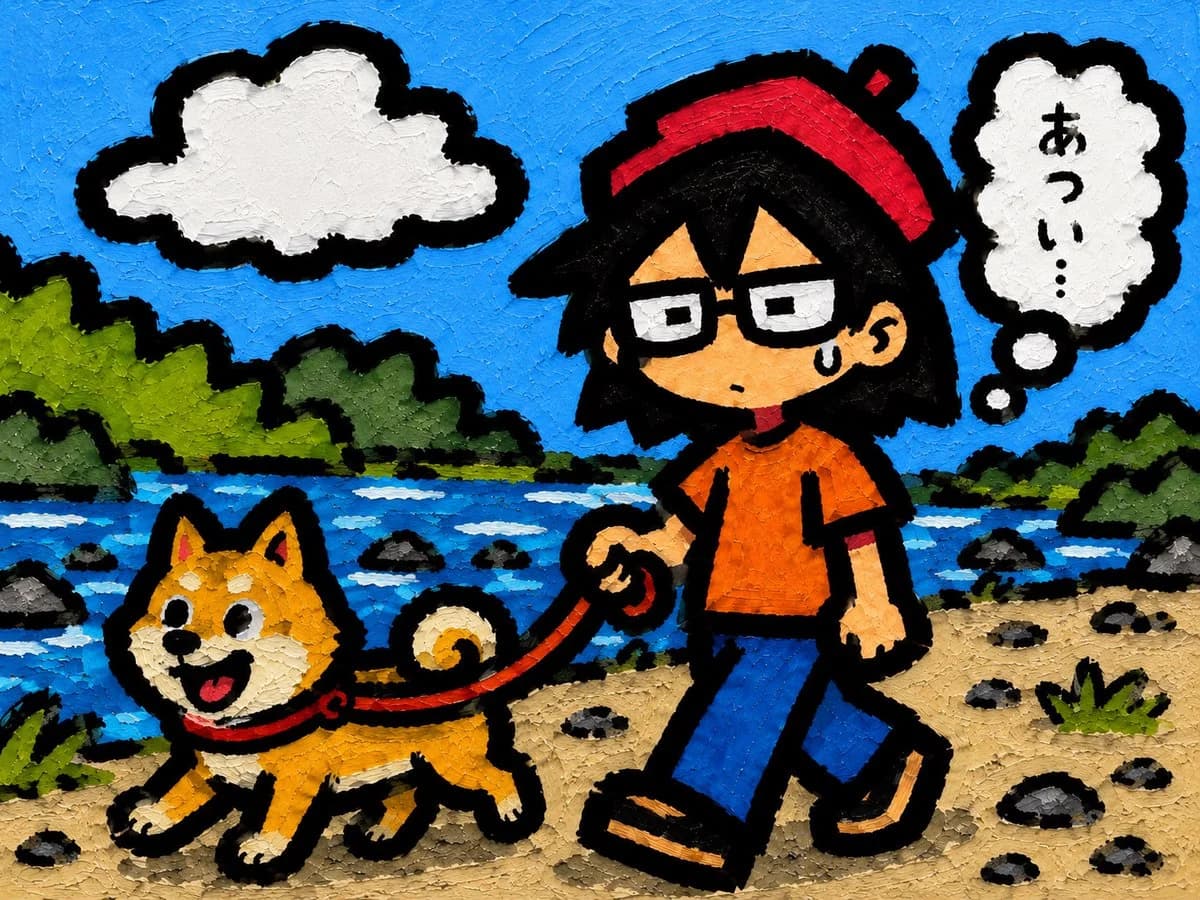
194 wordsUsing the provided reference image as the character base, regenerate the same character in a new outdoor scene while keeping their recognizable design, outfit, thick black outlines, and textured hand-painted/cartoon look. Change the pose to walking forward, with one hand holding a red leash, and add a small sweat-drop expression to show awkwardness or hesitation.
Add a cute Shiba Inu dog walking beside the character on the leash: orange fur, curled tail, red collar, happy open-mouth expression, thick black outline, matching painted texture.
Set the scene on a rocky riverbank path with a blue river running horizontally through the middle ground, scattered rocks, green bushes/trees along both sides, a bright blue sky, and exactly 1 large white cloud in the upper left. Add exactly 1 white thought bubble in the upper right connected by 2 small bubble dots, containing the Japanese text {argument name="thought bubble text" default="あつい…"} in black vertical lettering.
Style: make the whole image look like a bold children’s illustration painted with thick impasto acrylic or oil-paint texture, visible brush strokes, saturated colors, chunky black outlines, playful proportions, and a square-ish landscape composition. Avoid photorealism, gradients, thin line art, or extra text.About this prompt
Character Walking Dog Scene is a ready-to-use storyboard prompt for GPT Image 2 on Image 2. Copy the 194 words below, paste them into the Create form, and you will get a result close to the preview above. Tweak the Storyboard, Fashion, Sports tag if you want to push it somewhere new.
Use it as a starting point, then adjust the subject, lighting, or composition to suit your idea. The credit cost stays the same whether you use it as written or customize it.
Use case
A strong starting point for Storyboard
Start here when you want a storyboard image inspired by Character Walking Dog Scene. The prompt already sets the look and composition; replace the subject, product, colors, or scene details to match your project.
Easy places to tweak
- Subject Swap in your person, product, place, or object without changing the overall composition.
- Look and mood Tune the lighting, palette, camera angle, or materials so the image fits your brand.
- Final format Set the aspect ratio, background, text, or layout notes before you generate.
More prompt paths to explore
Find more GPT Image 2 prompts with a similar style, use case, or subject.
How to use it
- Step 1
Copy the prompt
Hit the Copy button above to grab the full text.
- Step 2
Open Image 2 Create
Head to the Create form and paste it in.
- Step 3
Generate
Hit Generate. Your version lands in seconds.
Make it yours
Load the prompt into the Create form with one click, then start tweaking.