Prompt
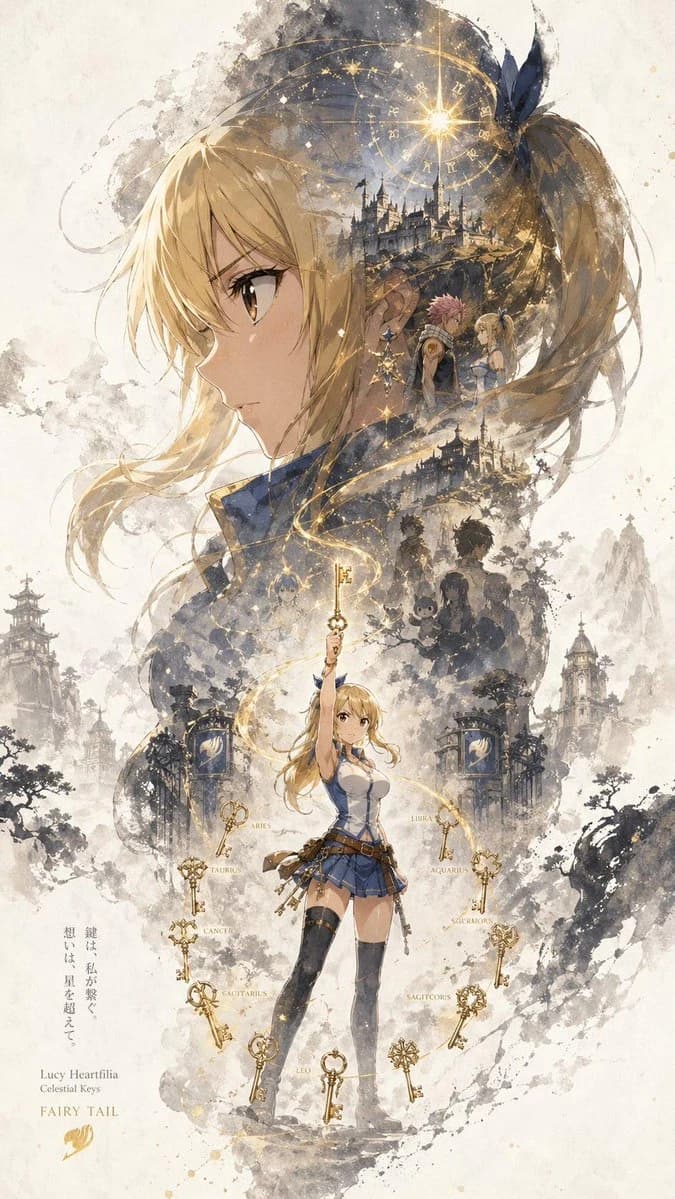
141 wordsA character promotional poster titled “INPUT NAME,” designed in a unified vertical key visual composition (9:16). The upper half features the most recognizable element of the character as a dominant oversized visual silhouette. The middle to lower section contains the full character as a secondary subject. Inside the large silhouette and around the character, use a double-exposure and collage-style narrative composition with scenes, symbolic imagery, supporting elements, and environmental details blended into mist, ink wash, and negative space. The left and right sides include complementary secondary elements to create narrative tension and spatial variation. A continuous flowing visual line runs from top to bottom, connecting the main character, internal collage, and the large upper silhouette. Preserve large areas of negative space with ink diffusion, soft blurring, and fragmented transitions inspired by Eastern aesthetics. The style is cohesive, refined, restrained, and poster-worthy.
About this prompt
Character key visual poster with silhouette collage is a ready-to-use character design prompt for GPT Image 2 on Image 2. Copy the 141 words below, paste them into the Create form, and you will get a result close to the preview above. Tweak the Character, Watercolor, Minimalist tag if you want to push it somewhere new.
Use it as a starting point, then adjust the subject, lighting, or composition to suit your idea. The credit cost stays the same whether you use it as written or customize it.
Use case
A strong starting point for Character Design
Start here when you want a character design image inspired by Character key visual poster with silhouette collage. The prompt already sets the look and composition; replace the subject, product, colors, or scene details to match your project.
Easy places to tweak
- Subject Swap in your person, product, place, or object without changing the overall composition.
- Look and mood Tune the lighting, palette, camera angle, or materials so the image fits your brand.
- Final format Set the aspect ratio, background, text, or layout notes before you generate.
More prompt paths to explore
Find more GPT Image 2 prompts with a similar style, use case, or subject.
How to use it
- Step 1
Copy the prompt
Hit the Copy button above to grab the full text.
- Step 2
Open Image 2 Create
Head to the Create form and paste it in.
- Step 3
Generate
Hit Generate. Your version lands in seconds.
Make it yours
Load the prompt into the Create form with one click, then start tweaking.