Prompt
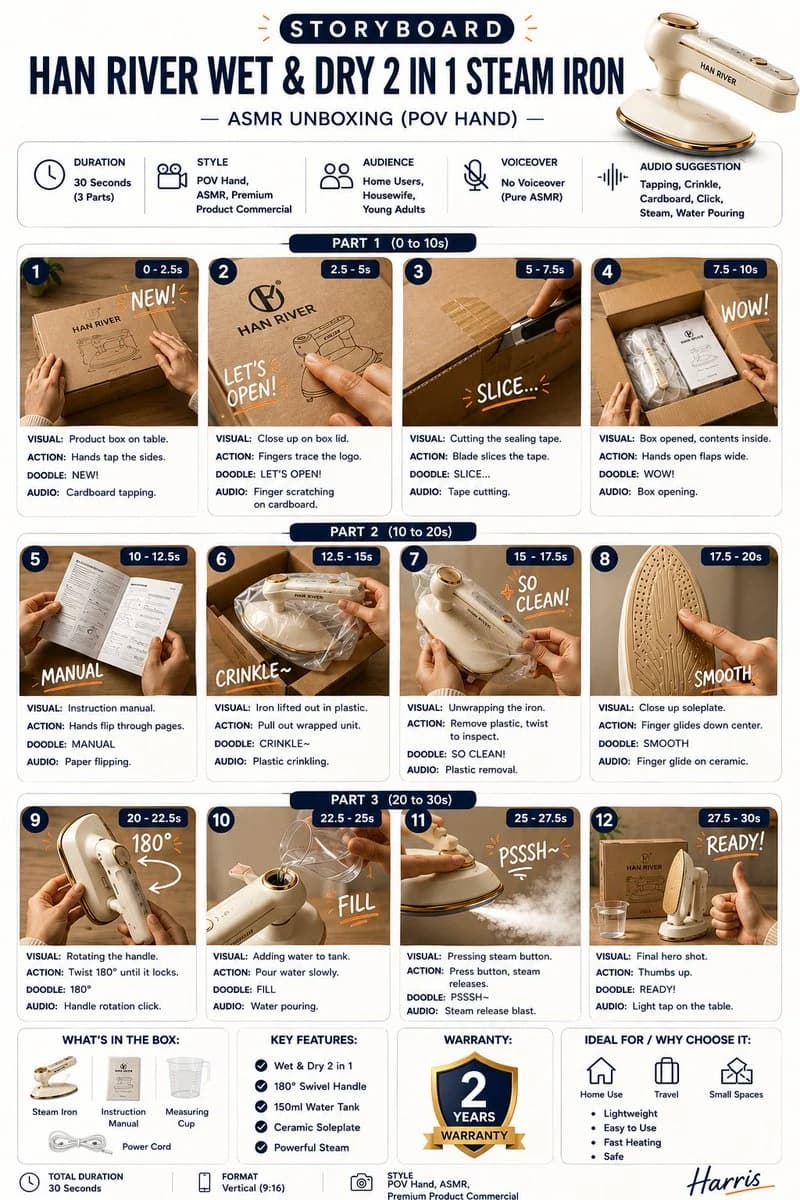
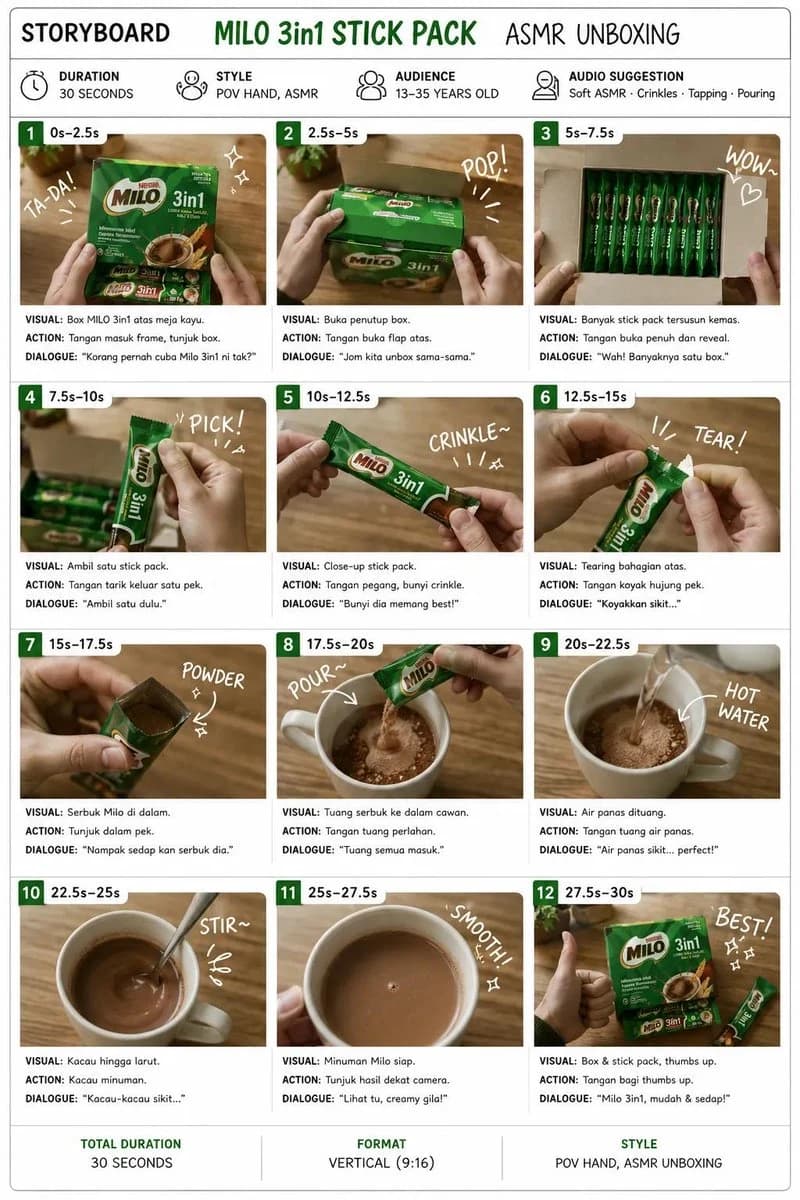
396 wordsCreate a clean, premium storyboard infographic for a product ASMR unboxing video. Design specifications: White background with a modern, minimalist layout. Title at the top: STORYBOARD. Product name in bold green (replace with: {argument name="product name" default="[PRODUCT NAME]"}). Subtitle: ASMR UNBOXING. Include four information boxes below the title: Duration: 30 Seconds, Style: POV Hands, ASMR, Audience: {argument name="audience" default="18–35 years old"}, Audio Suggestion: Soft ASMR • Crinkles • Tapping • Pouring. Create {argument name="number of panels" default="12"} storyboard panels arranged in a 3-column × 4-row grid. Each panel should contain: A numbered green badge (1–12), Timestamp (0–2.5s, 2.5–5s, etc.), A realistic cinematic image showing the scene, Handwritten white doodle text like: TA-DA! POP! WOW! PICK! CRINKLE~ TEAR! POUR~ HOT WATER STIR~ SMOOTH! BEST! Three text sections below every image: VISUAL: ACTION: DIALOGUE: Use realistic product photography, warm wooden table, soft natural lighting, shallow depth of field, POV hands only (no face visible), premium commercial advertising style. Storyboard sequence: 1 (0–2.5s) Visual: Product box on wooden table. Action: Hands enter frame and point to the box. Dialogue: "Have you tried this before?" 2 (2.5–5s) Visual: Opening the box. Action: Lift the top flap slowly. Dialogue: "Let's unbox it together." 3 (5–7.5s) Visual: Multiple individual sachets neatly arranged. Action: Fully reveal the inside. Dialogue: "Wow, look how many!" 4 (7.5–10s) Visual: Pick up one sachet. Action: Remove a single stick pack. Dialogue: "Let's start with one." 5 (10–12.5s) Visual: Close-up of sachet. Action: Hold and gently crinkle it. Dialogue: "That crinkle sound is satisfying." 6 (12.5–15s) Visual: Tear open the top. Action: Slow ASMR tearing. Dialogue: "Just a small tear." 7 (15–17.5s) Visual: Powder visible inside. Action: Show the powder close-up. Dialogue: "Looks delicious." 8 (17.5–20s) Visual: Pour powder into mug. Action: Slow pouring. Dialogue: "Pour everything in." 9 (20–22.5s) Visual: Hot water being poured. Action: Steam visible. Dialogue: "Add hot water." 10 (22.5–25s) Visual: Stir drink. Action: Slow circular stirring. Dialogue: "Mix it well." 11 (25–27.5s) Visual: Finished drink. Action: Show creamy texture from above. Dialogue: "Looks smooth and creamy." 12 (27.5–30s) Visual: Product box beside finished drink with thumbs up. Action: Hand gives thumbs up. Dialogue: "Easy, delicious, and ready!" Footer: Total Duration: 30 Seconds, Format: Vertical (9:16), Style: POV Hands, ASMR Unboxing. Typography should resemble a professional creative agency storyboard, with clean spacing, green accents, rounded panel borders, and high-end presentation suitable for client pitches.About this prompt
ASMR Unboxing Storyboard Infographic is a ready-to-use infographic prompt for GPT Image 2 on Image 2. Copy the 396 words below, paste them into the Create form, and you will get a result close to the preview above. Tweak the Product Ad, Infographic, Storyboard tag if you want to push it somewhere new.
Use it as a starting point, then adjust the subject, lighting, or composition to suit your idea. The credit cost stays the same whether you use it as written or customize it.
Use case
A strong starting point for Infographic
Start here when you want a infographic image inspired by ASMR Unboxing Storyboard Infographic. The prompt already sets the look and composition; replace the subject, product, colors, or scene details to match your project.
Easy places to tweak
- Subject Swap in your person, product, place, or object without changing the overall composition.
- Look and mood Tune the lighting, palette, camera angle, or materials so the image fits your brand.
- Final format Set the aspect ratio, background, text, or layout notes before you generate.
More prompt paths to explore
Find more GPT Image 2 prompts with a similar style, use case, or subject.
How to use it
- Step 1
Copy the prompt
Hit the Copy button above to grab the full text.
- Step 2
Open Image 2 Create
Head to the Create form and paste it in.
- Step 3
Generate
Hit Generate. Your version lands in seconds.
Make it yours
Load the prompt into the Create form with one click, then start tweaking.