Prompt
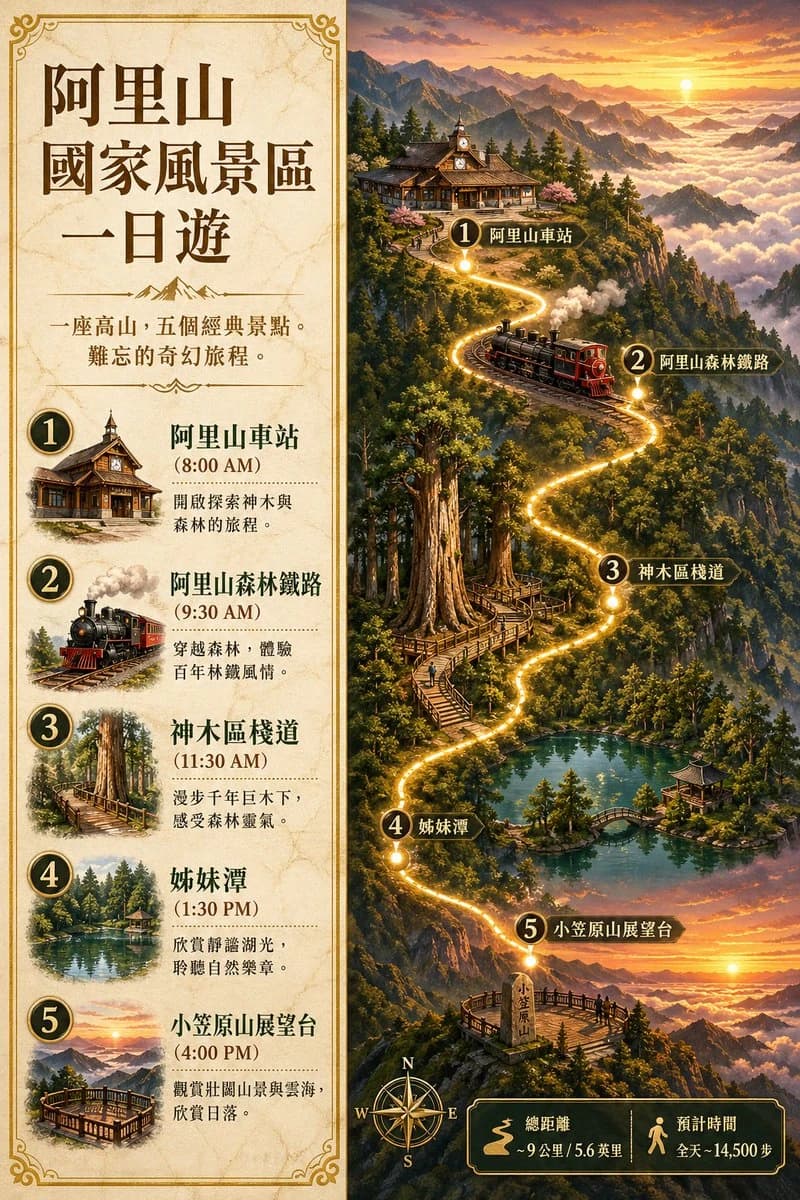
433 wordsCreate a vintage illustrated travel poster in traditional Chinese for {argument name="destination name" default="阿里山國家風景區"}, designed as a one-day itinerary infographic with a split vertical layout. The left panel is a parchment-textured itinerary card in warm beige with ornate gold Art Nouveau borders and dark brown typography, and the right panel is a dramatic painted fantasy-realism map scene of a mountain journey at sunrise and sunset tones. At the top of the left panel, large headline text reads {argument name="headline text" default="阿里山國家風景區一日遊"}. Beneath it, include a short centered tagline in traditional Chinese: 「一座高山,五個經典景點。難忘的奇幻旅程。」 with a small decorative mountain divider. The left panel must contain exactly 5 numbered itinerary stops stacked vertically, each with a circular black-and-gold number badge, a small vignette illustration, a bold location name, a time in parentheses, and a short Chinese description. The 5 stops are: 1. 「阿里山車站」 at 「(8:00 AM)」 with a wooden mountain railway station illustration and description 「開啟探索神木與森林的旅程。」 2. 「阿里山森林鐵路」 at 「(9:30 AM)」 with a red-and-black steam train illustration and description 「穿越森林,體驗百年林鐵風情。」 3. 「神木區棧道」 at 「(11:30 AM)」 with giant cedar trees and elevated wooden boardwalk illustration and description 「漫步千年巨木下,感受森林靈氣。」 4. 「姊妹潭」 at 「(1:30 PM)」 with a tranquil forest lake and pavilion illustration and description 「欣賞靜謐湖光,聆聽自然樂章。」 5. 「小笠原山展望台」 at 「(4:00 PM)」 with a wooden observation deck above clouds at sunset illustration and description 「觀賞壯闊山景與雲海,欣賞日落。」 The right panel should depict a continuous glowing golden path winding through exactly 5 numbered map markers that match the left panel labels in order, with black-and-gold marker plaques reading: 1 「阿里山車站」, 2 「阿里山森林鐵路」, 3 「神木區棧道」, 4 「姊妹潭」, 5 「小笠原山展望台」. Show stop 1 as a rustic alpine wooden station perched on a cliff among pine forests; stop 2 as a small steam locomotive traveling on a curved mountain railway with smoke drifting upward; stop 3 as towering ancient red cypress trees with a spiral and zigzag wooden walkway around the trunks; stop 4 as an emerald lake surrounded by dense forest with a small pavilion and arched bridge; stop 5 as a lookout deck on a peak above a sea of clouds, facing a glowing sunset. The environment should feature layered mountain ranges, mist-filled valleys, evergreen forests, golden-hour light, luminous cloud seas, and a romantic painterly atmosphere with rich detail. At the bottom right, add a decorative compass rose labeled N, E, S, W, plus a dark green and gold information box with exactly 2 stats in traditional Chinese: 「總距離 ~9公里 / 5.6英里」 and 「預計時間 全天 - 14,500步」. Overall style: premium tourism poster, painterly digital illustration, nostalgic national-park brochure aesthetic, highly detailed, warm sepia and gold accents, elegant composition, readable Chinese text, vertical 2:3 poster.About this prompt
Alishan One-Day Travel Poster is a ready-to-use poster prompt for GPT Image 2 on Image 2. Copy the 433 words below, paste them into the Create form, and you will get a result close to the preview above. Tweak the Infographic, Poster, Travel tag if you want to push it somewhere new.
Use it as a starting point, then adjust the subject, lighting, or composition to suit your idea. The credit cost stays the same whether you use it as written or customize it.
Use case
A strong starting point for Poster
Start here when you want a poster image inspired by Alishan One-Day Travel Poster. The prompt already sets the look and composition; replace the subject, product, colors, or scene details to match your project.
Easy places to tweak
- Subject Swap in your person, product, place, or object without changing the overall composition.
- Look and mood Tune the lighting, palette, camera angle, or materials so the image fits your brand.
- Final format Set the aspect ratio, background, text, or layout notes before you generate.
More prompt paths to explore
Find more GPT Image 2 prompts with a similar style, use case, or subject.
How to use it
- Step 1
Copy the prompt
Hit the Copy button above to grab the full text.
- Step 2
Open Image 2 Create
Head to the Create form and paste it in.
- Step 3
Generate
Hit Generate. Your version lands in seconds.
Make it yours
Load the prompt into the Create form with one click, then start tweaking.