Prompt
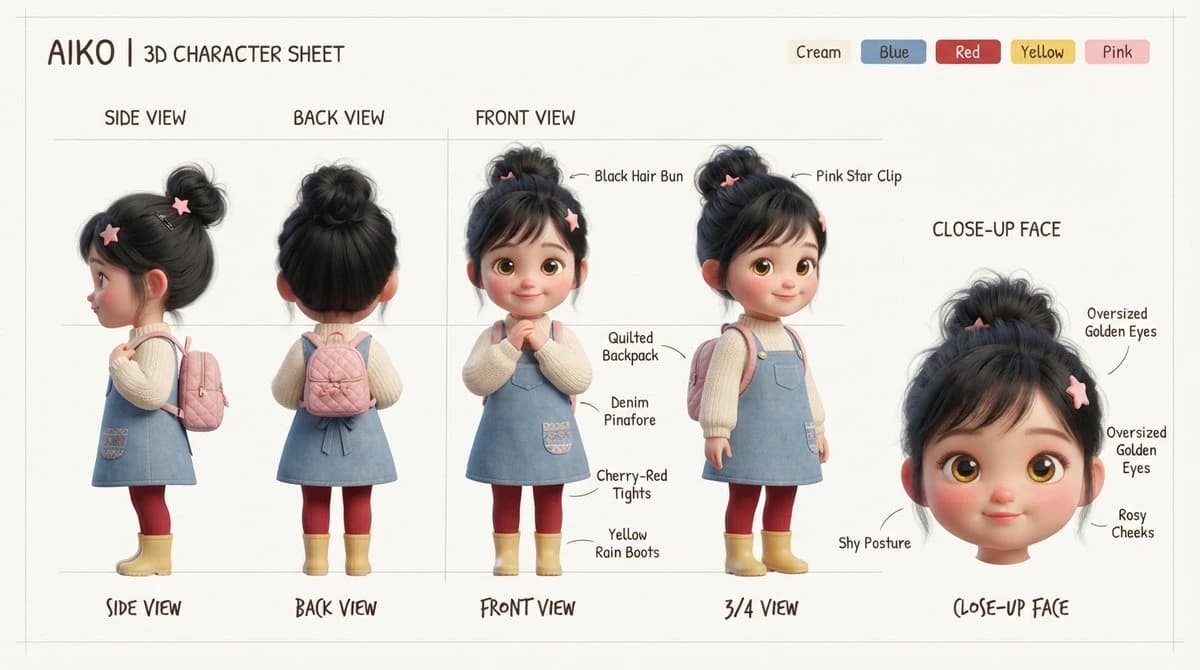
374 wordsGoal: Create a clean 3D character design sheet for a cute stylized toddler girl named {argument name="character name" default="AIKO"}, presented like a professional toy/animation reference board.
Canvas: Wide horizontal character sheet on a warm off-white background with faint grey guide lines, thin section dividers, and a subtle hand-drawn annotation feel. Use soft studio lighting, high-quality 3D render style, rounded childlike proportions, plush toy/Pixar-inspired realism, and gentle pastel colors.
Header: Top left text reads “{argument name="character name" default="AIKO"} | 3D CHARACTER SHEET”. Top right include exactly 5 small rounded color swatches labeled: Cream, Blue, Red, Yellow, Pink.
Layout: Show exactly 5 character views across the sheet: 1 side view on the far left, 1 back view left-center, 2 front-area full-body views in the middle (one straight front pose and one 3/4 pose), and 1 close-up face view on the far right. Above the full-body columns place neat uppercase labels “SIDE VIEW”, “BACK VIEW”, and “FRONT VIEW”. Along the bottom, use handwritten-style captions: “SIDE VIEW”, “BACK VIEW”, “FRONT VIEW”, “3/4 VIEW”, and “CLOSE-UP FACE”.
Subject details: The character is a shy, sweet young girl with oversized golden-brown eyes, rosy cheeks, tiny smile, small nose, rounded face, and black hair gathered into a messy high bun with side bangs. Hair accessories: pink star clips. Outfit: cream ribbed long-sleeve sweater under a light blue denim pinafore dress with a small front pocket and embroidered patch detail, cherry-red tights, yellow rain boots, and a quilted pink backpack. The far-left side view shows her profile and backpack straps; the back view clearly shows the quilted backpack and rear of the bun; the front view shows hands clasped shyly; the 3/4 view shows the backpack and outfit volume; the close-up face is a large floating head cropped at the neck.
Annotations: Add thin curved callout arrows and handwritten labels pointing to exactly 9 details: “Black Hair Bun”, “Pink Star Clip”, “Quilted Backpack”, “Denim Pinafore”, “Cherry-Red Tights”, “Yellow Rain Boots”, “Shy Posture”, “Oversized Golden Eyes”, and “Rosy Cheeks”. Keep labels legible, black or dark brown, placed around the figures without clutter.
Constraints: No extra characters, no scenery, no watermark, no logo, no photorealistic adult proportions. Maintain a tidy concept-art sheet composition with consistent scale between full-body views and a larger close-up face.About this prompt
Aiko 3D Character Sheet is a ready-to-use character design prompt for GPT Image 2 on Image 2. Copy the 374 words below, paste them into the Create form, and you will get a result close to the preview above. Tweak the Infographic, Character, Character Design tag if you want to push it somewhere new.
Use it as a starting point, then adjust the subject, lighting, or composition to suit your idea. The credit cost stays the same whether you use it as written or customize it.
Use case
A strong starting point for Character Design
Start here when you want a character design image inspired by Aiko 3D Character Sheet. The prompt already sets the look and composition; replace the subject, product, colors, or scene details to match your project.
Easy places to tweak
- Subject Swap in your person, product, place, or object without changing the overall composition.
- Look and mood Tune the lighting, palette, camera angle, or materials so the image fits your brand.
- Final format Set the aspect ratio, background, text, or layout notes before you generate.
More prompt paths to explore
Find more GPT Image 2 prompts with a similar style, use case, or subject.
How to use it
- Step 1
Copy the prompt
Hit the Copy button above to grab the full text.
- Step 2
Open Image 2 Create
Head to the Create form and paste it in.
- Step 3
Generate
Hit Generate. Your version lands in seconds.
Make it yours
Load the prompt into the Create form with one click, then start tweaking.