Prompt
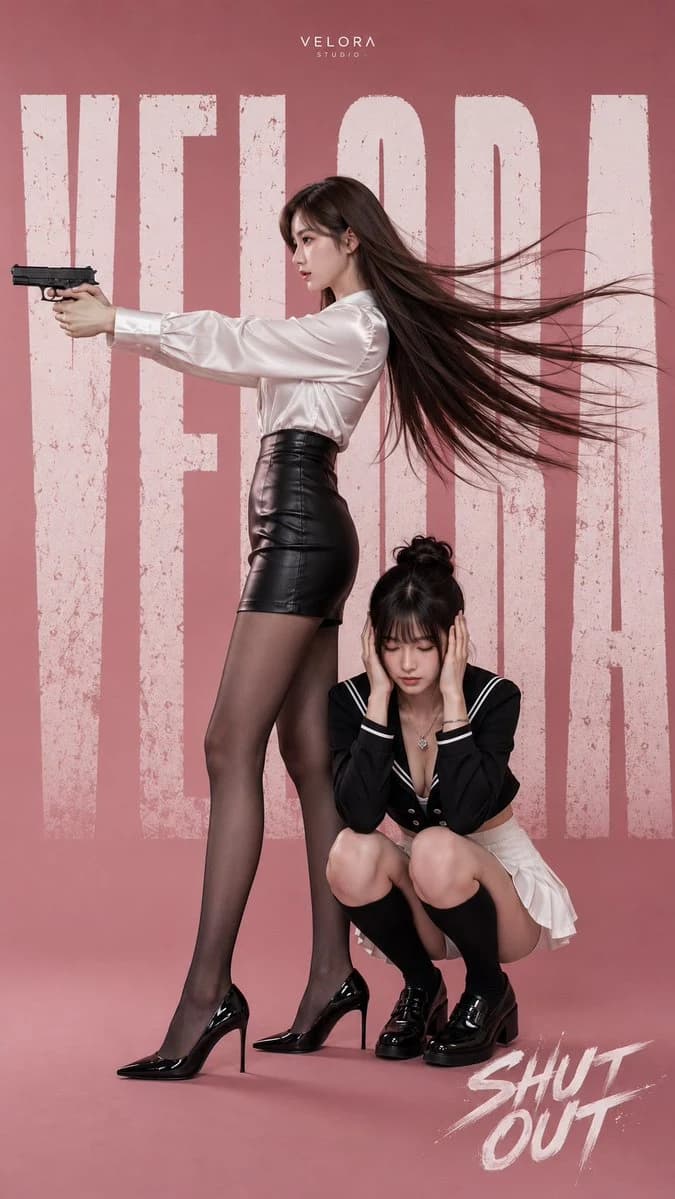
300 words{ "image_type": "ultra-realistic stylized character poster, anime-inspired 3D digital illustration", "aspect_ratio": "9:16 vertical", "resolution": "8K, highly detailed, commercial-quality", "style": { "genre": "cinematic fashion character key visual", "rendering": "photorealistic CGI with anime facial aesthetics", "mood": "confident, dramatic, elegant, slightly mysterious", "color_palette": "dusty rose, white, black, soft skin tones", "processing": "clean rendering, high micro-detail, soft contrast, premium poster finish" }, "camera": { "angle": "eye-level side perspective", "framing": "full-body composition", "lens": "50mm full-frame equivalent", "aperture": "f/4", "focus": "sharp across both characters", "depth_of_field": "moderately deep" }, "lighting": { "type": "large soft studio lighting", "setup": "front-left key light with soft fill and subtle rim light", "quality": "smooth shadows, glossy highlights on fabric and skin", "background": "solid {argument name="background color" default="dusty pink"} seamless backdrop" }, "environment": { "scene": "minimalist studio", "graphics": "large distressed white vertical typography filling the background, small 'VELORA STUDIO' logo centered near the top, stylized 'SHUT OUT' brush lettering at bottom-right" }, "subjects": [ { "role": "{argument name="standing subject" default="standing woman"}", "appearance": "young East Asian woman, slim, fair skin, long straight dark brown hair flowing dramatically backward", "expression": "calm, focused", "pose": "standing in profile facing left, arms fully extended, holding a black semi-automatic pistol with both hands, weight on right leg", "clothing": "white satin long-sleeve blouse, fitted black high-waisted leather mini skirt, sheer black pantyhose, glossy black pointed stiletto pumps" }, { "role": "{argument name="crouching subject" default="crouching woman"}", "appearance": "young East Asian woman, fair skin, dark hair in a messy bun with bangs", "expression": "eyes closed, serious", "pose": "low squat beside the standing woman's legs, both hands covering ears, head slightly lowered", "clothing": "black sailor-style cropped jacket with white piping and deep V neckline, white pleated mini skirt, black knee-high socks, black patent loafers" } ], "objects": { "weapon": "modern black semi-automatic handgun", "floor": "smooth matte studio floor matching the background" } }About this prompt
Anime Fashion Digital Illustration is a ready-to-use character design prompt for GPT Image 2 on Image 2. Copy the 300 words below, paste them into the Create form, and you will get a result close to the preview above. Tweak the Product Ad, Character, Character Design tag if you want to push it somewhere new.
Use it as a starting point, then adjust the subject, lighting, or composition to suit your idea. The credit cost stays the same whether you use it as written or customize it.
Use case
A strong starting point for Character Design
Start here when you want a character design image inspired by Anime Fashion Digital Illustration. The prompt already sets the look and composition; replace the subject, product, colors, or scene details to match your project.
Easy places to tweak
- Subject Swap in your person, product, place, or object without changing the overall composition.
- Look and mood Tune the lighting, palette, camera angle, or materials so the image fits your brand.
- Final format Set the aspect ratio, background, text, or layout notes before you generate.
More prompt paths to explore
Find more GPT Image 2 prompts with a similar style, use case, or subject.
How to use it
- Step 1
Copy the prompt
Hit the Copy button above to grab the full text.
- Step 2
Open Image 2 Create
Head to the Create form and paste it in.
- Step 3
Generate
Hit Generate. Your version lands in seconds.
Make it yours
Load the prompt into the Create form with one click, then start tweaking.