Prompt
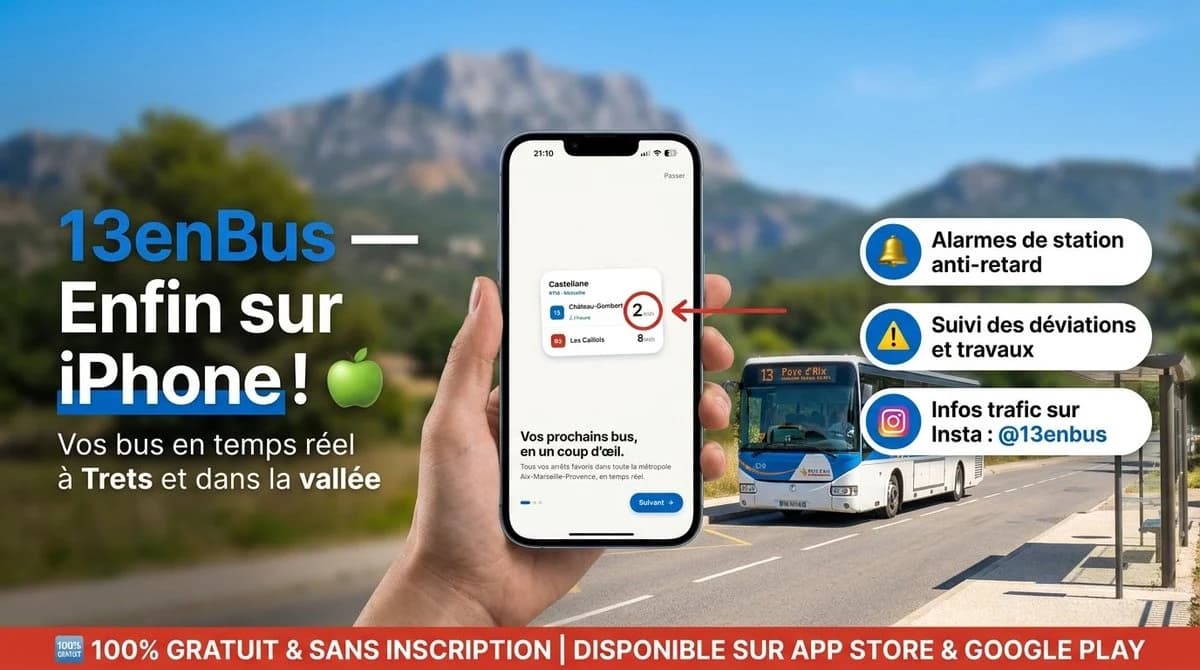
437 wordsGoal: Create a high-resolution French promotional social media banner for the public transport app {argument name="app name" default="13enBus"}, announcing its iPhone availability in a polished advertising style.
Canvas: Wide horizontal 16:9 banner, approximately 1200×675 px. Use a bright Mediterranean outdoor setting with a shallow-depth-of-field background: blue sky, blurred green valley, distant rocky mountain, and a sunny road with a bus stop shelter on the right.
Layout: On the left, place a large bold headline in French with strong contrast: “13enBus —” in bright blue followed by “Enfin sur iPhone !” in large white text, with a green apple emoji beside it. Under it, add the subtitle “Vos bus en temps réel à Trets et dans la vallée” in white. In the center foreground, show a realistic hand holding a modern black iPhone vertically. On the phone screen, display a clean app onboarding screen with a small transit card, the heading “Vos prochains bus, en un coup d'œil.”, a blue “Suivant” button, and tiny app interface details. A red arrow points from the right toward the phone’s small transit card, highlighting a circled waiting time.
Main subject details: The phone screen should include exactly 1 small transit card with exactly 3 visible bus rows: line 15 “Château-Gombert” with “2 min” emphasized in a red circle, line 15 “Auriol” with “7 min”, and line 85 “Les Caillols” with “8 min”. Behind the phone on the right, place exactly 1 realistic white-and-blue city bus driving on the road, front facing slightly toward the viewer, with route number 13 visible on its sign.
Feature callouts: On the right side, stack exactly 3 rounded white pill-shaped feature boxes with blue circular icons on the left and bold black French text. The 3 boxes are: 1) yellow bell icon, “Alarmes de station anti-retard”; 2) yellow warning triangle icon, “Suivi des déviations et travaux”; 3) Instagram-style gradient camera icon, “Infos trafic sur Insta : {argument name="instagram handle" default="@13enbus"}”.
Bottom banner: Add a full-width red strip along the bottom with a small “100% GRATUIT” badge at the far left and large white uppercase text: “100% GRATUIT & SANS INSCRIPTION | DISPONIBLE SUR APP STORE & GOOGLE PLAY”.
Visual style: Realistic HD advertising composite, crisp typography, saturated colors, strong sunlight, professional app launch campaign design. Use clean French transit-app branding with blue, white, red, and green accents. Keep the phone and text sharp while the background remains softly blurred.
Constraints: Use exactly the described 3 feature callouts, exactly 1 phone, exactly 1 hand, exactly 1 bus, exactly 1 bottom red banner, and exactly 1 green apple emoji. No extra logos, no watermark, no additional unrelated text.About this prompt
13enBus iPhone Launch Banner is a ready-to-use ad creative prompt for GPT Image 2 on Image 2. Copy the 437 words below, paste them into the Create form, and you will get a result close to the preview above. Tweak the Product Ad, Ad Creative, Social Media tag if you want to push it somewhere new.
Use it as a starting point, then adjust the subject, lighting, or composition to suit your idea. The credit cost stays the same whether you use it as written or customize it.
Use case
A strong starting point for Ad Creative
Start here when you want a ad creative image inspired by 13enBus iPhone Launch Banner. The prompt already sets the look and composition; replace the subject, product, colors, or scene details to match your project.
Easy places to tweak
- Subject Swap in your person, product, place, or object without changing the overall composition.
- Look and mood Tune the lighting, palette, camera angle, or materials so the image fits your brand.
- Final format Set the aspect ratio, background, text, or layout notes before you generate.
More prompt paths to explore
Find more GPT Image 2 prompts with a similar style, use case, or subject.
How to use it
- Step 1
Copy the prompt
Hit the Copy button above to grab the full text.
- Step 2
Open Image 2 Create
Head to the Create form and paste it in.
- Step 3
Generate
Hit Generate. Your version lands in seconds.
Make it yours
Load the prompt into the Create form with one click, then start tweaking.