Prompt
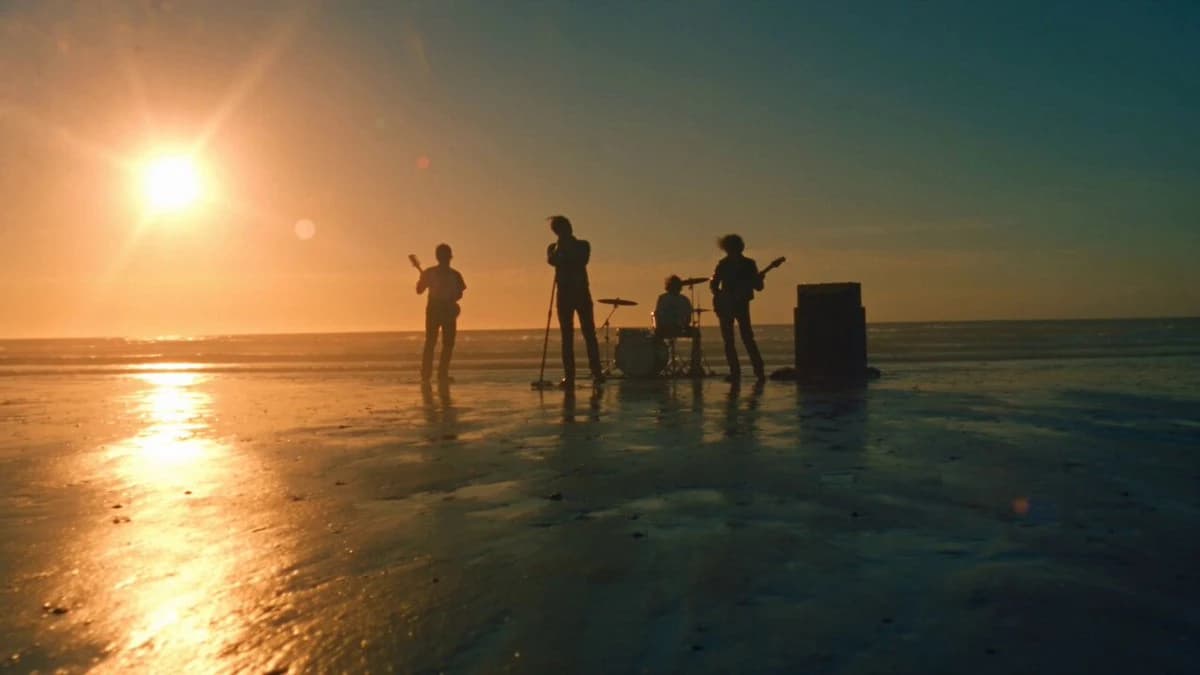
452 wordsCinematic hip-hop/rap music video, photo-realistic quality, high-end, beach setting. Build the scene based on @Image1: a band performs on a golden beach with waves crashing. A lead singer passionately sings with a microphone stand on the wet sand, a guitarist stands on the left, another on the right, and a drummer sits behind the kit. The vast coastline stretches behind them with rolling waves. A giant, warm golden-hour sun sweeps across the beach, sparkling on the water with sea mist and salty spray in the air. The lead singer in a red tracksuit RAPs toward the camera with rhythm—mouth movements and jaw precisely aligned with every word, head nodding to the beat, driving the flow. Musicians sway to the rhythm as waves crash behind them. This is a bright, energetic rap song—fast-paced, confident, and strong beat. Hard cuts on the beat, with double contrast (shot scale and camera type) at each switch. Lyrics (the lead singer sings 'Hello' in these languages with precise lip-sync): English: 'Hello', Chinese: '你好', Japanese: 'こんにちは', Korean: '안녕하세요', Portuguese: 'Ola', Thai: 'สวัสดี', Spanish: 'Hola', Arabic: 'مرحب'. Shot 1 [0:00-0:03]: Low-angle wide establishing shot, stabilized camera advances through golden sunset and sea mist as waves surge behind the band. Lyric line 1 (English 'Hello'). Hard cut. Shot 2 [0:03-0:05]: Close-up of red tracksuit singer rapping to camera, handheld whip-pan in, blurred shimmering water behind. Lyric line 2 (Chinese '你好'). Hard cut. Shot 3 [0:05-0:08]: Macro insert shot, fixed camera, guitarist's fingers moving fast on strings, sand and mist passing the foreground. Lyric line 3 (Japanese 'こんにちは'). Hard cut. Shot 4 [0:08-0:10]: 3/4 mid-shot of a musician, slow orbiting creep, instrument metal and wet highlights reflecting the sunset. Lyric line 4 (Korean '안녕하세요'). Hard cut. Shot 5 [0:10-0:13]: A musician by the water, fast tracking shot passing him, he turns to camera as a wave breaks behind. Lyric line 5 (Portuguese 'Ola'). Hard cut. Shot 6 [0:13-0:15]: Drummer by the water, handheld quick tilt up, sea breeze and spray blowing hair as he drums to beat. Lyric line 6 (Thai 'สวัสดี'). Hard cut. Shot 7 [0:15-0:18]: Tight push on red tracksuit singer in full flow, aggressive handheld, twilight sea behind band silhouettes. Lyric line 7 (Spanish 'Hola'). Hard cut. Shot 8 [0:18-0:20]: Heroic wide shot of the full band, aggressive handheld advance, band steps toward camera on beat, waves crash and golden sunset explodes into a halo behind them. Lyric line 8 (Arabic 'مرحبا'). White balance 4000K, teal-and-amber grading, 35mm, shallow depth of field, film grain, diffused sea mist, golden hour glow. Solid, high-end texture. Rhythmic rap performance, precise lip-syncing, head nodding to beat. No subtitles, no text overlays, no dissolves, no duplicate characters, hard cuts only. Total duration 20s.
About this prompt
Cinematic Hip-Hop Beach Music Video is a Cinematic Seedance 2.0 prompt with 452 words, structured around shot timing, camera direction, motion cues, and remixable scene details.
Use the visual preview, when available, to understand the composition, then treat the prompt text as a production brief you can adapt for your own subject, brand, or story.
Video prompt structure
Use it for Cinematic videos
Best for Seedance 2.0 generations that need Cinematic, Multi-Shot, Dialogue. Replace the subject, setting, product, dialogue, music, and timing before sending it to the generator.
Customize before generating
- Swap the subject. Keep the camera and timing structure, but change the character, product, or environment.
- Tighten the timeline. Shorten or expand shot blocks so they match the duration you want to render.
- Add reference media. Use first frames, last frames, images, video, or audio when the prompt depends on a specific look or rhythm.
More Seedance paths to explore
Browse adjacent styles and techniques from the same Seedance 2.0 prompt library.
How to use it
- Step 1
Copy or start from this prompt
Use the full prompt as a structured draft rather than rewriting the whole video brief.
- Step 2
Open Seedance 2.0
Send the text into the Seedance generator and choose text, image, or reference mode.
- Step 3
Adapt and render
Tune duration, aspect ratio, reference media, camera notes, and dialogue before generating.
Make it a Seedance video
Start from this prompt in the Seedance 2.0 generator, then adjust the scene, duration, aspect ratio, and reference media.