Prompt
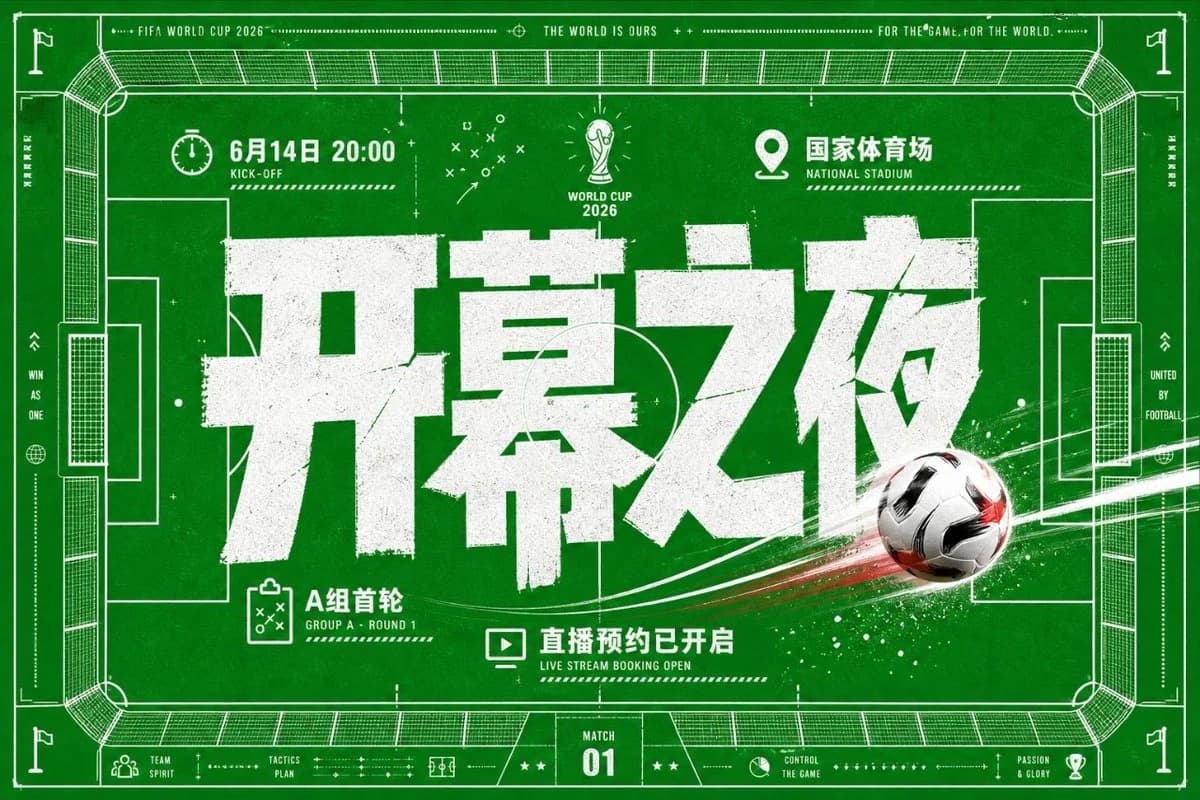
429 wordsGoal: Create a high-energy football match poster in a green-and-white tactical blueprint style for {argument name="event name" default="FIFA World Cup 2026"}, combining a top-down soccer field diagram, bold Chinese typography, and dynamic ball motion.
Canvas: Horizontal 16:9 sports poster, deep grass-green background with subtle paper grain, scuffed print texture, and white ink distressing. Use a full-bleed soccer pitch viewed from above as the main composition, with thin white technical linework, corner flags, goal boxes, center circle arcs, stadium seating outlines, measurement marks, dotted rules, arrows, crosses, tiny tactical symbols, and a thin white border.
Layout: Put an enormous distressed white Chinese headline {argument name="main headline" default="开幕之夜"} across the center, occupying most of the poster width. Add a realistic black-white-red soccer ball on the lower-right side of the headline, flying diagonally from right to left with bright white and red motion streaks, paint splatter, and speed particles crossing the field. Keep the headline layered above the field markings but partly intersected by the ball trail for depth.
Top information row: Include exactly 3 labeled information modules: left module with a stopwatch icon and {argument name="date and time" default="6月14日 20:00"} plus small English label “KICK-OFF”; center module with a simplified World Cup trophy icon and text “WORLD CUP 2026”; right module with a location pin icon and {argument name="venue" default="国家体育场"} plus small English label “NATIONAL STADIUM”. Along the very top border add small uppercase microtext: “FIFA WORLD CUP 2026”, “THE WORLD IS OURS”, and “FOR THE GAME. FOR THE WORLD.” separated by dotted lines and plus symbols.
Bottom information row: Include exactly 3 main callouts below the headline: left callout with a clipboard tactics icon and text “A组首轮” with small English “GROUP A · ROUND 1”; center callout with a monitor/play icon and text {argument name="booking text" default="直播预约已开启"} with small English “LIVE STREAM BOOKING OPEN”; bottom-center scoreboard badge reading “MATCH 01”. Add small footer labels and icons such as “TEAM SPIRIT”, “TACTICS PLAN”, “CONTROL THE GAME”, and “PASSION & GLORY”.
Visual style: Bold modern Chinese block display font, very heavy weight, rough stamped edges, cracked grunge texture, slight off-white ink. Background should feel like a tactical coaching board mixed with a stadium blueprint. Use only green, white, black, and small red accents from the soccer ball trail. High contrast, crisp vector linework, energetic sports advertising aesthetic.
Constraints: Use exactly one soccer ball, one central oversized Chinese headline, three top modules, three bottom callouts, and one match badge. Keep all text white, avoid extra players or people, avoid photorealistic stadium crowds, no logos other than generic World Cup-style trophy iconography, no watermark.About this prompt
World Cup Opening Night Poster is a ready-to-use poster prompt for GPT Image 2 on Image 2. Copy the 429 words below, paste them into the Create form, and you will get a result close to the preview above. Tweak the Infographic, Poster, Product tag if you want to push it somewhere new.
Use it as a starting point, then adjust the subject, lighting, or composition to suit your idea. The credit cost stays the same whether you use it as written or customize it.
Use case
A strong starting point for Poster
Start here when you want a poster image inspired by World Cup Opening Night Poster. The prompt already sets the look and composition; replace the subject, product, colors, or scene details to match your project.
Easy places to tweak
- Subject Swap in your person, product, place, or object without changing the overall composition.
- Look and mood Tune the lighting, palette, camera angle, or materials so the image fits your brand.
- Final format Set the aspect ratio, background, text, or layout notes before you generate.
More prompt paths to explore
Find more GPT Image 2 prompts with a similar style, use case, or subject.
How to use it
- Step 1
Copy the prompt
Hit the Copy button above to grab the full text.
- Step 2
Open Image 2 Create
Head to the Create form and paste it in.
- Step 3
Generate
Hit Generate. Your version lands in seconds.
Make it yours
Load the prompt into the Create form with one click, then start tweaking.