Prompt
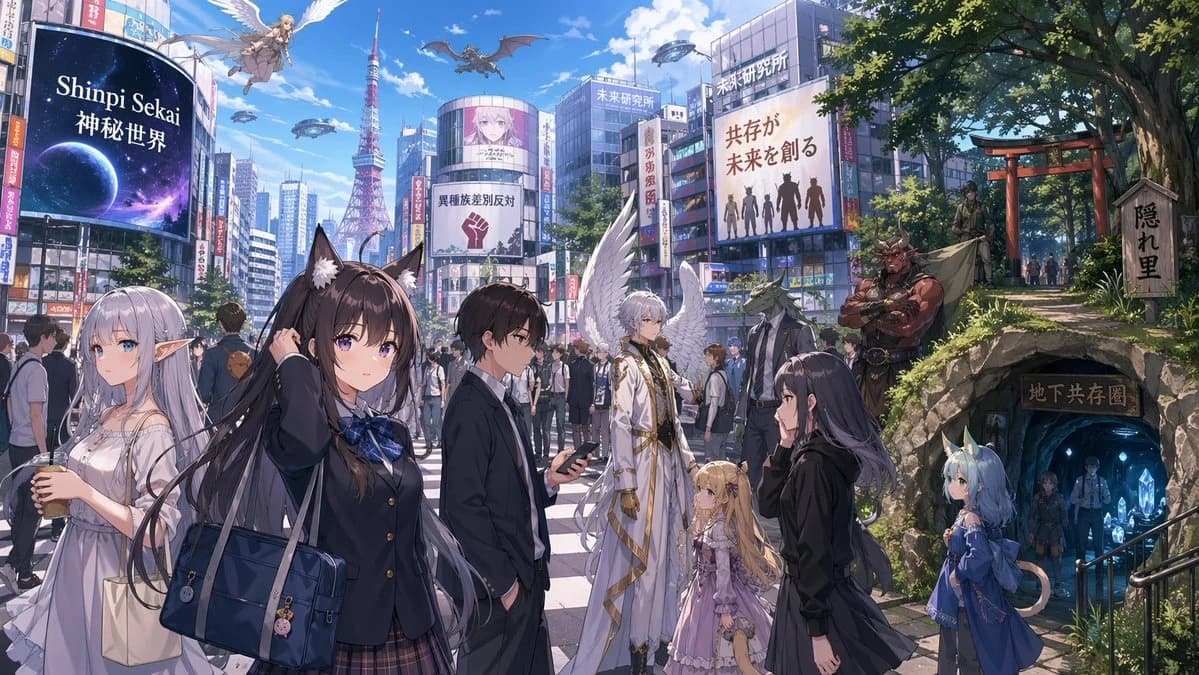
425 wordsA highly detailed anime-style urban fantasy illustration set at a busy Tokyo-style scramble crossing on a bright clear day, viewed at street level with a wide cinematic composition. The city blends modern realism with mythic fantasy: dense high-rise buildings covered in giant billboards, a red broadcast tower in the middle distance, blue sky with fluffy clouds, and a crowded crosswalk full of pedestrians. In the foreground, show 7 prominent character figures: a silver-haired elf woman in a flowing white dress holding an iced drink and tote bag on the far left; a central schoolgirl with long dark hair, black animal ears, a navy school blazer, plaid skirt, blue ribbon, and large navy shoulder bag, lifting one hand to her head; a young man in a dark suit looking down at a smartphone; an androgynous white-haired angelic figure in an elegant white-and-gold ceremonial outfit with large white wings; a small blonde girl in an ornate pastel pink frilled dress beside the angel; a dark-haired woman in a black coat in right foreground profile; and a small blue-haired cat-eared child in a blue dress with a bow standing near a cave entrance on the right. In the midground crowd, include mixed humans and fantasy races walking together naturally. Add 4 clearly visible nonhuman or supernatural background beings: 1 dragon flying in the sky, 1 winged female angel descending above the street, 1 lizard-headed businessman in a suit near the angelic figure, and 1 tall red-skinned horned demon with crossed arms standing by the hillside path. On the right side, transition the city into a lush shrine hillside with large green trees, a red torii gate, stone steps, and a wooden signboard reading Japanese kanji. Below it, place a rocky cave-like tunnel entrance glowing blue, with a wooden sign over the entrance and several figures descending into an underground shared district lit by crystals. Show 6 major billboard/sign elements across the cityscape: a huge left billboard reading "Shinpi Sekai 神秘世界" with a cosmic planet image; a large central political poster with Japanese text and a raised fist icon; 2 rooftop signs reading "未来研究所" on separate buildings; a large right billboard with Japanese text about coexistence and silhouettes of different beings; and 1 vertical banner with Japanese text on a nearby building. Emphasize the theme of coexistence between ordinary modern city life and hidden fantasy societies. Crisp anime linework, polished light novel key visual rendering, rich textures, soft sunlight, subtle atmospheric perspective, vibrant but believable colors, intricate clothing details, and a sense of awe, everyday bustle, and worldbuilding depth.
About this prompt
Urban Fantasy Coexistence Crossing is a ready-to-use poster prompt for GPT Image 2 on Image 2. Copy the 425 words below, paste them into the Create form, and you will get a result close to the preview above. Tweak the Poster, Food, Fashion tag if you want to push it somewhere new.
Use it as a starting point, then adjust the subject, lighting, or composition to suit your idea. The credit cost stays the same whether you use it as written or customize it.
Use case
A strong starting point for Poster
Start here when you want a poster image inspired by Urban Fantasy Coexistence Crossing. The prompt already sets the look and composition; replace the subject, product, colors, or scene details to match your project.
Easy places to tweak
- Subject Swap in your person, product, place, or object without changing the overall composition.
- Look and mood Tune the lighting, palette, camera angle, or materials so the image fits your brand.
- Final format Set the aspect ratio, background, text, or layout notes before you generate.
More prompt paths to explore
Find more GPT Image 2 prompts with a similar style, use case, or subject.
How to use it
- Step 1
Copy the prompt
Hit the Copy button above to grab the full text.
- Step 2
Open Image 2 Create
Head to the Create form and paste it in.
- Step 3
Generate
Hit Generate. Your version lands in seconds.
Make it yours
Load the prompt into the Create form with one click, then start tweaking.