Prompt
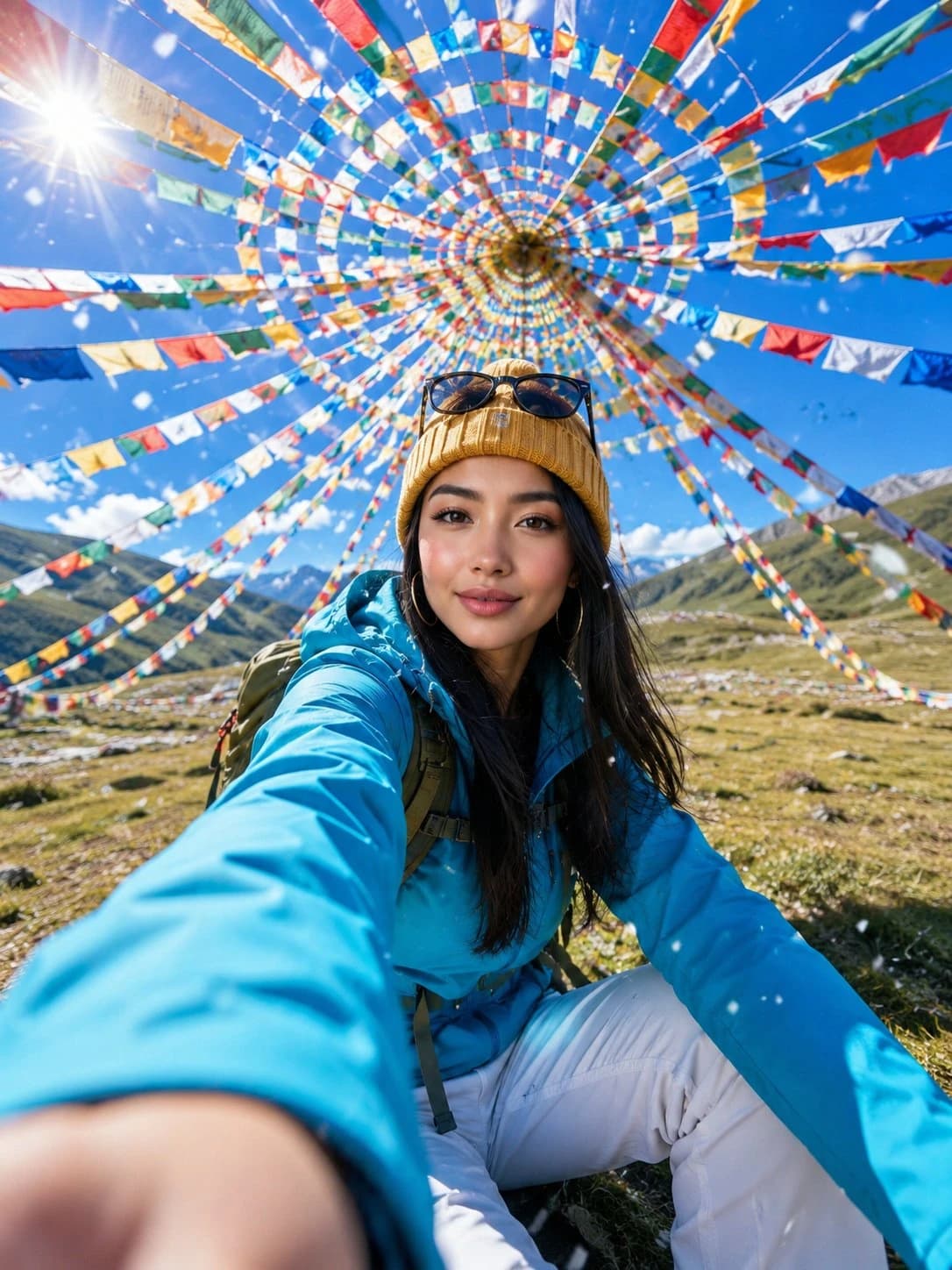
333 wordsAsset type: portrait image for social post Primary request: create a photorealistic travel selfie portrait, using the uploaded portrait photo as the appearance reference for the person. Scene/backdrop: an open alpine meadow under a vivid blue sky, surrounded overhead by hundreds of colorful Tibetan prayer flags arranged in a circular spiral canopy, with distant green hills and bright daylight. Subject: a young woman with the recognizable facial structure, eyes, hairline direction, and natural skin texture from the uploaded portrait photo, wearing a bright cyan outdoor jacket, white hiking pants, a mustard yellow knit beanie, sunglasses resting on the hat, and a backpack. Style/medium: ultra-realistic mobile travel photography with a dynamic action-camera feel, crisp but natural detail, lively social-media adventure portrait. Composition/framing: vertical 3:4 frame, extreme wide-angle perspective, low-to-high selfie composition, one hand reaching toward the camera in the foreground with strong perspective enlargement, face in the midground, prayer flags forming a colorful radial tunnel above her head, energetic candid smile. Lighting/mood: brilliant high-altitude midday sun, visible lens flare near the upper left, sparkling backlight, bright optimistic mood, high clarity, realistic shadows on grass. Color palette: saturated cyan, mustard yellow, red, orange, green, white, and sky blue, clean contrast, sunlit alpine freshness. Textures/retouching: believable fabric texture, natural skin pores, realistic hair strands, clean optical sharpness on the face, shallow foreground hand blur, small falling snowflakes or white petals crossing the lens. Constraints: preserve the person's recognizable appearance from the uploaded portrait photo; no watermark; no logo; no text; no caption; no signature. Avoid: plastic beauty-filter skin, over-smoothed face, distorted hands, extra fingers, warped prayer flags, unreadable markings on clothing, artificial CGI look Negative Prompt: watermark, logo, text, caption, signature, AI label, brand mark, extra fingers, missing fingers, fused fingers, deformed hands, oversized malformed palm, asymmetrical eyes, crossed eyes, warped face, plastic skin, waxy skin, over-smoothed beauty filter, blurry face, low detail, low resolution, heavy compression artifacts, distorted anatomy, duplicate person, bad perspective, bent flag strings, warped flags, fake CGI look, overexposed face, muddy colors
About this prompt
Travel Selfie Portrait Reference is a ready-to-use portrait prompt for GPT Image 2 on Image 2. Copy the 333 words below, paste them into the Create form, and you will get a result close to the preview above. Tweak the Portrait, Product, Fashion tag if you want to push it somewhere new.
Use it as a starting point, then adjust the subject, lighting, or composition to suit your idea. The credit cost stays the same whether you use it as written or customize it.
Use case
A strong starting point for Portrait
Start here when you want a portrait image inspired by Travel Selfie Portrait Reference. The prompt already sets the look and composition; replace the subject, product, colors, or scene details to match your project.
Easy places to tweak
- Subject Swap in your person, product, place, or object without changing the overall composition.
- Look and mood Tune the lighting, palette, camera angle, or materials so the image fits your brand.
- Final format Set the aspect ratio, background, text, or layout notes before you generate.
More prompt paths to explore
Find more GPT Image 2 prompts with a similar style, use case, or subject.
How to use it
- Step 1
Copy the prompt
Hit the Copy button above to grab the full text.
- Step 2
Open Image 2 Create
Head to the Create form and paste it in.
- Step 3
Generate
Hit Generate. Your version lands in seconds.
Make it yours
Load the prompt into the Create form with one click, then start tweaking.