Prompt
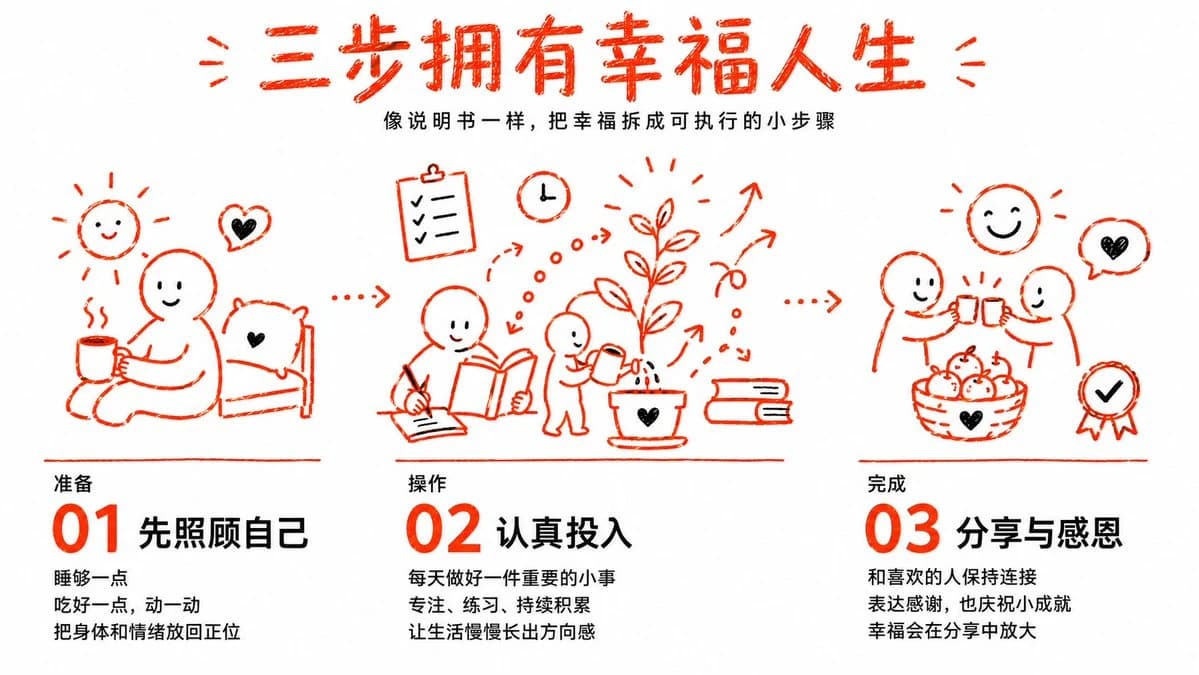
417 wordsGoal: Create a clean illustrated Chinese self-improvement infographic titled {argument name="headline text" default="三步拥有幸福人生"}, presenting happiness as three executable small steps like an instruction manual.
Canvas: Wide horizontal 16:9 white background, airy margins, minimalist editorial poster layout. Use a hand-drawn red-orange marker style for all illustrations and large step numbers, with black Chinese body text. Overall feeling: warm, encouraging, simple, practical, like a WeChat article cover illustration.
Header: Center a large rough handwritten red-orange headline at the top: 「三步拥有幸福人生」, with small decorative red strokes on both sides. Under it, add a small black subtitle: 「像说明书一样,把幸福拆成可执行的小步骤」.
Layout: Three equal columns across the lower two-thirds of the canvas, connected visually by red-orange dotted arrows moving left to right. Each column has one doodle illustration above, a thin red divider line, then a step label, huge red step number, bold black title, and three short black lines of explanatory text. Use exactly 3 steps.
Step 1 column, left: Section label 「准备」. Huge red number 「01」 followed by bold title 「先照顾自己」. Body text has exactly 3 lines: 「睡够一点」, 「吃好一点,动一动」, 「把身体和情绪放回正位」. Illustration: a simple smiling person sitting on the floor beside a pillow or bed, holding a steaming mug; include a small smiling sun doodle, a heart speech bubble, and cozy rest/self-care feeling.
Step 2 column, center: Section label 「操作」. Huge red number 「02」 followed by bold title 「认真投入」. Body text has exactly 3 lines: 「每天做好一件重要的小事」, 「专注、练习、持续积累」, 「让生活慢慢长出方向感」. Illustration: a person writing in a notebook, another person reading an open book, a small child watering a potted plant with a heart on the pot; include a checklist clipboard, a clock, books, dotted motion arrows, growth arrows, and a tall sprouting plant to symbolize progress.
Step 3 column, right: Section label 「完成」. Huge red number 「03」 followed by bold title 「分享与感恩」. Body text has exactly 3 lines: 「和喜欢的人保持连接」, 「表达感谢,也庆祝小成就」, 「幸福会在分享中放大」. Illustration: two simple smiling people clinking mugs or cups, a basket of apples with a heart, a smiling sun, a heart speech bubble, and a small award ribbon with a check mark.
Visual style: Red-orange sketch lines should look slightly imperfect and textured, as if drawn with a wax crayon or marker. Text should be crisp and readable, using bold sans-serif Chinese for headings and smaller black sans-serif for descriptions. Keep the design uncluttered, balanced, friendly, and high contrast.
Constraints: Include exactly 3 columns and exactly 3 numbered steps: 01, 02, 03. Preserve the visible Chinese text exactly as specified. Do not add extra panels, photos, gradients, shadows, watermarks, logos, or additional explanatory paragraphs.About this prompt
Three Steps to a Happy Life Infographic is a ready-to-use infographic prompt for GPT Image 2 on Image 2. Copy the 417 words below, paste them into the Create form, and you will get a result close to the preview above. Tweak the Infographic, Storyboard, Product tag if you want to push it somewhere new.
Use it as a starting point, then adjust the subject, lighting, or composition to suit your idea. The credit cost stays the same whether you use it as written or customize it.
Use case
A strong starting point for Infographic
Start here when you want a infographic image inspired by Three Steps to a Happy Life Infographic. The prompt already sets the look and composition; replace the subject, product, colors, or scene details to match your project.
Easy places to tweak
- Subject Swap in your person, product, place, or object without changing the overall composition.
- Look and mood Tune the lighting, palette, camera angle, or materials so the image fits your brand.
- Final format Set the aspect ratio, background, text, or layout notes before you generate.
More prompt paths to explore
Find more GPT Image 2 prompts with a similar style, use case, or subject.
How to use it
- Step 1
Copy the prompt
Hit the Copy button above to grab the full text.
- Step 2
Open Image 2 Create
Head to the Create form and paste it in.
- Step 3
Generate
Hit Generate. Your version lands in seconds.
Make it yours
Load the prompt into the Create form with one click, then start tweaking.