Prompt
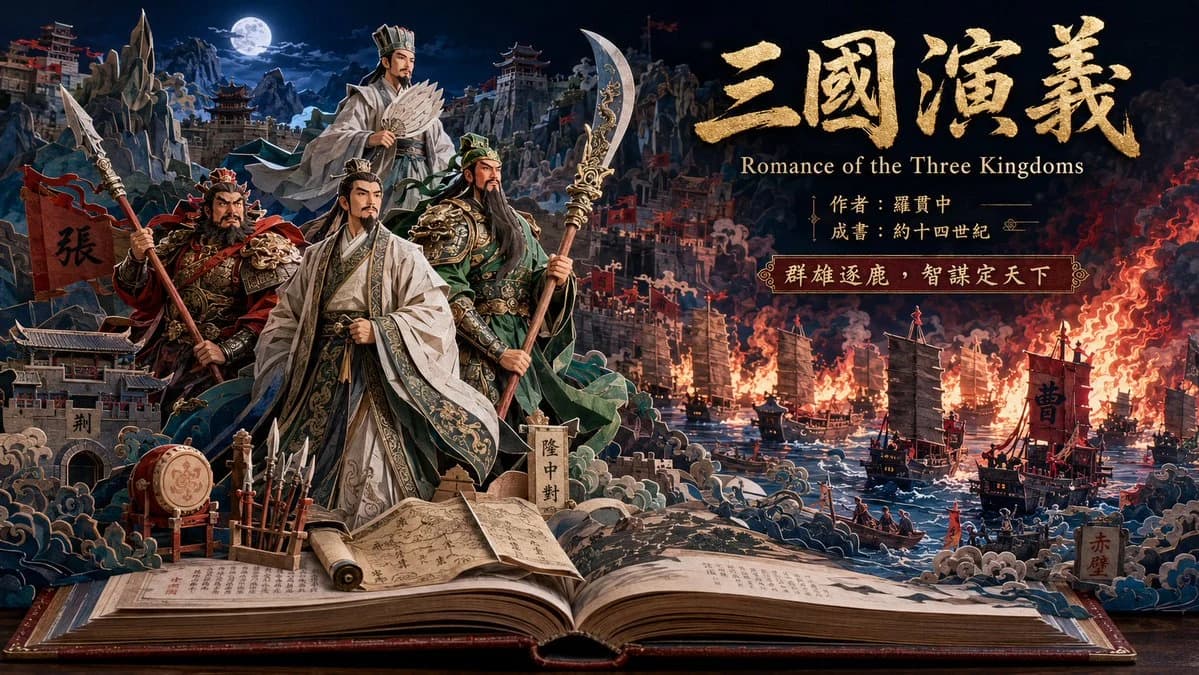
458 wordsGoal: Create a cinematic paper-craft pop-up book illustration for {argument name="classic novel title" default="三國演義"}, presenting Romance of the Three Kingdoms as an epic Chinese classical literature scene.
Canvas: Wide 16:9 landscape composition, dark theatrical lighting, high-detail 3D layered paper diorama emerging from an open antique book on a wooden table. The book fills the bottom foreground with visible printed Chinese-style text, aged pages, a red-brown cover, and a central spine crease.
Layout: The open book forms a pop-up battlefield and river panorama. Place the heroic character group on the left-center foreground, the burning naval battle on the right, mountains and fortress cities in the background, and large title typography in the upper-right sky.
Subject details: Include exactly 4 main historical figures in layered paper-cut style: 1 stern armored warrior on the far left holding a spear beside a red banner marked 「張」, 1 elegant strategist in white robes at center front holding a sheathed or folded object and wearing ornate trim, 1 green-robed bearded general at center-right holding a tall curved guandao, and 1 elevated scholar-strategist behind them in pale robes holding a feather fan. Their costumes should be ornate Han-era fantasy armor and robes with gold embroidery, expressive faces, theatrical poses, and crisp cut-paper edges.
Scene elements: Include exactly 6 prominent foreground props around the book scene: 1 standing war drum, 1 rack of upright spears, 1 rolled scroll, 1 open handwritten manuscript, 1 vertical stone marker labeled 「隆中對」, and 1 small fortress gate labeled 「荊」. In the right-side river battle, include exactly 5 large visible warships with black sails, red flags, and firelit silhouettes, plus smaller implied boats only as background texture. Add layered paper waves, smoke plumes, orange flames, fortress walls, banners, and troops in miniature scale.
Background: Create a moonlit mountainous Chinese landscape with pagodas, cliffside fortresses, blue-black night sky, and a bright full moon on the upper left. The right background should glow with red-orange fire and smoke, contrasting against cool blue mountains on the left.
Text content: In the upper right, write the large gold brush-calligraphy title 「三國演義」 with rough metallic texture. Below it, add the English subtitle “Romance of the Three Kingdoms”. Under the subtitle, add two smaller Chinese lines: 「作者:羅貫中」 and 「成書:約十四世紀」. Add a decorative plaque reading 「群雄逐鹿,智謀定天下」. Preserve the Chinese text exactly as visible.
Visual style: Ultra-detailed cinematic paper art, dimensional pop-up book construction, layered cut-paper silhouettes, embossed gold calligraphy, dramatic rim light, volumetric smoke, miniature stage design, ornate historical fantasy realism, sharp focus, rich contrast, deep navy blues and fiery reds, museum-quality craftsmanship.
Constraints: Keep the scene as a single coherent pop-up book spread, not a flat poster. Do not add modern objects, watermarks, logos, or extra main characters. Maintain readable typography and a premium cinematic book-cover feel.About this prompt
Three Kingdoms Pop-Up Book Scene is a ready-to-use infographic prompt for GPT Image 2 on Image 2. Copy the 458 words below, paste them into the Create form, and you will get a result close to the preview above. Tweak the Infographic, 3D, Watercolor tag if you want to push it somewhere new.
Use it as a starting point, then adjust the subject, lighting, or composition to suit your idea. The credit cost stays the same whether you use it as written or customize it.
Use case
A strong starting point for Infographic
Start here when you want a infographic image inspired by Three Kingdoms Pop-Up Book Scene. The prompt already sets the look and composition; replace the subject, product, colors, or scene details to match your project.
Easy places to tweak
- Subject Swap in your person, product, place, or object without changing the overall composition.
- Look and mood Tune the lighting, palette, camera angle, or materials so the image fits your brand.
- Final format Set the aspect ratio, background, text, or layout notes before you generate.
More prompt paths to explore
Find more GPT Image 2 prompts with a similar style, use case, or subject.
How to use it
- Step 1
Copy the prompt
Hit the Copy button above to grab the full text.
- Step 2
Open Image 2 Create
Head to the Create form and paste it in.
- Step 3
Generate
Hit Generate. Your version lands in seconds.
Make it yours
Load the prompt into the Create form with one click, then start tweaking.