Prompt
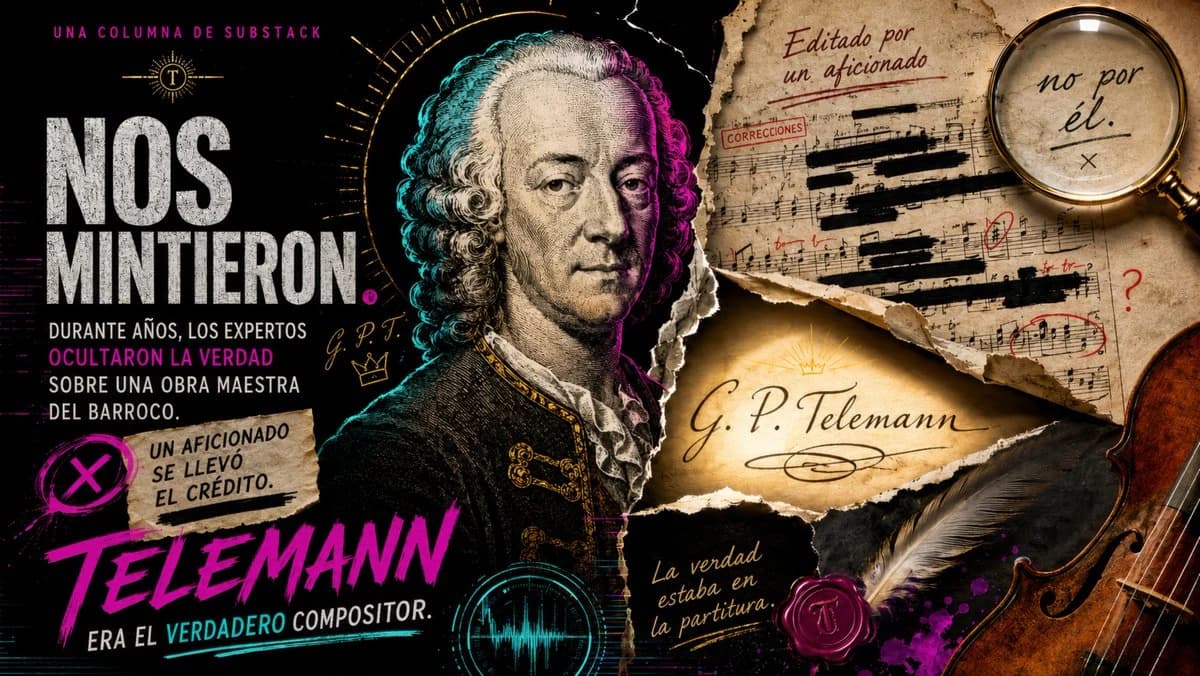
455 wordsGoal: Create a dramatic investigative YouTube-thumbnail style historical music poster about a hidden Baroque authorship scandal, centered on {argument name="composer name" default="Telemann"}.
Canvas: Wide 16:9 horizontal composition, dark black background with a gritty collage texture, high contrast, cinematic lighting, neon magenta and cyan accents, aged parchment and torn paper layers. Make it look like a sensational editorial cover for a Substack column.
Layout: Left third contains the main Spanish headline in very large distressed white uppercase typography: “NOS MINTIERON.” Above it, small magenta spaced text reads “UNA COLUMNA DE SUBSTACK” with a small gold sunburst emblem containing a “T”. Under the headline, add smaller stacked Spanish text: “DURANTE AÑOS, LOS EXPERTOS” then magenta emphasis “OCULTARON LA VERDAD” then “SOBRE UNA OBRA MAESTRA DEL BARROCO.” Below, place a ripped beige note with a magenta circled X icon and the text “UN AFICIONADO SE LLEVÓ EL CRÉDITO.” At the bottom left, add huge magenta brush-script text “TELEMANN” and beneath it small white text “ERA EL VERDADERO COMPOSITOR.”
Central subject: A detailed engraved portrait of an 18th-century Baroque composer, front-facing three-quarter view, powdered curly wig, solemn expression, ornate dark coat with gold embroidery. Add cyan rim light on the left side of his hair and magenta rim light on the right side, with a thin golden halo or radial measuring arc behind his head. Include small handwritten initials “G. P. T.” and a little gold crown sketch near the portrait.
Right side collage: Use exactly 7 main evidence elements: 1) a large torn aged manuscript page in the upper right with sheet music, black censor bars, red correction marks, and a red stamp reading “CORRECCIONES”; 2) handwritten red-brown text on that page reading “Editado por un aficionado”; 3) a magnifying glass over the page showing handwritten text “no por él.” with an underlined phrase and an X beneath it; 4) a torn parchment strip in the middle glowing warm gold, signed “G. P. Telemann” in elegant black calligraphy with a small sunburst above it; 5) a handwritten note on dark paper near the bottom reading “La verdad estaba en la partitura”; 6) a red wax seal stamped with a “T” beside a large gray feather quill; 7) a cropped wooden violin body entering from the far right edge.
Additional visual details: Add subtle music staff lines, ink scratches, dust, cracks, magenta paint splatter, teal waveform circle near the lower center, torn edges, and layered paper shadows. Use dramatic warm highlights on parchment and cool neon accents on the portrait. Spanish text must be legible and placed as described.
Style constraints: Dark investigative documentary thumbnail, grunge editorial collage, realistic engraved portrait mixed with modern graphic design, no extra logos, no watermark, no additional text beyond the specified Spanish phrases.About this prompt
Telemann Baroque Scandal Poster is a ready-to-use social media prompt for GPT Image 2 on Image 2. Copy the 455 words below, paste them into the Create form, and you will get a result close to the preview above. Tweak the Social Media, Watercolor, Cyberpunk tag if you want to push it somewhere new.
Use it as a starting point, then adjust the subject, lighting, or composition to suit your idea. The credit cost stays the same whether you use it as written or customize it.
Use case
A strong starting point for Social Media
Start here when you want a social media image inspired by Telemann Baroque Scandal Poster. The prompt already sets the look and composition; replace the subject, product, colors, or scene details to match your project.
Easy places to tweak
- Subject Swap in your person, product, place, or object without changing the overall composition.
- Look and mood Tune the lighting, palette, camera angle, or materials so the image fits your brand.
- Final format Set the aspect ratio, background, text, or layout notes before you generate.
More prompt paths to explore
Find more GPT Image 2 prompts with a similar style, use case, or subject.
How to use it
- Step 1
Copy the prompt
Hit the Copy button above to grab the full text.
- Step 2
Open Image 2 Create
Head to the Create form and paste it in.
- Step 3
Generate
Hit Generate. Your version lands in seconds.
Make it yours
Load the prompt into the Create form with one click, then start tweaking.