Prompt
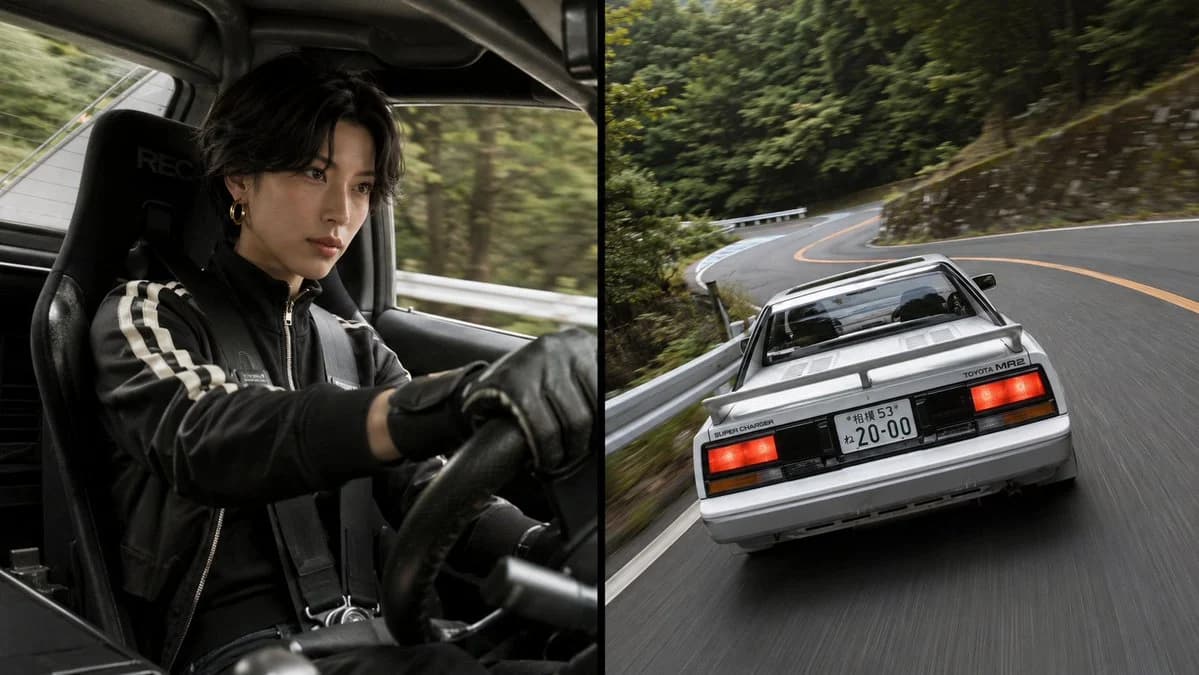
238 wordsCreate a cinematic two-panel automotive action photograph in a 16:9 horizontal frame, split exactly down the center by a thin vertical black divider. Left panel: an interior cockpit shot from the passenger side of a classic compact sports car, showing one driver wearing a black racing jacket with two white sleeve stripes, black leather driving gloves, a black harness, and a small gold hoop earring. The driver has messy dark hair, their face intentionally obscured by a plain dark brown square, hands gripping the steering wheel, seated in a black RECARO-style bucket seat. The cabin is dark, tight, and realistic, with blurred forest and guardrail streaking past the window to imply speed. Right panel: a dynamic rear three-quarter tracking shot of a {argument name="car model" default="white Toyota MR2 AW11 late-model G-Limited Supercharger"} driving fast on a winding Japanese mountain road. Show the car from low behind, centered slightly right, with rectangular red taillights, black rear trim, rear spoiler, rear glass engine cover area, visible badge text including “TOYOTA MR2” and “SUPER CHARGER,” and a Japanese license plate reading {argument name="license plate text" default="20-00"}. The road curves through dense green forest with metal guardrails, stone retaining walls, orange center lines, and strong motion blur on the asphalt. Use photorealistic DSLR quality, natural overcast daylight, muted green and gray tones, high shutter-speed realism mixed with panning blur, dramatic touge racing atmosphere, and no extra captions, logos, watermarks, or added vehicles.About this prompt
Split-Screen MR2 Touge Drive is a ready-to-use ad creative prompt for GPT Image 2 on Image 2. Copy the 238 words below, paste them into the Create form, and you will get a result close to the preview above. Tweak the Product Ad, Ad Creative, Comparison tag if you want to push it somewhere new.
Use it as a starting point, then adjust the subject, lighting, or composition to suit your idea. The credit cost stays the same whether you use it as written or customize it.
Use case
A strong starting point for Ad Creative
Start here when you want a ad creative image inspired by Split-Screen MR2 Touge Drive. The prompt already sets the look and composition; replace the subject, product, colors, or scene details to match your project.
Easy places to tweak
- Subject Swap in your person, product, place, or object without changing the overall composition.
- Look and mood Tune the lighting, palette, camera angle, or materials so the image fits your brand.
- Final format Set the aspect ratio, background, text, or layout notes before you generate.
More prompt paths to explore
Find more GPT Image 2 prompts with a similar style, use case, or subject.
How to use it
- Step 1
Copy the prompt
Hit the Copy button above to grab the full text.
- Step 2
Open Image 2 Create
Head to the Create form and paste it in.
- Step 3
Generate
Hit Generate. Your version lands in seconds.
Make it yours
Load the prompt into the Create form with one click, then start tweaking.