Prompt
417 words{
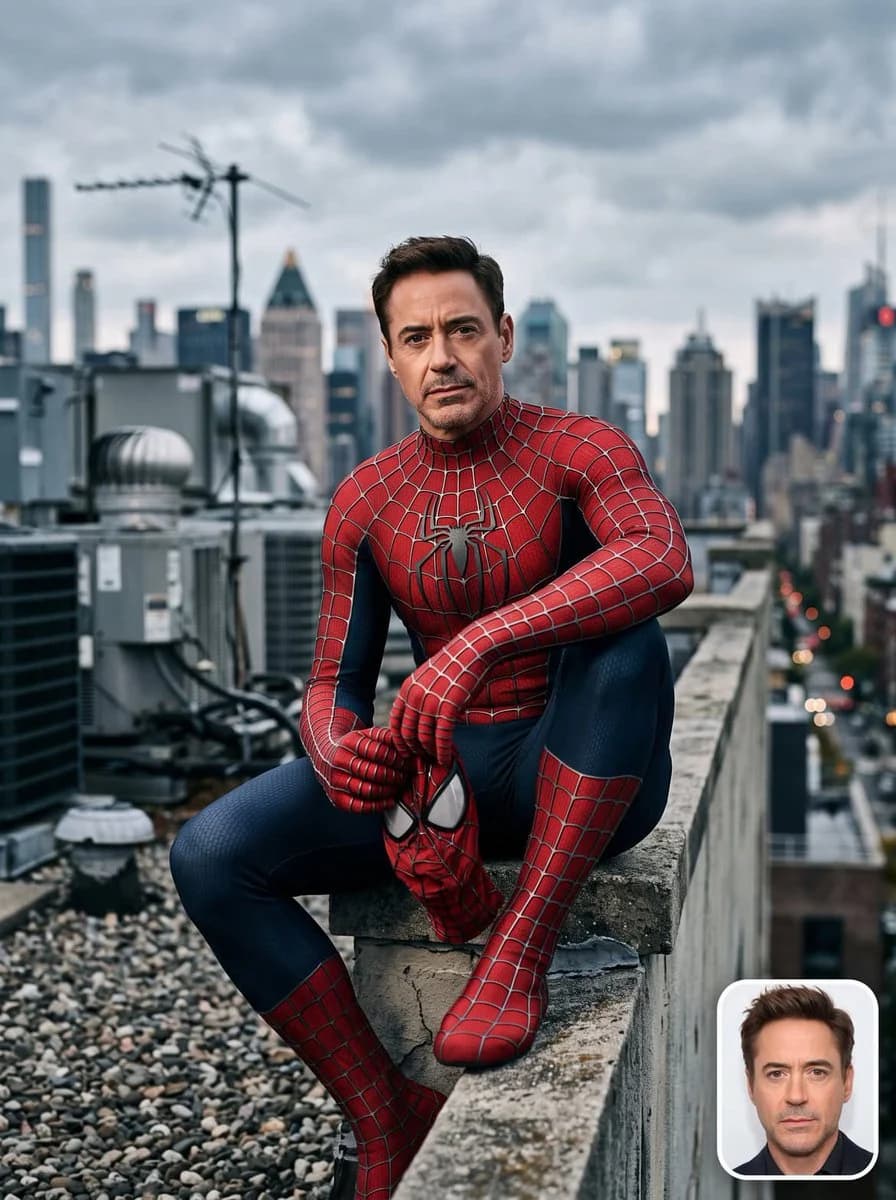
"style_prompt_name": "Rooftop Spider-Suit Portrait — Photorealistic Composite",
"subject": {
"identity_source": "{argument name="identity source" default="Person_Name/Upload Image"}",
"instruction": "Take the face, skin tone, hairstyle, and identifying features exactly from the uploaded reference photo (or the named public figure) and realistically composite them onto the body/pose described below. Preserve the subject's real facial structure, expression style, and likeness with high fidelity — do not alter or stylize the face."
},
"wardrobe": {
"costume": "{argument name="costume" default="Classic red-and-blue Spider-Man suit (Sam Raimi trilogy-style webbed design)"}",
"condition": "Pristine, complete, and undamaged — no rips, tears, frays, or exposed threads anywhere on the suit; fabric appears brand-new, clean, and perfectly fitted",
"material_detail": "Textured spandex/lycra fabric with raised stitched web-lines, matte-yet-slightly-sheen finish, deep red chest and limbs, navy-blue sides and legs, large black spider emblem centered on chest",
"accessories": "Full-face or half-removed mask optional per pose (mask held in hand if partially removed), gloves and boots fully intact matching suit pattern"
},
"pose_and_composition": {
"framing": "Medium-to-full body shot, subject seated on the ledge/parapet of a rooftop",
"pose": "Relaxed seated crouch on the edge, one leg bent up, elbows resting on knee, hands loosely clasped or holding the mask, head turned toward camera with a calm, confident, slightly serious expression",
"camera_angle": "Slightly low-to-eye-level angle looking up at subject, shallow depth of field",
"aspect_ratio": "3:4 vertical portrait"
},
"environment": {
"setting": "{argument name="environment" default="Urban rooftop with HVAC units, vents, and antenna structures in the midground"}",
"background": "Dense city skyline of high-rise buildings, softly blurred (bokeh) to keep focus on subject",
"sky": "Overcast, moody cloud cover with soft diffused daylight"
},
"lighting": {
"type": "Improved cinematic soft lighting",
"key_light": "Large soft key light from upper-front-left, mimicking diffused daylight through clouds, gently wrapping around the face and suit to bring out fabric texture without harsh shadows",
"fill_light": "Subtle cool-toned fill from the right to lift shadow side of the face and suit, avoiding flat lighting",
"rim_light": "Faint rim/edge light along shoulders and hair to separate subject from the background skyline",
"color_grade": "Neutral-cool cinematic grade, slightly desaturated blues and grays in the environment, with the suit's red and blue kept rich and saturated as the focal color contrast",
"mood": "Clean, high-end editorial lighting — crisp highlights on suit texture, soft shadow falloff, no muddy or underexposed areas"
},
"photographic_style": {
"realism": "Hyper-photorealistic, shot-on-camera aesthetic (as if captured with a full-frame DSLR, 85mm lens, f/2.0)",
"texture_detail": "Sharp fabric weave with raised stitched web-lines, realistic skin pores, individual hair strands, and natural cloth tension folds at the joints"
}
}About this prompt
Rooftop Spider-Suit Portrait is a ready-to-use social media prompt for GPT Image 2 on Image 2. Copy the 417 words below, paste them into the Create form, and you will get a result close to the preview above. Tweak the Social Media, Fashion, Architecture tag if you want to push it somewhere new.
Use it as a starting point, then adjust the subject, lighting, or composition to suit your idea. The credit cost stays the same whether you use it as written or customize it.
Use case
A strong starting point for Social Media
Start here when you want a social media image inspired by Rooftop Spider-Suit Portrait. The prompt already sets the look and composition; replace the subject, product, colors, or scene details to match your project.
Easy places to tweak
- Subject Swap in your person, product, place, or object without changing the overall composition.
- Look and mood Tune the lighting, palette, camera angle, or materials so the image fits your brand.
- Final format Set the aspect ratio, background, text, or layout notes before you generate.
More prompt paths to explore
Find more GPT Image 2 prompts with a similar style, use case, or subject.
How to use it
- Step 1
Copy the prompt
Hit the Copy button above to grab the full text.
- Step 2
Open Image 2 Create
Head to the Create form and paste it in.
- Step 3
Generate
Hit Generate. Your version lands in seconds.
Make it yours
Load the prompt into the Create form with one click, then start tweaking.