Prompt
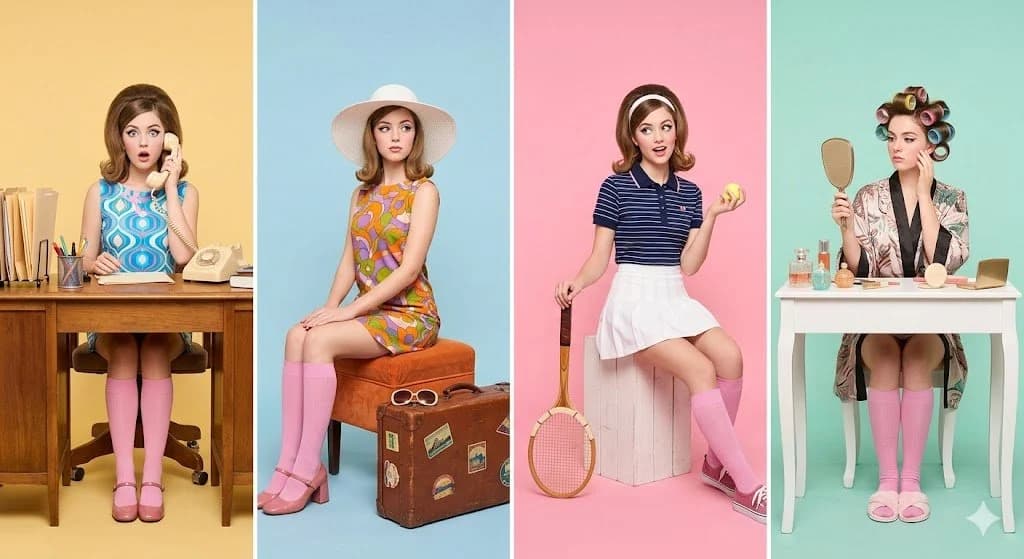
190 wordsRetro studio photography featuring the same woman in four distinct character roles, laid out side by side in a horizontal panel grid. Each panel has its own bold {argument name="colors" default="pastel backdrop (yellow, blue, pink, mint)"}. She's styled in {argument name="era" default="1960s vintage fashion"} throughout, colorful prints, pink knee-high socks, and bold makeup.
Left panel (Office): Seated at a desk surrounded by props, a rotary telephone, file folders, stationery. Patterned dress, expression of surprise while on the phone.
Second panel (Travel): Wide-brimmed hat, vibrant ensemble, posed with a vintage suitcase and travel accessories, elegant posture.
Third panel (Sports): Retro athletic outfit, holding a tennis racket and ball with laid-back playful energy.
Right panel (Home): Wearing a robe with rollers in her hair, holding a hand mirror at a vanity table with beauty products arranged around her.
Panels are neatly divided with symmetrical framing and consistent lighting and camera angle throughout. Soft bright studio light, high-end fashion editorial aesthetic, razor-sharp detail, vivid saturated colors, near-shadowless, no text, no logos, no watermarks.
Style: {argument name="style" default="pop art nostalgia, Wes Anderson symmetry, fashion editorial photography, pastel color blocking"}, high resolution, 8K, clean composition.About this prompt
Retro 1960s Four-Panel Fashion Editorial is a ready-to-use poster prompt for GPT Image 2 on Image 2. Copy the 190 words below, paste them into the Create form, and you will get a result close to the preview above. Tweak the Social Media, Storyboard, Fashion tag if you want to push it somewhere new.
Use it as a starting point, then adjust the subject, lighting, or composition to suit your idea. The credit cost stays the same whether you use it as written or customize it.
Use case
A strong starting point for Poster
Start here when you want a poster image inspired by Retro 1960s Four-Panel Fashion Editorial. The prompt already sets the look and composition; replace the subject, product, colors, or scene details to match your project.
Easy places to tweak
- Subject Swap in your person, product, place, or object without changing the overall composition.
- Look and mood Tune the lighting, palette, camera angle, or materials so the image fits your brand.
- Final format Set the aspect ratio, background, text, or layout notes before you generate.
More prompt paths to explore
Find more GPT Image 2 prompts with a similar style, use case, or subject.
How to use it
- Step 1
Copy the prompt
Hit the Copy button above to grab the full text.
- Step 2
Open Image 2 Create
Head to the Create form and paste it in.
- Step 3
Generate
Hit Generate. Your version lands in seconds.
Make it yours
Load the prompt into the Create form with one click, then start tweaking.