Prompt
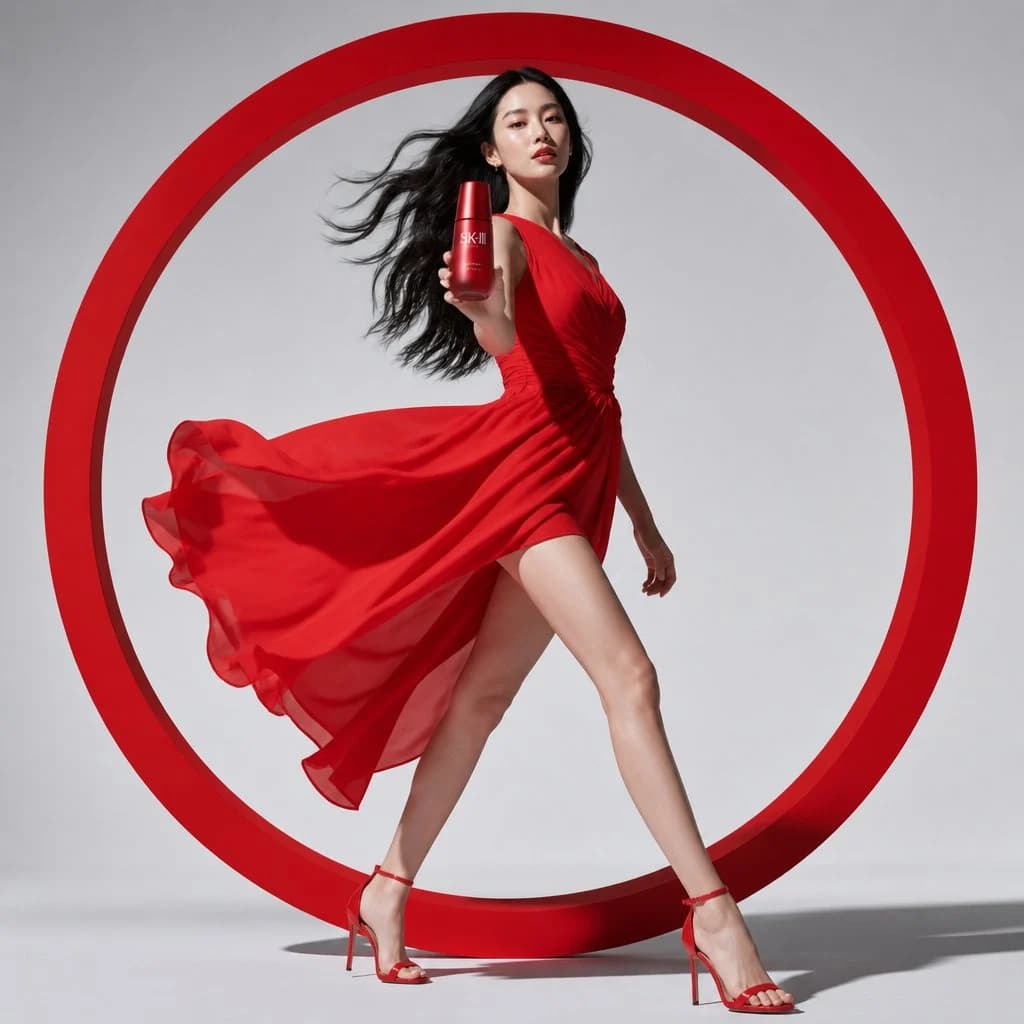
171 wordsCreate a high-fashion luxury skincare commercial advertisement on a square studio canvas. A slim young Asian female model with long flowing black hair walks confidently out of a giant minimalist red circular frame positioned behind her, centered like a bold graphic halo. She is frozen in a dynamic runway stride with one leg extended forward and the other behind, creating a strong elegant silhouette. She wears a vibrant flowing red one-shoulder chiffon dress with a high slit, ruched bodice, translucent fabric layers, and wind-swept skirt billowing dramatically to the left, paired with red ankle-strap stiletto sandals. Her right arm reaches toward the viewer holding a red cylindrical luxury skincare bottle labeled {argument name="product label" default="SK-II"}, making the bottle prominent in the foreground; her left arm trails naturally behind. Use a clean light gray studio background, glossy floor contact shadows, crisp commercial lighting, subtle shadows from the circular frame, premium beauty-ad styling, red-on-gray minimalist palette, photorealistic editorial fashion photography, sharp focus, elegant confidence, no extra text, no logo except the bottle label.About this prompt
Red Circle Luxury Skincare Fashion Ad is a ready-to-use ad creative prompt for GPT Image 2 on Image 2. Copy the 171 words below, paste them into the Create form, and you will get a result close to the preview above. Tweak the Product Ad, Ad Creative, Infographic tag if you want to push it somewhere new.
Use it as a starting point, then adjust the subject, lighting, or composition to suit your idea. The credit cost stays the same whether you use it as written or customize it.
Use case
A strong starting point for Ad Creative
Start here when you want a ad creative image inspired by Red Circle Luxury Skincare Fashion Ad. The prompt already sets the look and composition; replace the subject, product, colors, or scene details to match your project.
Easy places to tweak
- Subject Swap in your person, product, place, or object without changing the overall composition.
- Look and mood Tune the lighting, palette, camera angle, or materials so the image fits your brand.
- Final format Set the aspect ratio, background, text, or layout notes before you generate.
More prompt paths to explore
Find more GPT Image 2 prompts with a similar style, use case, or subject.
How to use it
- Step 1
Copy the prompt
Hit the Copy button above to grab the full text.
- Step 2
Open Image 2 Create
Head to the Create form and paste it in.
- Step 3
Generate
Hit Generate. Your version lands in seconds.
Make it yours
Load the prompt into the Create form with one click, then start tweaking.