Prompt
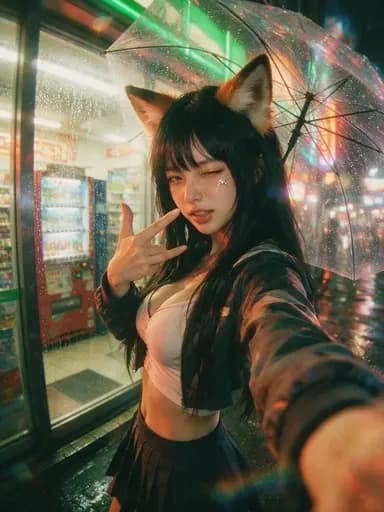
234 wordsCreate a photorealistic cinematic vertical selfie of a {argument name="character type" default="Japanese yokai fox-girl gyaru"} wandering through modern Tokyo at night in the rain. The subject is a young woman with long black hair, large realistic fox ears with tan inner fur, subtle fang-like charm, glossy makeup, small star stickers or glitter under one eye, and a playful wink. She holds up a V-sign near her cheek while extending her other arm toward the camera as if taking a close wide-angle smartphone selfie. She wears a Y2K gyaru-inspired outfit: cropped pale pink fitted top, dark cropped jacket with wet reflective fabric, and a dark pleated mini skirt. She stands beside a brightly lit convenience-store or arcade frontage with red vending machines visible through glass on the left, neon green and warm orange signage reflections, wet pavement, raindrops, and colorful Tokyo street bokeh in the background. Include one transparent umbrella above and behind her, speckled with raindrops and catching rainbow lens flares. Mood: cute, mischievous, urban supernatural nightlife. Style: ultra-detailed realistic anime-cosplay photography, 35mm wide-angle selfie perspective, shallow depth of field, wet reflections, cinematic teal-orange lighting, high contrast, soft skin detail, visible rain droplets, lens flare and light bloom. Composition: portrait 3:4, subject centered slightly right, face sharp, outstretched forearm large in the foreground, background softly blurred but recognizable as rainy Tokyo. Avoid extra characters, text, logos, distorted hands, duplicate ears, or overly cartoonish rendering.About this prompt
Rainy Tokyo Yokai Gyaru Selfie is a ready-to-use portrait prompt for GPT Image 2 on Image 2. Copy the 234 words below, paste them into the Create form, and you will get a result close to the preview above. Tweak the Social Media, Portrait, Fashion tag if you want to push it somewhere new.
Use it as a starting point, then adjust the subject, lighting, or composition to suit your idea. The credit cost stays the same whether you use it as written or customize it.
Use case
A strong starting point for Portrait
Start here when you want a portrait image inspired by Rainy Tokyo Yokai Gyaru Selfie. The prompt already sets the look and composition; replace the subject, product, colors, or scene details to match your project.
Easy places to tweak
- Subject Swap in your person, product, place, or object without changing the overall composition.
- Look and mood Tune the lighting, palette, camera angle, or materials so the image fits your brand.
- Final format Set the aspect ratio, background, text, or layout notes before you generate.
More prompt paths to explore
Find more GPT Image 2 prompts with a similar style, use case, or subject.
How to use it
- Step 1
Copy the prompt
Hit the Copy button above to grab the full text.
- Step 2
Open Image 2 Create
Head to the Create form and paste it in.
- Step 3
Generate
Hit Generate. Your version lands in seconds.
Make it yours
Load the prompt into the Create form with one click, then start tweaking.