Prompt
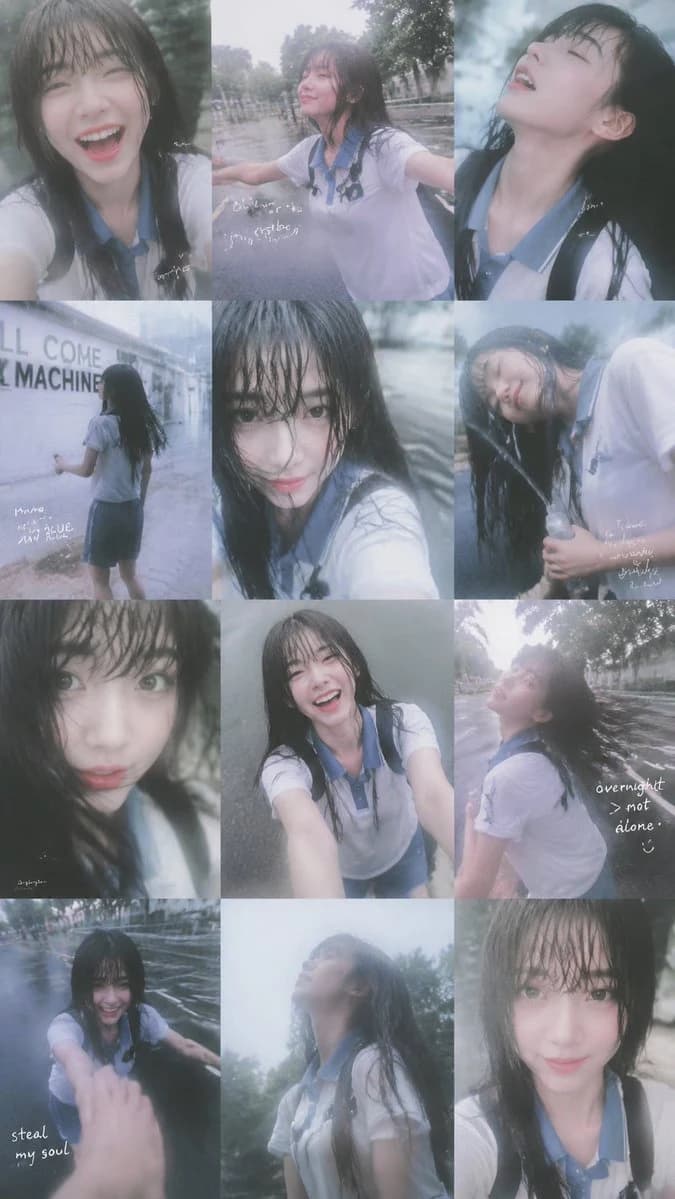
458 wordsCreate a vertical 2:3 soft cinematic photo collage of {argument name="character name" default="a young East Asian schoolgirl"} in heavy summer rain, assembled as an exact 3-column by 4-row grid of 12 separate candid smartphone-style photos with thin seamless borders. The subject has long wet black hair with bangs stuck to her face, pale skin, natural makeup, expressive eyes, and wears {argument name="outfit" default="a soaked white short-sleeve school polo shirt with a pale blue collar, a dark blue skirt, and black backpack straps"}. Use a dreamy Y2K disposable-camera look: misty lens bloom, low contrast, cool blue-gray tones, rain haze, soft focus, motion blur, water droplets on lens, slightly overexposed highlights, nostalgic teenage summer mood, no perfect studio lighting.
Layout and panel count: exactly 12 panels. Row 1: panel 1 is a close selfie of her laughing with mouth open, rain-drenched bangs; panel 2 is a wide selfie with arms spread on a wet road, smiling upward, trees and rain in the background; panel 3 is a close side profile looking up into rain with eyes closed and mouth slightly open. Row 2: panel 4 shows her from behind walking beside a white wall with partial English signage, holding a small object in one hand; panel 5 is an intense wet-hair close-up selfie looking directly into the camera, strands covering one eye; panel 6 is a tilted portrait of her smiling softly while holding a clear umbrella handle or bottle-like object, wet hair falling over her face. Row 3: panel 7 is an extreme close-up with big eyes and a small pout, hair covering the forehead; panel 8 is a high-angle selfie where she smiles brightly with both arms extended toward the camera; panel 9 is a side/back view of her turning her head upward, hair flying, on a rainy tree-lined street. Row 4: panel 10 shows her crouching or leaning forward in the rain while reaching toward the camera, foreground hand blurred; panel 11 is a soft profile looking up at the cloudy sky, torso visible, soaked shirt; panel 12 is a calm centered close selfie with a faint smile and wet bangs.
Add small handwritten white diary-style scribbles on a few panels only, like analog photo notes, including the phrases {argument name="handwritten phrase one" default="steal my soul"} near the lower left of panel 10 and {argument name="handwritten phrase two" default="overnight > not alone"} near panel 9, plus a few tiny illegible cursive marks elsewhere. Keep the text subtle, imperfect, and hand-drawn, not typographic. Backgrounds should be rainy streets, trees, gray pavement, and a white wall, all blurred and atmospheric. The overall feeling is intimate, playful, melancholic, and romantic, like a rainy-day coming-of-age photo diary. Avoid extra people, logos, sharp editorial fashion lighting, clean studio backgrounds, or additional panels.About this prompt
Rainy Schoolgirl Photo Diary Collage is a ready-to-use social media prompt for GPT Image 2 on Image 2. Copy the 458 words below, paste them into the Create form, and you will get a result close to the preview above. Tweak the Social Media, Storyboard, Product tag if you want to push it somewhere new.
Use it as a starting point, then adjust the subject, lighting, or composition to suit your idea. The credit cost stays the same whether you use it as written or customize it.
Use case
A strong starting point for Social Media
Start here when you want a social media image inspired by Rainy Schoolgirl Photo Diary Collage. The prompt already sets the look and composition; replace the subject, product, colors, or scene details to match your project.
Easy places to tweak
- Subject Swap in your person, product, place, or object without changing the overall composition.
- Look and mood Tune the lighting, palette, camera angle, or materials so the image fits your brand.
- Final format Set the aspect ratio, background, text, or layout notes before you generate.
More prompt paths to explore
Find more GPT Image 2 prompts with a similar style, use case, or subject.
How to use it
- Step 1
Copy the prompt
Hit the Copy button above to grab the full text.
- Step 2
Open Image 2 Create
Head to the Create form and paste it in.
- Step 3
Generate
Hit Generate. Your version lands in seconds.
Make it yours
Load the prompt into the Create form with one click, then start tweaking.