Prompt
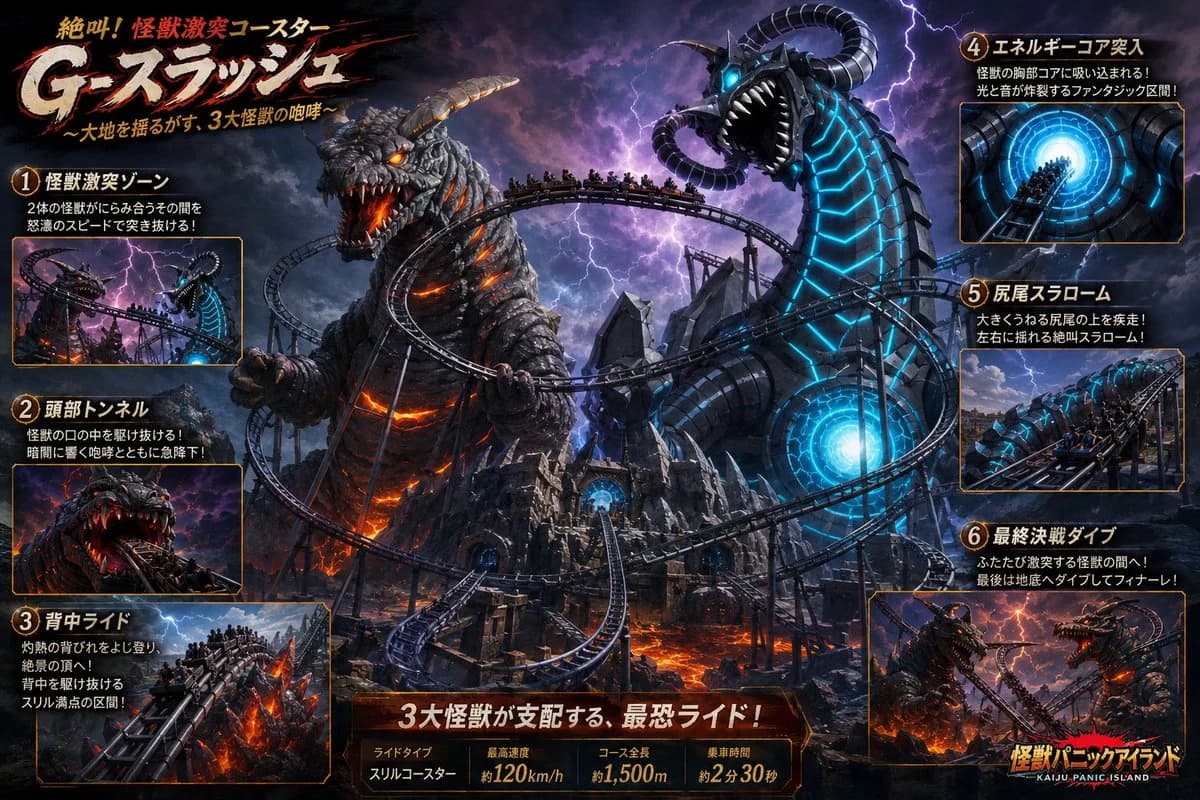
441 wordsGoal: Create a dramatic Japanese theme-park advertisement poster for a monster battle roller coaster called {argument name="ride name" default="G-スプラッシュ"}, with the subtitle 「〜大地を揺るがす、3大怪獣の咆哮〜」 and the small top tagline 「絶叫!怪獣激突コースター」.
Canvas: Wide 16:9 cinematic poster, dark high-contrast fantasy disaster lighting, stormy purple-black sky with lightning, fiery lava below, orange and cyan glow effects, dense action composition.
Main scene: A huge roller coaster twists through a volcanic kaiju island. Show exactly 2 dominant giant monsters in the center: 1) a rocky Godzilla-like lava monster on the left with glowing orange cracks, burning eyes, horned/armored head, open roaring mouth, and molten lava light inside its body; 2) a black biomechanical sea-serpent/dragon monster on the right with bright cyan glowing circuit-like stripes, a huge open mouth with white fangs, glowing blue eyes, and curled horn-like tentacles. The roller coaster track loops between and around both monsters, with multiple trains full of tiny screaming riders. Add jagged ruins, steel supports, a glowing blue energy core doorway in the central fortress, lava rivers, smoke, sparks, and lightning.
Layout: Use an information-dense theme-park ride brochure layout. Put the large brush-stroke Japanese title in the upper left, off-white letters with red shadow and black splatter strokes. Add exactly 6 numbered feature callout panels around the edges, each with an orange border, a circular gold number badge, a Japanese heading, 1–2 short Japanese description lines, and a small inset image. Count and label the panels as follows: 1 「怪獣激突ゾーン」 showing the coaster rushing between the two monsters; 2 「頭部トンネル」 showing the train diving into the lava monster’s open mouth; 3 「背中ライド」 showing the train climbing along the fiery monster’s back; 4 「エネルギーコア突入」 showing a train entering a bright blue circular energy tunnel; 5 「尻尾スラローム」 showing the train slaloming around a large swinging monster tail; 6 「最終決戦ダイブ」 showing the final plunge between battling monsters.
Bottom information bar: Centered along the bottom, create a red-brown metallic plaque with the headline 「3大怪獣が支配する、最恐ライド!」. Beneath it, include exactly 4 stat boxes: 「ライドタイプ」 with 「スリルコースター」, 「最高速度」 with 「約120km/h」, 「コース全長」 with 「約1,500m」, and 「乗車時間」 with 「約2分30秒」. In the lower right corner, place a fiery park logo reading {argument name="park logo text" default="怪獣パニックアイランド"} with small English text 「KAIJU PANIC ISLAND」 underneath.
Visual style: Hyper-detailed AI concept art, cinematic key art, Japanese amusement park poster, realistic monsters, dynamic perspective, dramatic rim lighting, motion blur on coaster trains, sparks and embers, sharp readable typography, gold-orange panel borders, dark fantasy disaster palette with lava orange and electric cyan accents.
Constraints: Keep exactly 6 numbered callout panels and exactly 4 bottom stat boxes. Make all Japanese text large enough to read. Do not add extra logos, watermarks, QR codes, or unrelated characters.About this prompt
Kaiju Roller Coaster Poster is a ready-to-use ad creative prompt for GPT Image 2 on Image 2. Copy the 441 words below, paste them into the Create form, and you will get a result close to the preview above. Tweak the Product Ad, Ad Creative, Storyboard tag if you want to push it somewhere new.
Use it as a starting point, then adjust the subject, lighting, or composition to suit your idea. The credit cost stays the same whether you use it as written or customize it.
Use case
A strong starting point for Ad Creative
Start here when you want a ad creative image inspired by Kaiju Roller Coaster Poster. The prompt already sets the look and composition; replace the subject, product, colors, or scene details to match your project.
Easy places to tweak
- Subject Swap in your person, product, place, or object without changing the overall composition.
- Look and mood Tune the lighting, palette, camera angle, or materials so the image fits your brand.
- Final format Set the aspect ratio, background, text, or layout notes before you generate.
More prompt paths to explore
Find more GPT Image 2 prompts with a similar style, use case, or subject.
How to use it
- Step 1
Copy the prompt
Hit the Copy button above to grab the full text.
- Step 2
Open Image 2 Create
Head to the Create form and paste it in.
- Step 3
Generate
Hit Generate. Your version lands in seconds.
Make it yours
Load the prompt into the Create form with one click, then start tweaking.