Prompt
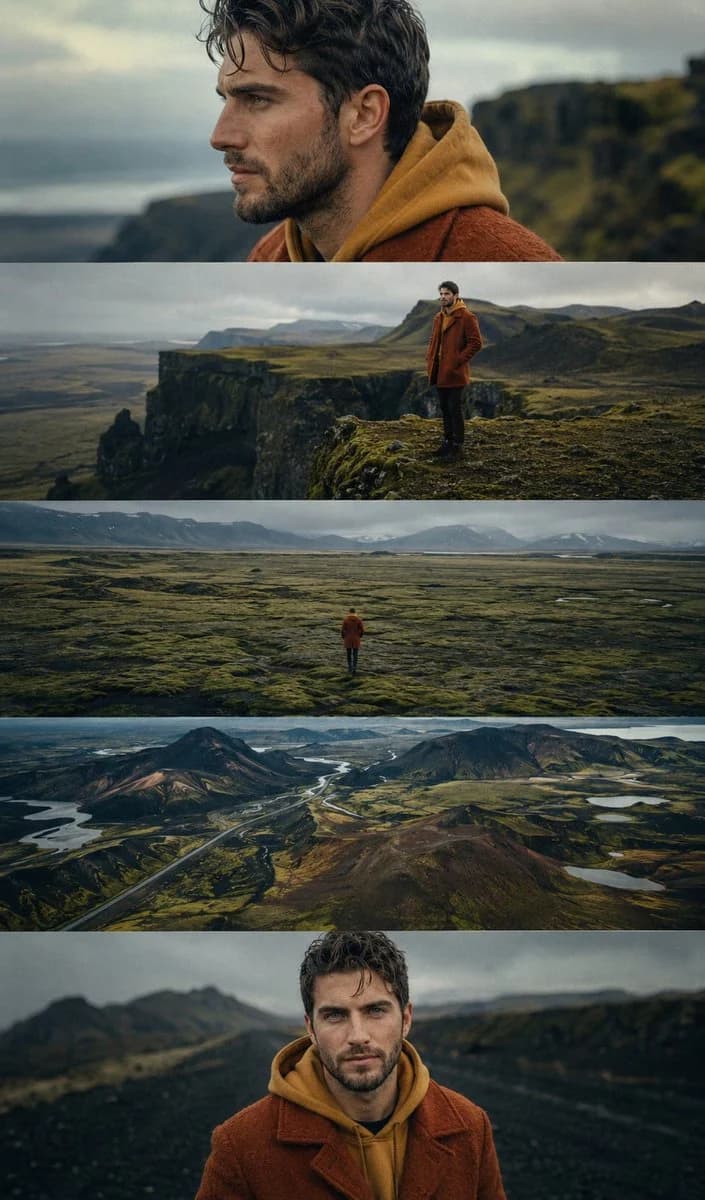
93 wordsCinematic 9:16 five-panel sequence featuring the same young man from the reference image exploring {argument name="location" default="Icelandic highlands"}. Curly dark hair and beard, wearing a {argument name="outfit" default="rust-orange wool coat over a mustard hoodie"}. Panels include: contemplative side-profile close-up, standing on a dramatic green cliff, tiny lone figure crossing vast moss-covered plains, aerial view of volcanic landscapes and winding roads, and a front-facing portrait on a dark gravel path. Arthouse film stills, 35mm film grain,photorealistic, {argument name="lighting" default="moody overcast skies"}, warm orange tones contrasting cool greens and blues, lonely introspective atmosphere, award-winning cinematographyAbout this prompt
Icelandic Highland Cinematography is a ready-to-use poster prompt for GPT Image 2 on Image 2. Copy the 93 words below, paste them into the Create form, and you will get a result close to the preview above. Tweak the Poster, Comic, Storyboard tag if you want to push it somewhere new.
Use it as a starting point, then adjust the subject, lighting, or composition to suit your idea. The credit cost stays the same whether you use it as written or customize it.
Use case
A strong starting point for Poster
Start here when you want a poster image inspired by Icelandic Highland Cinematography. The prompt already sets the look and composition; replace the subject, product, colors, or scene details to match your project.
Easy places to tweak
- Subject Swap in your person, product, place, or object without changing the overall composition.
- Look and mood Tune the lighting, palette, camera angle, or materials so the image fits your brand.
- Final format Set the aspect ratio, background, text, or layout notes before you generate.
More prompt paths to explore
Find more GPT Image 2 prompts with a similar style, use case, or subject.
How to use it
- Step 1
Copy the prompt
Hit the Copy button above to grab the full text.
- Step 2
Open Image 2 Create
Head to the Create form and paste it in.
- Step 3
Generate
Hit Generate. Your version lands in seconds.
Make it yours
Load the prompt into the Create form with one click, then start tweaking.