Prompt
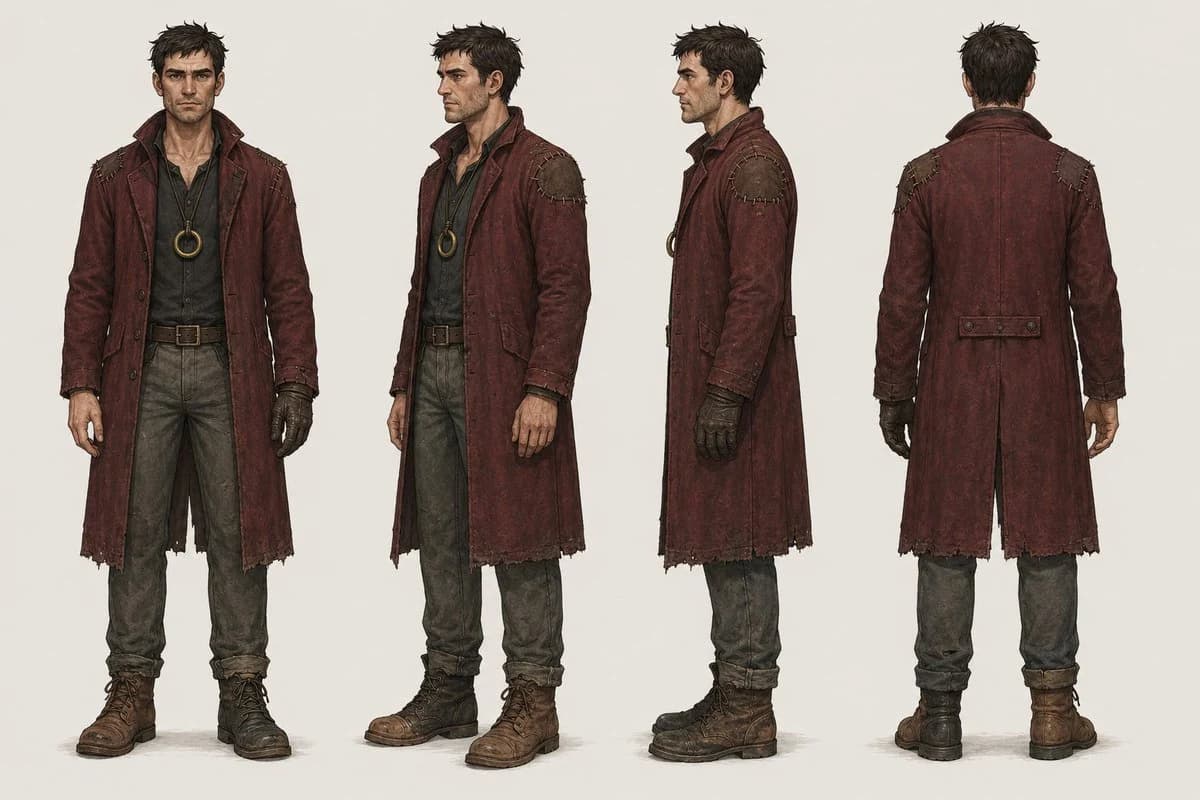
346 wordsGoal: Create a full-body character design turnaround sheet for a gritty cyberpunk-western bounty hunter named {argument name="character name" default="Vane"}, emphasizing realistic worn materials, dust, grime, and lived-in clothing.
Canvas: Wide horizontal concept-art sheet on a plain warm off-white studio background, no scenery, no props except worn clothing and accessories. Use soft neutral lighting and subtle contact shadows under the boots.
Layout: Show exactly 4 full-body standing views of the same male character, evenly spaced left to right: 1) front view facing camera, 2) three-quarter front view turned slightly to the viewer’s right, 3) strict side profile facing right, 4) back view. Keep proportions consistent across all four views and align the feet on the same ground line.
Subject details: Adult rugged male bounty hunter with messy short dark hair, lean build, weathered posture, and a realistic human body. The face should be deliberately obscured by a soft rectangular blur/censor block in the first three visible-face views, while the back view shows only the back of the head. Outfit includes exactly 7 main visible clothing/accessory elements: 1) long distressed oxblood-red duster coat with high collar, frayed hem, patched shoulders, seams, worn cuffs, and dirty leather texture; 2) dark charcoal button-up shirt beneath the coat; 3) circular brass pendant or ring amulet hanging at the chest; 4) brown leather belt with square metal buckle; 5) faded gray-green work trousers, dusty and creased; 6) rugged brown lace-up boots, scuffed and muddy; 7) one dark fingerless glove on the character’s right hand, visibly worn and dirty.
Visual style: Photorealistic character concept art with high material realism, detailed leather grain, fabric fraying, stitching, dirt, scratches, sweat-darkened cloth, grime in seams, and believable wear. The coat color should be {argument name="coat color" default="weathered oxblood red"}; the setting should feel like a {argument name="genre mood" default="cyberpunk western"} world without adding futuristic gadgets. Use muted earthy colors and a grounded, practical costume-design presentation.
Constraints: No text labels, no weapons, no hats, no extra characters, no dramatic background, no cinematic action pose. Keep the design clean, centered, and readable as a professional turnaround reference sheet.About this prompt
Gritty Bounty Hunter Turnaround is a ready-to-use character design prompt for GPT Image 2 on Image 2. Copy the 346 words below, paste them into the Create form, and you will get a result close to the preview above. Tweak the Character, Character Design, Fashion tag if you want to push it somewhere new.
Use it as a starting point, then adjust the subject, lighting, or composition to suit your idea. The credit cost stays the same whether you use it as written or customize it.
Use case
A strong starting point for Character Design
Start here when you want a character design image inspired by Gritty Bounty Hunter Turnaround. The prompt already sets the look and composition; replace the subject, product, colors, or scene details to match your project.
Easy places to tweak
- Subject Swap in your person, product, place, or object without changing the overall composition.
- Look and mood Tune the lighting, palette, camera angle, or materials so the image fits your brand.
- Final format Set the aspect ratio, background, text, or layout notes before you generate.
More prompt paths to explore
Find more GPT Image 2 prompts with a similar style, use case, or subject.
How to use it
- Step 1
Copy the prompt
Hit the Copy button above to grab the full text.
- Step 2
Open Image 2 Create
Head to the Create form and paste it in.
- Step 3
Generate
Hit Generate. Your version lands in seconds.
Make it yours
Load the prompt into the Create form with one click, then start tweaking.