Prompt
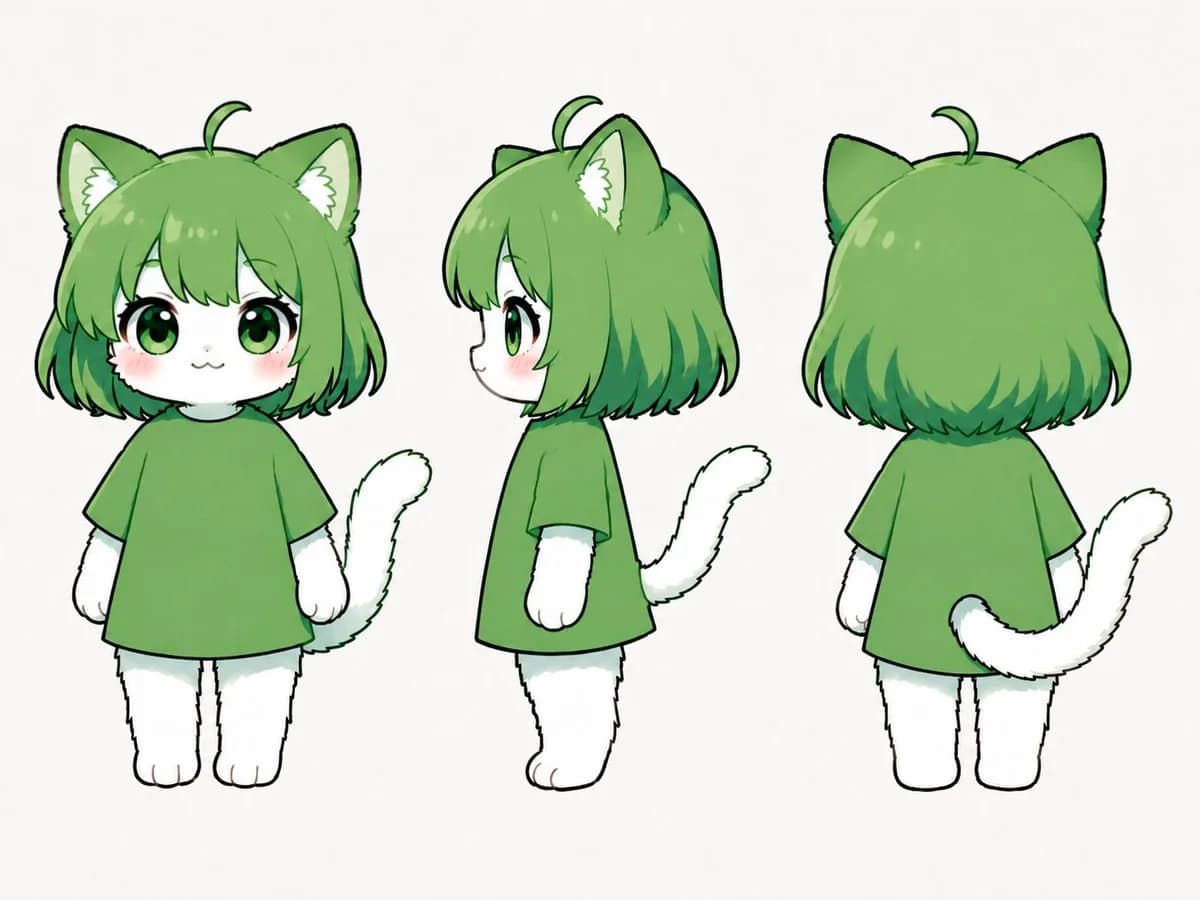
368 wordsGoal: Create a clean three-view character reference sheet for a cute chibi cat-girl mascot named {argument name="character name" default="green cat chibi"}.
Canvas: Landscape 4:3 white background, no text, no props, no shadows, evenly spaced character turnaround lineup.
Layout: Show exactly 3 full-body views of the same character: 1 front view on the left, 1 left-facing side profile in the center, and 1 back view on the right. Keep all three figures the same height and scale, with simple standing poses and arms relaxed at the sides.
Character details: The character is a small plush-like chibi with a large round head, tiny body, short legs, and white furry hands and feet. She has {argument name="hair color" default="leaf green"} bob-cut hair with rounded bangs, darker green tips, glossy highlights, one small curled ahoge strand on top, and large pointed cat ears with pale inner fur and white fluffy ear tufts. In the front view, she has oversized glossy green eyes, long black eyelashes, a tiny cat mouth, soft pink cheek blush, and a gentle cute expression. The side view shows the small protruding nose and rounded muzzle profile. The back view shows the rounded bob haircut covering the head and neck, both cat ears, and the ahoge.
Outfit and body: Dress the character in a plain oversized short-sleeve T-shirt in {argument name="shirt color" default="medium green"}, hanging like a simple tunic over the small body. No patterns, logos, buttons, shoes, or accessories. The visible fur on face, arms, legs, paws, and tail is pure white with subtle pale gray-green shading.
Tail: Include exactly 1 fluffy white cat tail on each view, matching the perspective: curved upward beside the body in the front view, curling behind the body in the side view, and extending from the lower back and sweeping to the right in the back view.
Visual style: Japanese kawaii character-design sheet, soft digital illustration, clean black sketch-like outlines, gentle cel shading, watercolor-like green gradients in the hair, rounded simplified anatomy, polished but hand-drawn Clip Studio Paint feel.
Constraints: Keep the design consistent across all 3 views, preserve the same outfit and proportions, avoid background elements, avoid extra poses, avoid labels, avoid realistic anatomy, and do not add any additional characters.About this prompt
Green Chibi Cat-Girl Turnaround is a ready-to-use character design prompt for GPT Image 2 on Image 2. Copy the 368 words below, paste them into the Create form, and you will get a result close to the preview above. Tweak the Character, Character Design, Product tag if you want to push it somewhere new.
Use it as a starting point, then adjust the subject, lighting, or composition to suit your idea. The credit cost stays the same whether you use it as written or customize it.
Use case
A strong starting point for Character Design
Start here when you want a character design image inspired by Green Chibi Cat-Girl Turnaround. The prompt already sets the look and composition; replace the subject, product, colors, or scene details to match your project.
Easy places to tweak
- Subject Swap in your person, product, place, or object without changing the overall composition.
- Look and mood Tune the lighting, palette, camera angle, or materials so the image fits your brand.
- Final format Set the aspect ratio, background, text, or layout notes before you generate.
More prompt paths to explore
Find more GPT Image 2 prompts with a similar style, use case, or subject.
How to use it
- Step 1
Copy the prompt
Hit the Copy button above to grab the full text.
- Step 2
Open Image 2 Create
Head to the Create form and paste it in.
- Step 3
Generate
Hit Generate. Your version lands in seconds.
Make it yours
Load the prompt into the Create form with one click, then start tweaking.