Prompt
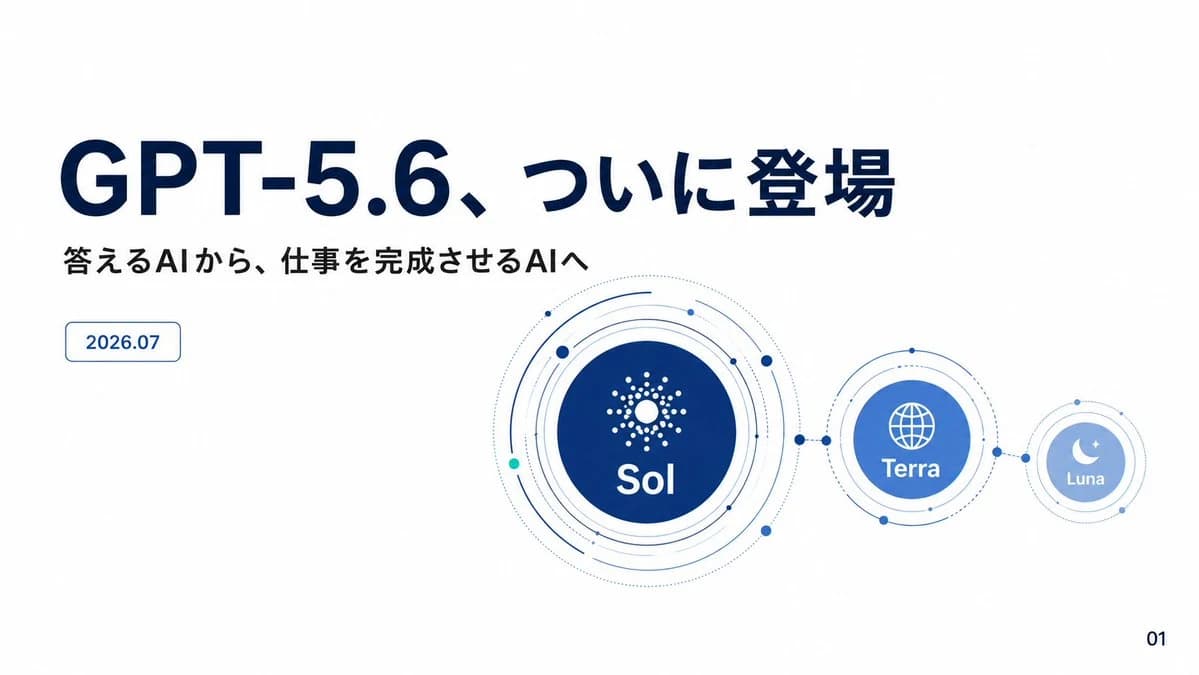
356 wordsGoal: Create a clean Japanese product announcement presentation slide for {argument name="product name" default="GPT-5.6"}, with a futuristic AI/model-family visual system.
Canvas: 16:9 widescreen slide, white background, ample negative space, minimalist corporate tech style in navy blue and light blue. Use crisp vector graphics, subtle dotted orbital lines, and no photo texture.
Layout: Left side contains the typography block; right side contains a connected orbital diagram of exactly 3 model circles. Keep the composition airy, with most content in the upper and middle portions and a small page number at bottom right.
Text content: Main headline in very large bold navy Japanese text: “{argument name="headline text" default="GPT-5.6、ついに登場"}”. Under it, smaller bold black Japanese subtitle: “{argument name="subtitle text" default="答えるAIから、仕事を完成させるAIへ"}”. Below the subtitle on the left, add one small rounded rectangle date badge with thin blue outline and blue text: “{argument name="date text" default="2026.07"}”. Bottom-right page number: “01”.
Diagram details: Show exactly 3 connected circular model nodes, arranged horizontally from largest to smallest: 1) a large dark navy “Sol” circle near center-right with a white radial dot/starburst icon above the label “Sol”, surrounded by multiple thin concentric orbit rings, dotted arcs, and small blue/teal nodes; 2) a medium blue “Terra” circle to its right, connected by a dotted line with small solid blue connector dots, containing a white globe icon above the label “Terra”, also surrounded by a few thin orbital rings; 3) a small pale blue “Luna” circle further right, connected the same way, containing a white crescent moon and small star icon above the label “Luna”, with thin rings around it.
Visual style: Use deep navy for the headline and Sol node, medium cobalt for Terra, pale sky blue for Luna, and tiny teal accent dots. Typography should look like a modern Japanese sans-serif presentation deck, bold for the headline, clean and geometric for labels. Keep the orbital diagram precise, balanced, and technical, with thin strokes and small circular nodes.
Constraints: Use exactly the three visible model labels Sol, Terra, and Luna; include exactly one date badge and one page number; do not add extra paragraphs, logos, watermarks, icons outside the described diagram, or decorative background patterns.About this prompt
GPT-5.6 Japanese Launch Slide is a ready-to-use infographic prompt for GPT Image 2 on Image 2. Copy the 356 words below, paste them into the Create form, and you will get a result close to the preview above. Tweak the Infographic, Product, Minimalist tag if you want to push it somewhere new.
Use it as a starting point, then adjust the subject, lighting, or composition to suit your idea. The credit cost stays the same whether you use it as written or customize it.
Use case
A strong starting point for Infographic
Start here when you want a infographic image inspired by GPT-5.6 Japanese Launch Slide. The prompt already sets the look and composition; replace the subject, product, colors, or scene details to match your project.
Easy places to tweak
- Subject Swap in your person, product, place, or object without changing the overall composition.
- Look and mood Tune the lighting, palette, camera angle, or materials so the image fits your brand.
- Final format Set the aspect ratio, background, text, or layout notes before you generate.
More prompt paths to explore
Find more GPT Image 2 prompts with a similar style, use case, or subject.
How to use it
- Step 1
Copy the prompt
Hit the Copy button above to grab the full text.
- Step 2
Open Image 2 Create
Head to the Create form and paste it in.
- Step 3
Generate
Hit Generate. Your version lands in seconds.
Make it yours
Load the prompt into the Create form with one click, then start tweaking.