Prompt
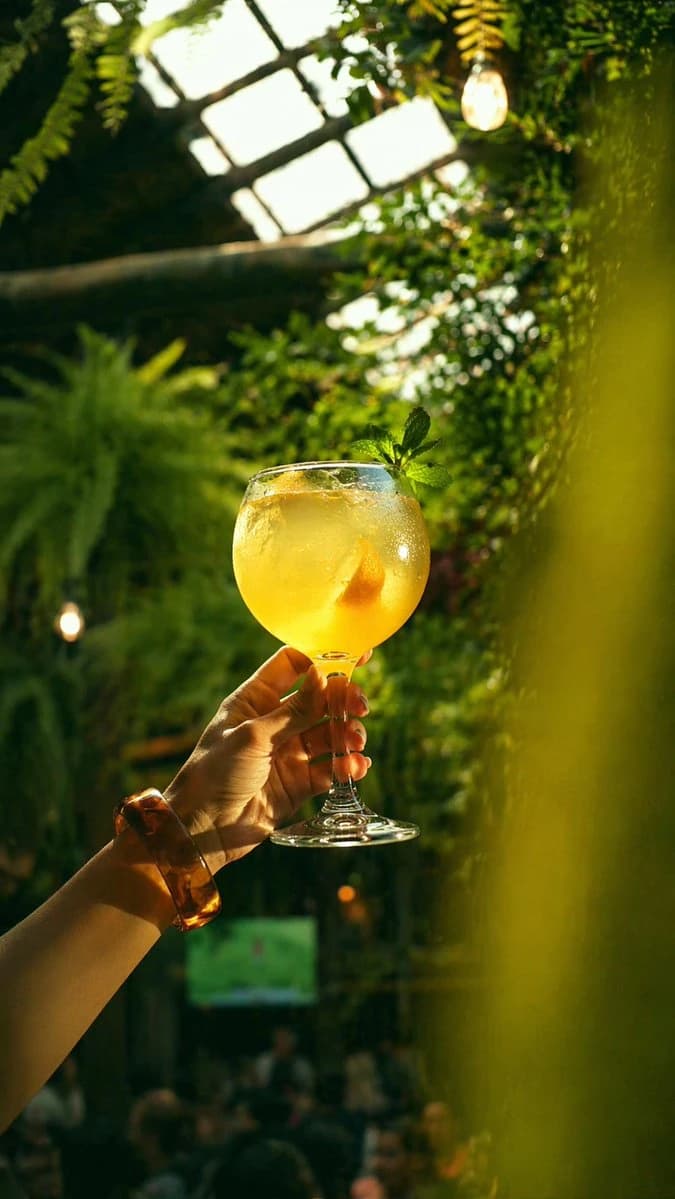
193 wordsA cinematic vertical photo of a hand holding up a large balloon wine glass filled with a sparkling golden-yellow citrus cocktail in a lush indoor greenhouse bar. The drink is backlit by warm late-afternoon sunlight, making it glow translucent amber. Inside the glass there is 1 visible citrus wedge, and at the rim there is 1 fresh mint garnish cluster. The hand enters from the lower left, delicately gripping the stem, wearing 1 chunky translucent amber bracelet. The setting is dense with tropical greenery, hanging ferns, and vine-covered walls, with a bright greenhouse roof structure visible overhead and 2 warm exposed hanging bulbs softly glowing in the background. Use shallow depth of field with creamy bokeh, strong sun rays filtering through leaves, soft haze, and rich green-and-gold color contrast. Add a blurred foreground leaf or plant along the right edge to frame the composition. The lower background should suggest a busy café or cocktail lounge with indistinct people, but keep them heavily out of focus. Photorealistic, elegant lifestyle photography, moody yet sun-drenched, shot from a low angle looking upward at the raised glass, high detail on condensation, glass reflections, and the luminous drink.
About this prompt
Golden Cocktail in Greenhouse Bar is a ready-to-use ui mockup prompt for GPT Image 2 on Image 2. Copy the 193 words below, paste them into the Create form, and you will get a result close to the preview above. Tweak the UI, Mockup, Food tag if you want to push it somewhere new.
Use it as a starting point, then adjust the subject, lighting, or composition to suit your idea. The credit cost stays the same whether you use it as written or customize it.
Use case
A strong starting point for UI Mockup
Start here when you want a ui mockup image inspired by Golden Cocktail in Greenhouse Bar. The prompt already sets the look and composition; replace the subject, product, colors, or scene details to match your project.
Easy places to tweak
- Subject Swap in your person, product, place, or object without changing the overall composition.
- Look and mood Tune the lighting, palette, camera angle, or materials so the image fits your brand.
- Final format Set the aspect ratio, background, text, or layout notes before you generate.
More prompt paths to explore
Find more GPT Image 2 prompts with a similar style, use case, or subject.
How to use it
- Step 1
Copy the prompt
Hit the Copy button above to grab the full text.
- Step 2
Open Image 2 Create
Head to the Create form and paste it in.
- Step 3
Generate
Hit Generate. Your version lands in seconds.
Make it yours
Load the prompt into the Create form with one click, then start tweaking.