Prompt
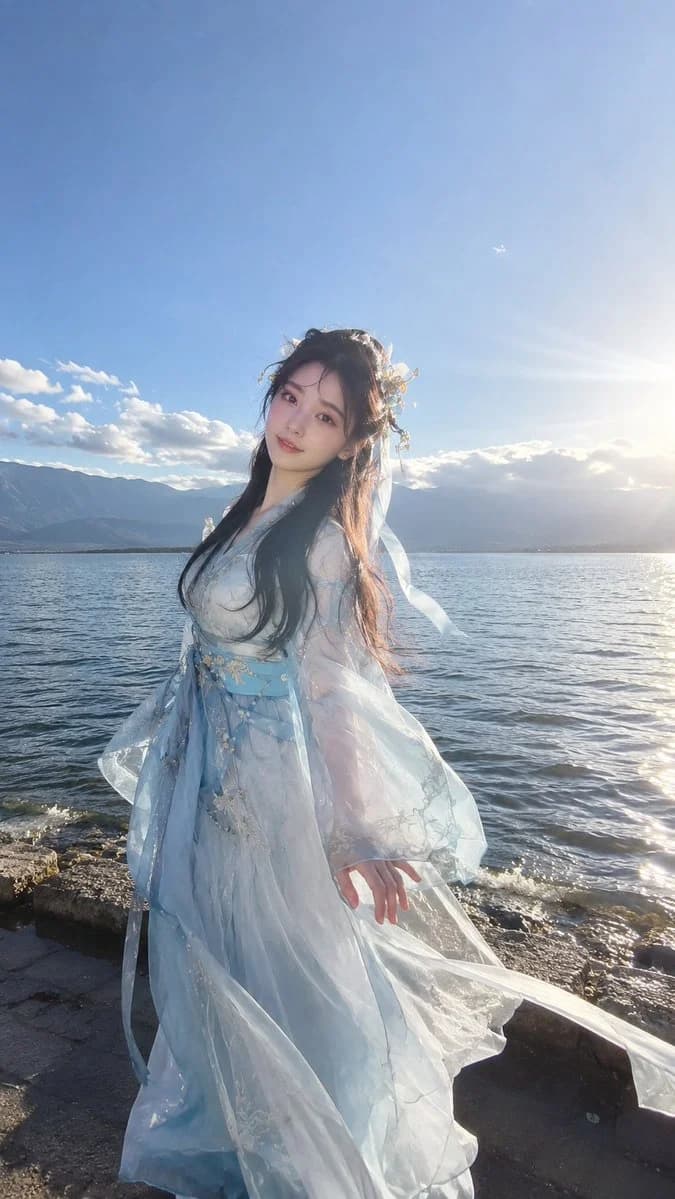
213 wordsA realistic travel photo taken with an {argument name="camera" default="iPhone 16 Pro"}, vertical 9:16. A 22-year-old young Chinese woman standing by the {argument name="location" default="shore of Erhai Lake in Yunnan"}, with Cangshan Mountain in the background, full-body shot, wide-angle lens, slightly low angle. Oval face, standard Oriental proportions, fair and delicate skin, translucent and hydrated skin with natural luster, petite and youthful, perfect figure, moderate bust, natural waist-to-hip ratio, long legs, slender fingers, innocent and seductive style, full of idol presence. Long straight black hair naturally draped, soft and fluffy, blown by the sea breeze, a few strands lightly touching the cheeks, creating a natural airy feel. Makeup, hairstyle, hair color, movements, and camera angles are kept natural and random, making each photo look slightly different, like a real travel record. She is wearing {argument name="clothing" default="light blue Wei-Jin style cross-collar Hanfu"} blended with modern fairy-style Lolita fashion, an original niche brand design, paired with Chinese-style hairpins, ribbons, and bow elements, light and elegant, with unified colors, full of ethereal charm. Natural side-backlighting, slightly overexposed, real mobile HDR, slight lens flare, real dynamic range, no signs of retouching, obvious aerial perspective, a snapshot moment, strong sense of daily life, real photography. Photorealistic, iPhone photography, RAW, ultra detailed, cinematic lighting, realistic skin texture, masterpiece.About this prompt
Erhai Lake Travel iPhone Portrait is a ready-to-use portrait prompt for GPT Image 2 on Image 2. Copy the 213 words below, paste them into the Create form, and you will get a result close to the preview above. Tweak the Portrait, Product, Fashion tag if you want to push it somewhere new.
Use it as a starting point, then adjust the subject, lighting, or composition to suit your idea. The credit cost stays the same whether you use it as written or customize it.
Use case
A strong starting point for Portrait
Start here when you want a portrait image inspired by Erhai Lake Travel iPhone Portrait. The prompt already sets the look and composition; replace the subject, product, colors, or scene details to match your project.
Easy places to tweak
- Subject Swap in your person, product, place, or object without changing the overall composition.
- Look and mood Tune the lighting, palette, camera angle, or materials so the image fits your brand.
- Final format Set the aspect ratio, background, text, or layout notes before you generate.
More prompt paths to explore
Find more GPT Image 2 prompts with a similar style, use case, or subject.
How to use it
- Step 1
Copy the prompt
Hit the Copy button above to grab the full text.
- Step 2
Open Image 2 Create
Head to the Create form and paste it in.
- Step 3
Generate
Hit Generate. Your version lands in seconds.
Make it yours
Load the prompt into the Create form with one click, then start tweaking.