Prompt
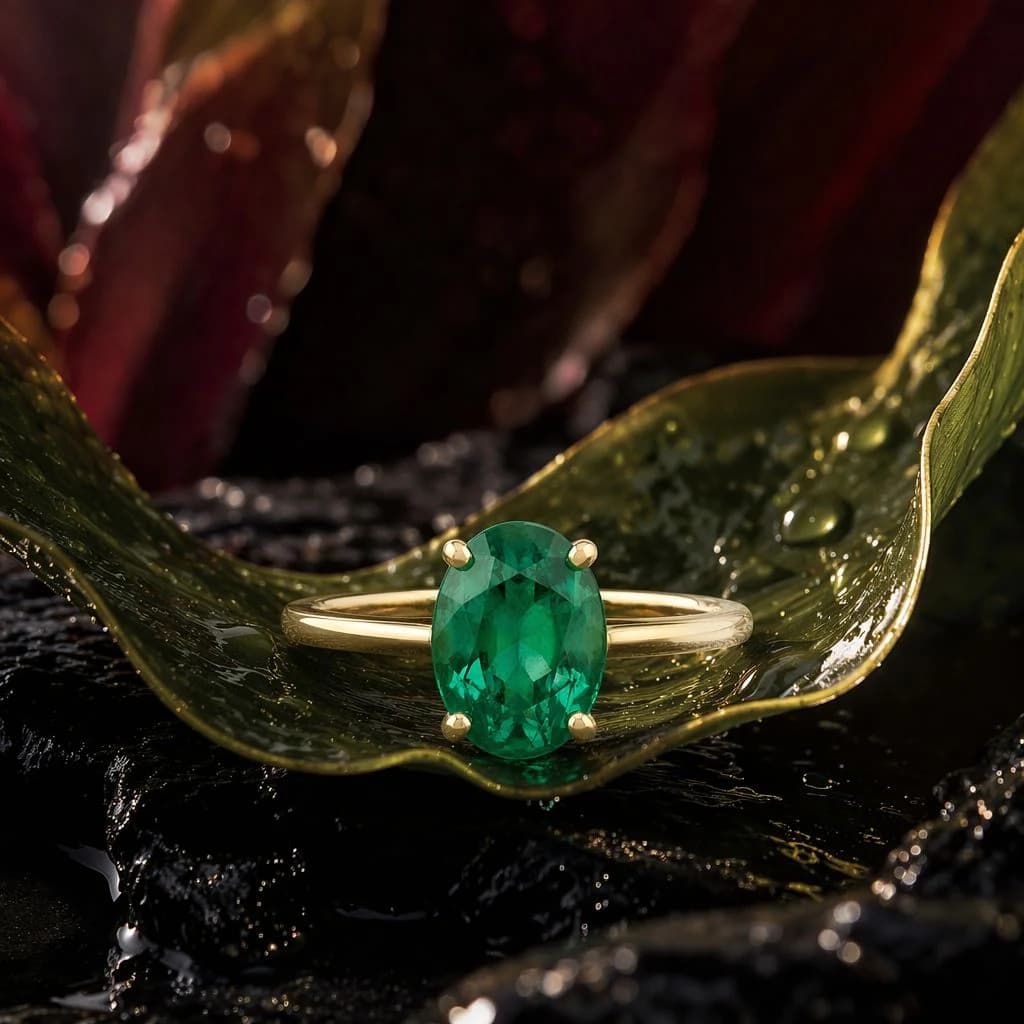
234 wordsCreate a square luxury macro product photograph of an {argument name="jewelry type" default="emerald solitaire ring"} staged like precious botanical alchemy. Place one ring centered in the lower-middle of the frame, resting horizontally on a curled glossy green leaf that forms a shallow cradle. The ring has a polished yellow-gold band, four rounded gold prongs, and one vertical oval-cut {argument name="gemstone" default="deep emerald green stone"} with crisp facets and internal sparkle. Surround it with exactly three large background leaves or petals: one curved green leaf sweeping from the left foreground toward the ring, one curled green leaf rising on the right edge, and one blurred burgundy-red petal mass in the upper background. The surface beneath is wet black volcanic stone or lacquered rock, with small puddles and mirrorlike highlights. Add visible water droplets on the leaves and rock, including several bright beads near the right leaf and tiny specks on the left leaf. Lighting should be dramatic and cinematic: warm golden rim light from the upper right, soft frontal reflection on the gemstone, deep shadows, high contrast, shallow depth of field, luxurious editorial jewelry advertising style. Use a dark moody palette of emerald green, yellow gold, burgundy, and glossy black. Camera angle is close-up at leaf level, 1:1 square crop, ring tack-sharp while background petals and foreground edges fall into creamy bokeh. No text, no hands, no packaging, no extra jewelry, no logo, no watermark.About this prompt
Emerald Ring Botanical Macro is a ready-to-use e-commerce prompt for GPT Image 2 on Image 2. Copy the 234 words below, paste them into the Create form, and you will get a result close to the preview above. Tweak the Product Ad, E-commerce, Product tag if you want to push it somewhere new.
Use it as a starting point, then adjust the subject, lighting, or composition to suit your idea. The credit cost stays the same whether you use it as written or customize it.
Use case
A strong starting point for E-commerce
Start here when you want a e-commerce image inspired by Emerald Ring Botanical Macro. The prompt already sets the look and composition; replace the subject, product, colors, or scene details to match your project.
Easy places to tweak
- Subject Swap in your person, product, place, or object without changing the overall composition.
- Look and mood Tune the lighting, palette, camera angle, or materials so the image fits your brand.
- Final format Set the aspect ratio, background, text, or layout notes before you generate.
More prompt paths to explore
Find more GPT Image 2 prompts with a similar style, use case, or subject.
How to use it
- Step 1
Copy the prompt
Hit the Copy button above to grab the full text.
- Step 2
Open Image 2 Create
Head to the Create form and paste it in.
- Step 3
Generate
Hit Generate. Your version lands in seconds.
Make it yours
Load the prompt into the Create form with one click, then start tweaking.