Prompt
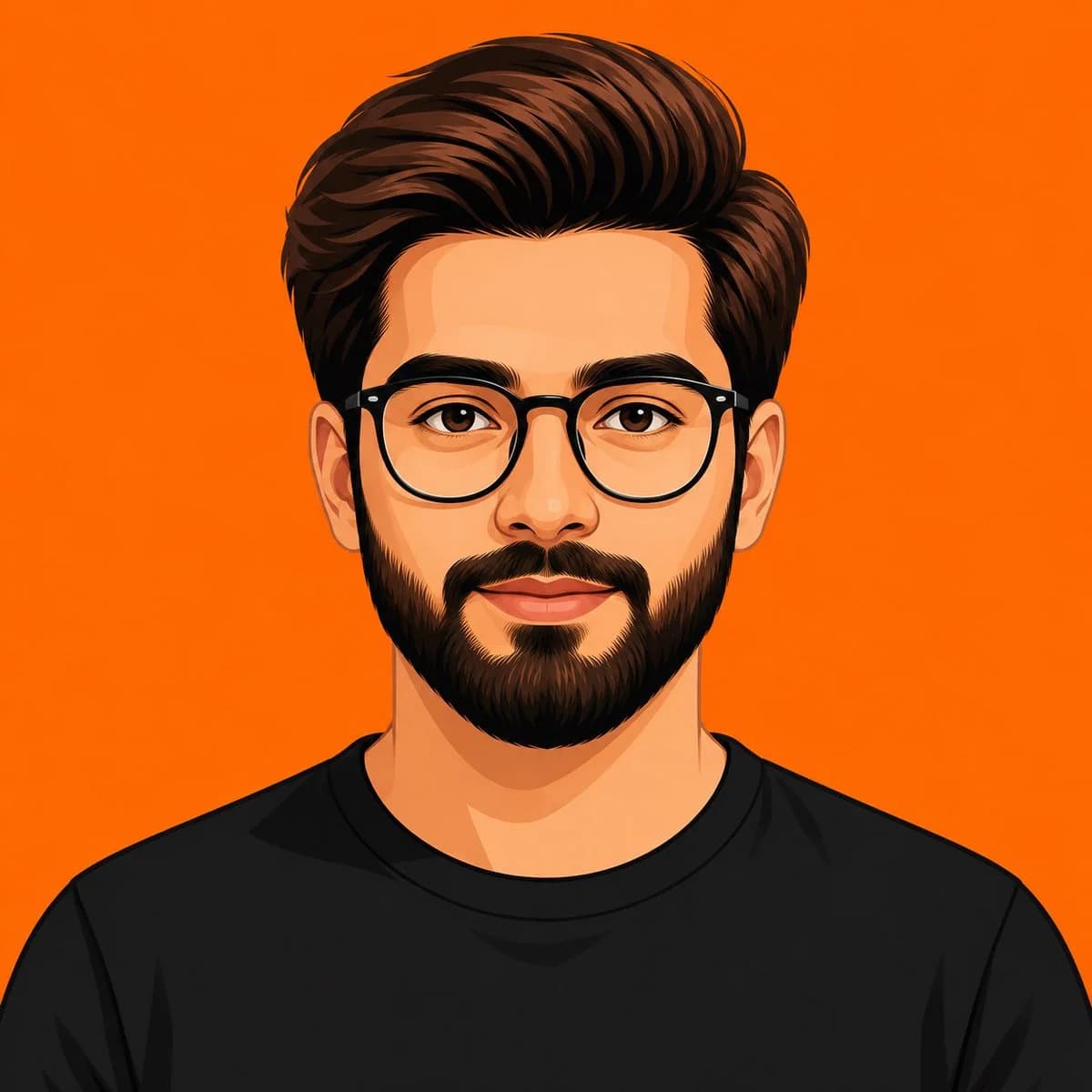
144 wordsCreate a clean, front-facing vector avatar of a young man in a contemporary flat illustration style. The portrait is perfectly centered and cropped from the upper chest upward, with the subject filling most of the square frame. Use bold geometric forms, smooth color transitions, crisp edges, and a balanced, symmetrical composition. Facial features should be simplified yet expressive, with clear eyes, subtle shadows, and natural skin tones. He has {argument name="hair style" default="thick brown hair brushed back neatly"}, a {argument name="facial hair" default="well-groomed full beard"}, and wears round black eyeglasses with a plain black crew-neck T-shirt. Place him against a {argument name="background" default="solid warm orange background"} with no patterns or objects. Maintain a polished digital avatar aesthetic inspired by modern vector artwork, featuring vibrant colors, sharp lines, minimal detail, and absolutely no photorealistic textures. High-resolution, 1:1 aspect ratio, suitable for a professional profile image.About this prompt
Clean Flat Vector Avatar is a ready-to-use portrait prompt for GPT Image 2 on Image 2. Copy the 144 words below, paste them into the Create form, and you will get a result close to the preview above. Tweak the Portrait, Minimalist tag if you want to push it somewhere new.
Use it as a starting point, then adjust the subject, lighting, or composition to suit your idea. The credit cost stays the same whether you use it as written or customize it.
Use case
A strong starting point for Portrait
Start here when you want a portrait image inspired by Clean Flat Vector Avatar. The prompt already sets the look and composition; replace the subject, product, colors, or scene details to match your project.
Easy places to tweak
- Subject Swap in your person, product, place, or object without changing the overall composition.
- Look and mood Tune the lighting, palette, camera angle, or materials so the image fits your brand.
- Final format Set the aspect ratio, background, text, or layout notes before you generate.
More prompt paths to explore
Find more GPT Image 2 prompts with a similar style, use case, or subject.
How to use it
- Step 1
Copy the prompt
Hit the Copy button above to grab the full text.
- Step 2
Open Image 2 Create
Head to the Create form and paste it in.
- Step 3
Generate
Hit Generate. Your version lands in seconds.
Make it yours
Load the prompt into the Create form with one click, then start tweaking.