Prompt
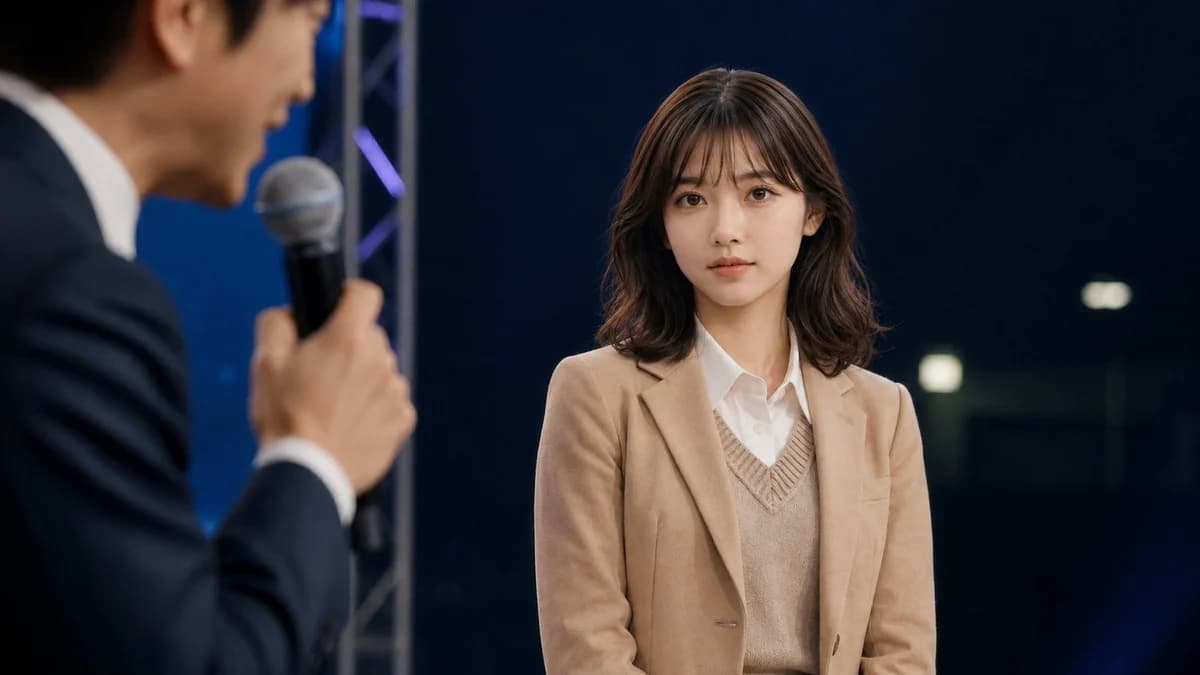
220 wordsCreate a cinematic photorealistic still from a live talk show or interview on a dark studio stage. The main subject is a young East Asian woman, about early 20s, seated or standing center-right, facing slightly left but looking toward the camera with a calm, neutral, attentive expression. She has {argument name="hair color" default="dark brown"} shoulder-length softly wavy hair with wispy bangs, natural makeup, clear skin, and large expressive eyes. She wears a {argument name="jacket color" default="camel beige"} blazer over a beige V-neck knit vest and a crisp white button-up shirt. In the extreme left foreground, include exactly 1 blurred male host in profile, an East Asian man in a dark navy suit and white shirt, holding exactly 1 handheld microphone close to his mouth while speaking; keep him intentionally out of focus with shallow depth of field. The woman should be sharply focused while the host, microphone, and foreground are blurred. Background: a deep navy-black studio backdrop with subtle blue lighting, a vertical silver stage truss behind the host, faint purple-blue accent lights, and a few soft rectangular bokeh lights on the right. Composition: widescreen 16:9, medium shot, woman occupying the right half of frame, host cropped on the left, realistic event lighting, soft key light on the woman’s face, professional broadcast photography, no visible text, no logos, no watermark.About this prompt
Cinematic Studio Interview Scene is a ready-to-use social media prompt for GPT Image 2 on Image 2. Copy the 220 words below, paste them into the Create form, and you will get a result close to the preview above. Tweak the Social Media, Beauty, Cinematic tag if you want to push it somewhere new.
Use it as a starting point, then adjust the subject, lighting, or composition to suit your idea. The credit cost stays the same whether you use it as written or customize it.
Use case
A strong starting point for Social Media
Start here when you want a social media image inspired by Cinematic Studio Interview Scene. The prompt already sets the look and composition; replace the subject, product, colors, or scene details to match your project.
Easy places to tweak
- Subject Swap in your person, product, place, or object without changing the overall composition.
- Look and mood Tune the lighting, palette, camera angle, or materials so the image fits your brand.
- Final format Set the aspect ratio, background, text, or layout notes before you generate.
More prompt paths to explore
Find more GPT Image 2 prompts with a similar style, use case, or subject.
How to use it
- Step 1
Copy the prompt
Hit the Copy button above to grab the full text.
- Step 2
Open Image 2 Create
Head to the Create form and paste it in.
- Step 3
Generate
Hit Generate. Your version lands in seconds.
Make it yours
Load the prompt into the Create form with one click, then start tweaking.